Product 

Resources 

Pricing

Dashboard 

Try for free 

Solutions

Drive growth with outcome-focused funnel strategies

eCommerce Funnels

Convert more visitors into customers with high-performing funnels.

eCommerce Blogs

Drive traffic and revenue with SEO-focused content.

eCommerce Customer Portals

Give customers a self-service space to manage their orders.

Coming soon

eCommerce Stores

Launch faster and start selling without friction.

Coming soon

Features

Powerful tools to build, optimize, and scale your funnels

Funnel Builder

Build complete sales funnels, from click to checkout.

Geo-targeting Funnels

Increase conversions with location-based personalization.

Fast Page Speed

Your pages will take only milliseconds to load.

Smart Payment Routing

Recover failed payments and maximize checkout success.

Automated Fulfillment

Streamline operations with end-to-end order automation.

Shared Components

Build once and reuse across every funnel.

Shopify Orders Sync

Sync your store and automate your entire workflow.

Powerful Analytics

Clear data on your sales and customers.

How it works

See how Funnelish helps you launch and scale faster.

Documentation & Tutorials

Get up and running quickly with clear, actionable guides.

Blog

Guides and strategies to build, optimize, and scale your funnels.

Dropshipping Businesses

Launch and scale winning dropshipping funnels.

Direct-to-Consumer (DTC)

Grow your brand with high-converting funnels.

Funnelish for Shopify

Keep Shopify for your catalog, or go fully standalone as a true Shopify alternative.

Community

Join other builders, share insights, and grow together.

User Reviews

Read success stories from real merchants.

Become an Affiliate

Join our affiliate program and earn commissions.

Product

Resources

Pricing

Ready to grow

your business?

Join thousands of eCommerce brands scaling faster with Funnelish.

Sign in

Try for free 

Solutions

Drive growth with outcome-focused funnel strategies

eCommerce Funnels

Convert more visitors into customers with high-performing funnels.

eCommerce Customer Portals

Give customers a self-service space to manage their orders.

Coming soon

eCommerce Stores

Launch faster and start selling without friction.

Coming soon

eCommerce Blogs

Drive traffic and revenue with SEO-focused content.

Features

Powerful tools to build, optimize, and scale your funnels

Geo-targeting Funnels

Increase conversions with location-based personalization.

Fast Page Speed

Your pages will take only milliseconds to load.

Smart Payment Routing

Recover failed payments and maximize checkout success.

Funnel Builder

Build complete sales funnels, from click to checkout.

Automated Fulfillment

Streamline operations with end-to-end order automation.

Shared Components

Build once and reuse across every funnel.

Shopify Orders Sync

Sync your store and automate your entire workflow.

Powerful Analytics

Clear data on your sales and customers.

Resources

How it works

See how Funnelish helps you launch and scale faster.

Documentation & Tutorials

Get up and running quickly with clear, actionable guides.

Blog

Guides and strategies to build, optimize, and scale your funnels.

Dropshipping Businesses

Launch and scale winning dropshipping funnels.

Direct-to-Consumer (DTC)

Grow your brand with high-converting funnels.

Funnelish for Shopify

Keep Shopify for your catalog, or go fully standalone as a true Shopify alternative.

Community

Join other builders, share insights, and grow together.

User Reviews

Read success stories from real merchants.

Become an Affiliate

Join our affiliate program and earn commissions.

Blog / News

Send/Sync Your Clickfunnels & Funnelish orders to Google Sheets – Without Zapier!

 15 May 2021

 Taylor

3 minutes

It’s pretty much safe to assume that by 2020 everyone has a Google account and utilizes it for either their email, calendar, documents, or one of the million other free tools they offer!

For us as ecommerce store owners or digital marketers, we squeeze out every free resource Google has to offer to make our stores run more efficiently, because why not?

Using Google Sheets is a great way for ecommerce store owners to keep track of purchases and record leads.

Automating the process from customer to a Google Sheet is usually done using tools like Zapier. 

Zapier has it’s disadvantages though. For one, it’s definitely more on the technical side and is sometimes difficult to set up. The free plan doesn’t include integrations like Shopify, and you can only set up 5 limited zaps before needing to upgrade to a paid plan!

Here at Funnelish we created a solution to that by directly integrating with Google Sheets!

You can now set up automations right from your Funnelish dashboard and seamlessly update your Google Sheets with each purchase, refund, subscription, or cancellation!

Section 1: Connecting The Google Sheets Integration

To integrate Google Sheets with your Funnelish and ClickFunnels account first visit the Integrations section of your Funnelish account (top right corner).
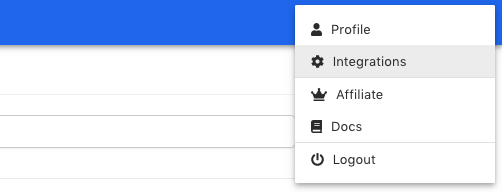
Integrations

Click connect and you’ll be prompted to sign in with your desired Google account. You’ll be asked to give permissions to Funnelish, click allow. This lets us add to your Google Sheets.
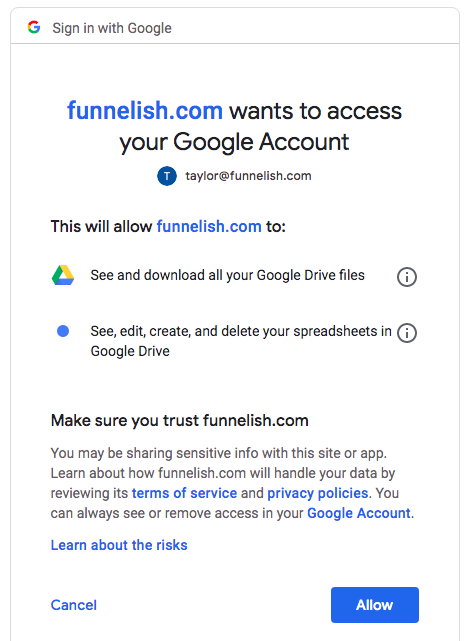
Allow Funnelish

You’ll be redirected back to your integrations page and from there you should be connected! Your screen should look like this:
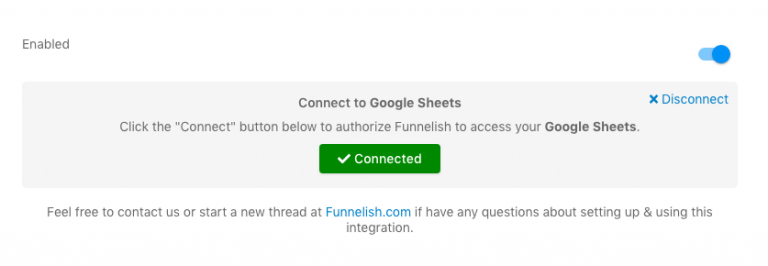
Connect Google Sheets

Section 2: Using Google Sheets As An Automation

Now we’ll actually set up an automation using the Google Sheets integration!

So you need to head to your funnels and click on your desired funnel. Go to the product you wish to connect it with and click on the product to edit it.

Scroll to the bottom and click “Create New Automation”.

Select Google Sheets as your integration and choose which spreadsheet you want the data to be uploaded to – it will auto-load from the sheets you have in your Google account.
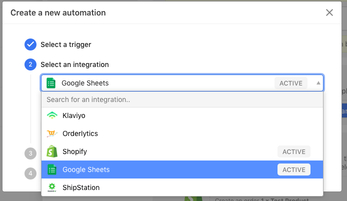
Create An Automation

Now from here you can then either auto-match fields or manually map where you want each piece of information to go.

I recommend auto-matching because if you have a ton of columns it saves you even more time!

That’s all you need to do to integrate your funnel with Google Sheets!

I hope you all find this integration to work wonders for your ecommerce store and hopefully it makes your life a little easier. 🙂

For our Knowledge Base Instructions, click here.

We’d love for you to join our awesome Funnelish Facebook group or take part in our Funnelish Community Forum.

Keep crushing it everyone!

Taylor

Table of contents

Boost your eCommerce

sales today

24/7 support

No credit card required

Cancel anytime

24/7 support

No credit card required

Cancel anytime

Start free 14-day trial 

2026

PRODUCT

FEATURES

SUPPORT

Resources