

iDEAL payment on your ClickFunnels’ order form? It’s here!
15 March 2026
Anna
Notice (2026 Update)
Our ClickFunnels apps have been officially deprecated and are no longer actively maintained.If you’re still using ClickFunnels, we strongly encourage you to switch to Funnelish, our all-in-one funnel builder designed specifically for high-converting ecommerce funnels.
To make the transition easier, our team can help migrate your existing ClickFunnels funnel into Funnelish, so you can get started faster without rebuilding everything from scratch.
Jump to: How to Add iDEAL Payments in Funnelish
If you’re already a Funnelish member, then yay! This will be an exciting article for you. If you’re not, then let’s begin by saying Funnelish allows you to offer multiple payment methods on your ClickFunnel’s order forms (you can almost instantly see an increase in conversions)!
Funnelish Pay now offers iDEAL as an additional payment method in your order forms! What does this mean, why should you use it, and how do you set it up? Read this article to find out all the info you need to start offering this payment method!
What is iDEAL payment?
iDEAL is one of the most popular payment gateways used in the Netherlands, and is now available for your funnel’s order form through our Funnelish Pay App.
iDEAL payment method features:
Adding multiple payment options to your ClickFunnels’ order form will show a considerable increase in your sales, and offering a payment option that’s trusted by people in your target audience’s country will help even more.
Here are some huge benefits of offering the iDEAL payment method for your funnel’s customers:
iDEAL is well-optimized for mobile banking!
iDEAL payment method will be automatically shown by Funnelish to all your visitors from the Netherlands and Belgium.
With iDEAL, the risk of fraud or un-recognized payments is low because the customer must authenticate the payment with their bank.
iDEAL allows for immediate online transfers from your Customer’s bank account to your merchant bank account.
iDEAL supports order bumps, up-sells and down-sells in your ClickFunnels’ funnel.
Is iDEAL safe?
iDEAL is safe and known as one of the most used payment options in the Netherlands. iDEAL is based on internet- and mobile banking and uses the same security techniques and standards. This means that iDEAL is just as safe as internet and mobile banking.
How to add iDEAL payment option on ClickFunnels’ order form?
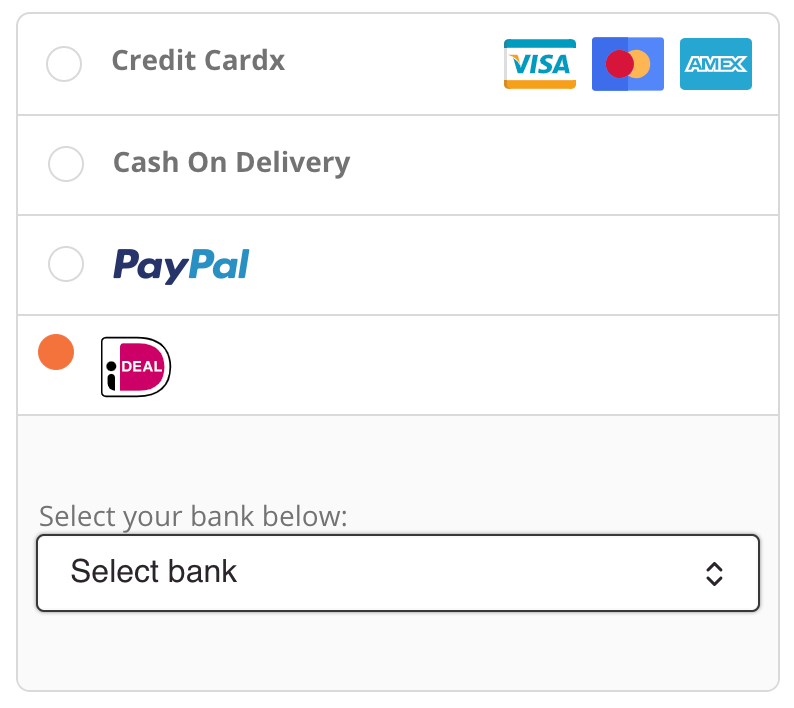
Adding iDEAL payment to your order form’s is super easy! Once you have the Funnelish Pay app installed, just add the iDEAL payment gateway on your order form. You can also choose to offer your customers PayPal, Stripe, or Cash on Delivery at the same time.
Add iDEAL payment method to your ClickFunnels’ order form with only a few clicks.
Add multiple payment methods to your ClickFunnels order form in just 30 seconds.
Why Offer iDEAL in Your Funnel?
Adding multiple payment options to your checkout is one of the easiest ways to increase conversion rates.
When customers see a payment method they already trust, they are much more likely to complete their purchase.
Here are some key benefits of offering iDEAL:
Optimized for Mobile Banking
iDEAL works seamlessly with mobile banking apps, making it extremely convenient for mobile shoppers.
Automatic Geotargeting
Funnelish automatically shows the iDEAL payment option to visitors from the Netherlands and Belgium, ensuring the right payment method appears for the right audience.
Lower Fraud Risk
Because customers authenticate payments directly with their bank, the risk of fraud or unauthorized payments is significantly reduced.
Instant Bank Transfers
Payments are transferred directly from the customer’s bank account to the merchant’s account in real time.
Works with Funnel Upsells
Unlike many payment methods, iDEAL works with order bumps, upsells, and downsells, allowing you to maintain a fully optimized funnel flow.
How to Add iDEAL Payments in Funnelish
If you're already a Funnelish member, great news! Adding iDEAL to your checkout takes just a few clicks, all done through the Funnelish Pay app.
If you’re not using Funnelish yet, this is a great time to start. Funnelish allows you to offer multiple payment methods directly inside your funnel checkout, which can significantly increase your conversion rates.
What is Funnelish Pay?
Funnelish Pay is Funnelish’s payment application that allows you to connect and manage your preferred payment processors directly inside your funnels.
Through Funnelish Pay, you can easily connect providers such as:
Stripe
PayPal
Airwallex
NMI
other supported gateways
Once connected, you can offer multiple payment methods in the same checkout, allowing customers to pay using the option they trust most.
Funnelish Pay also supports advanced funnel features like:
Order bumps
One-click upsells
Downsell flows
Multiple payment options in the same checkout
Step 1: Enable Funnelish Pay at the Account Level
Before adding iDEAL to your checkout, make sure Funnelish Pay is enabled on your account.
To do this:
Go to the top right corner inside your Funnelish dashboard
Navigate to Apps
Enable Funnelish Pay
Step 2: Enable Funnelish Pay for your funnel & add iDEAL
After enabling Funnelish Pay at the account level, you’ll also need to activate it inside the specific funnel where you want to use it.
To do this:
Open the funnel where you want to offer iDEAL
Go to the Funnel Apps section (left-side bar)
Enable Funnelish Pay
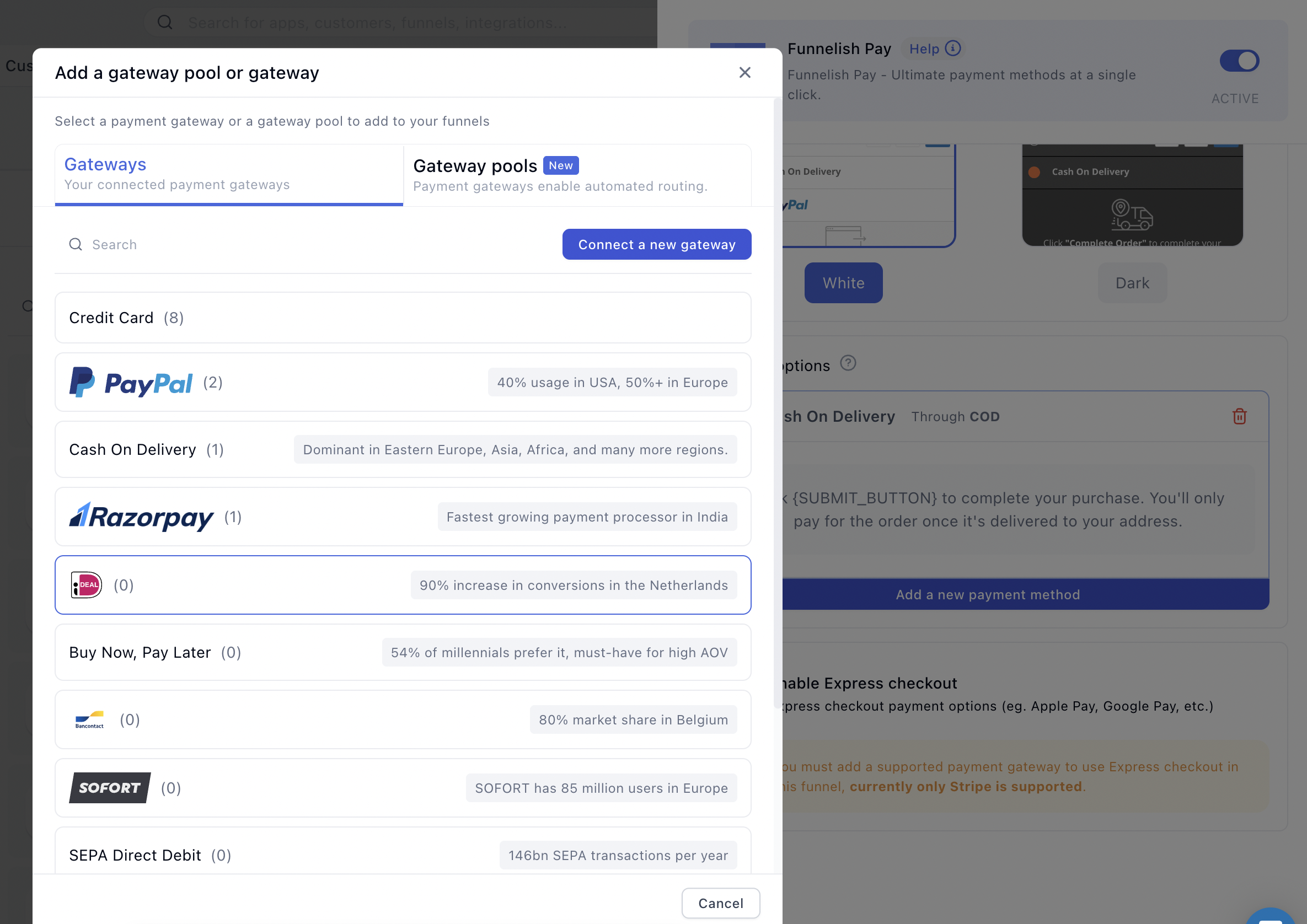
Now you can head to Add new payment method, and search for iDEAL.
Pick whether you want to add iDEAL via Stripe or via Airwallex.
Read detailed guides:
Table of contents
Boost your eCommerce
sales today

24/7 support
No credit card required
Cancel anytime
24/7 support
No credit card required
Cancel anytime
