

How to Sell on Amazon Globally (Updated for 2026)
08 July 2026
Anna P.
8 minutes
Selling in one country is a business. Selling in twenty is an empire. And thanks to Amazon Global Selling, expanding internationally no longer means building warehouses abroad or hiring local teams — you can reach customers in new countries from the same Seller Central dashboard you already use.
The opportunity is enormous. Amazon Global Selling connects you to hundreds of millions of active customers across more than 20 marketplaces on four continents. But global expansion isn't a magic switch — it takes the right markets, proper compliance, localized listings, and a smart fulfillment strategy. Let's see how to sell on Amazon globally in 2026, step by step, using Amazon's official program.
What is Amazon Global Selling?
Amazon Global Selling is Amazon's program that lets third-party sellers list and sell products across Amazon's international marketplaces. The key thing to understand: it's not a separate platform — it's a feature built into your existing Amazon seller account. If you sell on Amazon.com today, you can expand to other countries from your Sell Globally dashboard in Seller Central.
Amazon provides the heavy infrastructure — the trusted brand, the fulfillment network, currency conversion, and vetted shipping providers. What you handle is choosing the right markets, getting products through customs, meeting local compliance and product regulations, localizing your listings, and managing the financial side of selling across borders. Do that well, and you gain access to global customers you could never reach from a single domestic market.
How does Amazon Global Selling work?
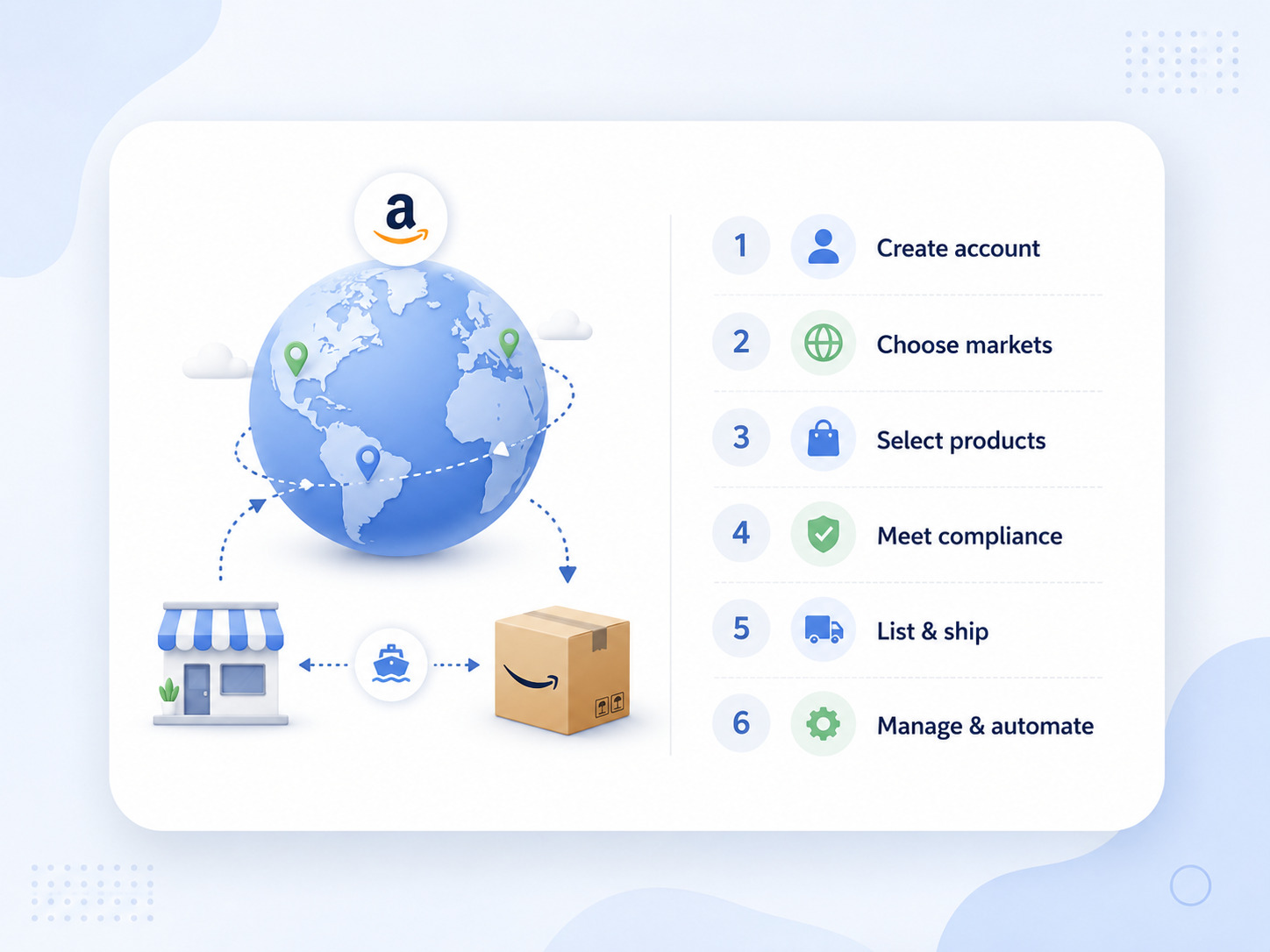
Per Amazon's official Global Selling page, selling globally involves the same six basic steps no matter which markets you choose:
Create a North America and Brazil unified selling account (plus any other regional or country-specific accounts you need).
Select the products you want to sell in each country.
Complete requirements for taxes, regulations, compliance, safety, and listing.
List your products in each country.
Ship inventory and fulfill customer orders.
Manage and automate your global business with Amazon tools and programs.
Simple in outline — the detail is in doing each step right. Let's break down the parts that matter most.
Step 1: Choose your target marketplaces
Amazon organizes its global marketplaces into regions, and how you access them depends on the region. Rather than launching everywhere at once, the smart play is to pick one or two target countries where demand for your product already exists, prove it, then expand.
Amazon's marketplaces are grouped as follows:
The Americas — a single North America and Brazil unified account reaches customers in the US, Canada, Mexico, and Brazil.
Europe — one Europe account reaches Amazon customers across 28 countries, including major marketplaces like the UK, Germany, France, Italy, and Spain.
Asia-Pacific — country-specific accounts reach customers in Australia, India, and Japan.
The Middle East and North Africa — country-specific accounts reach customers in the United Arab Emirates, Saudi Arabia, and Egypt.
For most sellers expanding from the US, the best country to start with is often Canada or the UK — English-speaking markets with strong demand and familiar buying behavior, which lowers the localization burden while you learn the ropes. To evaluate demand in any target market, use Amazon's Product Opportunity Explorer to explore customer search patterns, and study the competition and Best Sellers Rank in each country before committing inventory. Avoid product categories with brutal local competition, and favor items that are easy to ship with consistent demand.
Or use our guides to learn more about product research:
Step 2: Set up your global seller account
Here's how account structure works, and it trips a lot of sellers up. A single unified account covers an entire region — so one North America and Brazil unified account handles the US, Canada, Mexico, and Brazil, and one Europe account handles all 28 European countries. But standalone marketplaces like Japan, India, Australia, and the MENA countries each require their own country-specific account.
The good news on cost: if you link your global selling accounts, your monthly Professional selling plan fee is either the equivalent of $39.99 per month total, or the sum of the individual regional fees — whichever is lower. So expanding regions doesn't necessarily multiply your subscription cost.
Registering an Amazon seller account is quick — typically about 15 minutes — but you'll need your documents ready: a valid credit card, a phone number, ID proof, address proof, bank account details for receiving payments, and tax information. Some countries require additional documents, and Amazon may run identity and address verification (often via a postcard to your registered address). To receive payments in your home currency, set up Amazon Seller Wallet or the Amazon Currency Converter, which handles automatic conversion from local currencies — noting Amazon charges a currency conversion fee for this service.
Step 3: Handle taxes and compliance (don't skip this)
This is the step that gets accounts suspended when ignored, so treat it seriously. Product regulations, safety standards, and tax rules vary by country, and compliance is mandatory — not optional.
Two things demand special attention:
VAT in Europe. If you sell in the UK or store inventory in European countries, VAT registration is required. Amazon points sellers to its Europe tax and regulatory considerations for the specifics, and where you store inventory determines which countries you must register in.
Product compliance and safety. Different countries have different laws for product compliance, safety, and labeling. Use Amazon's Manage Your Compliance and Compliance Reference tools to verify your products meet each country's standards before listing.
If taxes across borders feel overwhelming, Amazon's Service Provider Network can connect you with vetted experts to handle VAT registration and filings — often well worth the cost to avoid a compliance misstep.
Step 4: Localize your product listings
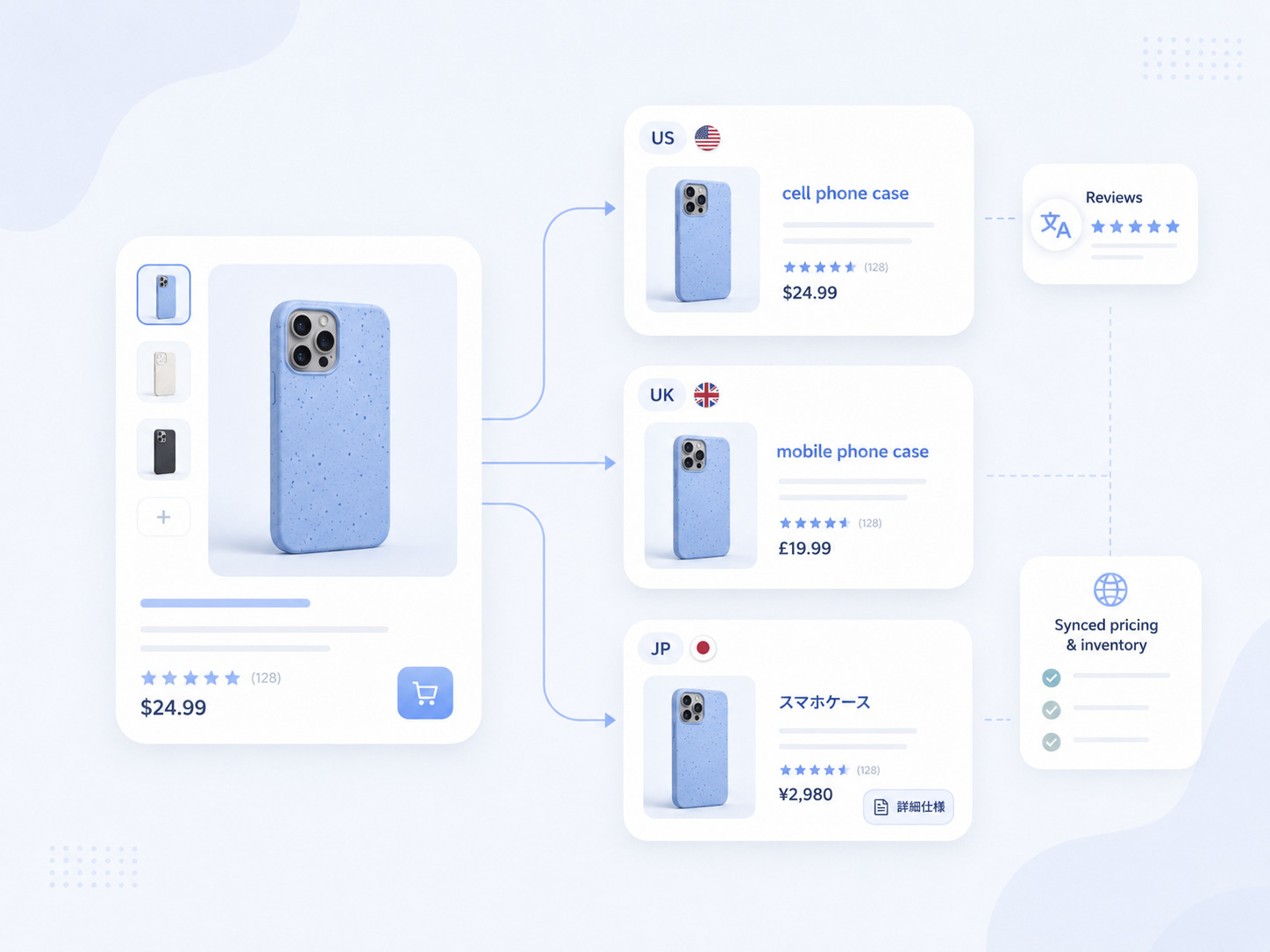
Products must be listed in the native language of the country you're selling in — and localization goes far beyond a machine translation. What buyers type into the search bar varies market to market, even between English-speaking countries (a "cell phone case" in the US is a "mobile phone case" in the UK; "sneakers" are "trainers"). So you need genuine local-language keyword research for each marketplace, not a translated copy of your US keywords.
Amazon's Build International Listings tool helps you cross-list and manage offers across global stores, syncing pricing and inventory from a source marketplace. But the content itself — titles, bullet points, and images — should reflect local culture and consumer preferences. European buyers often want sustainability credentials; Japanese buyers expect detailed technical specs.
One helpful note from Amazon: if you already sell on Amazon, in many cases your existing product reviews carry over to other global stores and are automatically translated — a real head start on trust in a new market.
Step 5: Choose your fulfillment strategy
You have two paths to fulfill customer orders internationally, and choosing the right one is essential:
Fulfillment by Amazon (FBA) — you send inventory to Amazon's fulfillment centers, and Amazon handles storage, packing, shipping, returns, and customer service in the local language. Crucially, FBA makes your products Prime-eligible, which drives conversion. Most sellers prefer FBA for international expansion because it removes the logistics headache entirely. In Europe, options like Pan-European FBA let you send inventory to one country and have Amazon distribute it based on demand (though this triggers VAT obligations in each storage country).
Fulfilled by Merchant (FBM) — you handle shipping and customer service yourself. This gives more control but means managing international carriers, customs, and returns on your own, with no Prime badge unless you qualify for Seller Fulfilled Prime.
For many sellers going global, FBA is the simpler and faster route to scale.
Step 6: Market, launch, and optimize
Once your listings are live, you need visibility. Amazon Ads is the fastest way to get in front of new customers in a fresh marketplace where you have no organic ranking yet — start with a moderate daily budget per marketplace, then scale what performs. After launch, monitor your performance metrics in each market closely, because success in one country doesn't automatically translate to another.
Adapt your pricing to local conditions (remembering that displayed prices in most countries outside the US include VAT or GST), and keep refining based on the data.
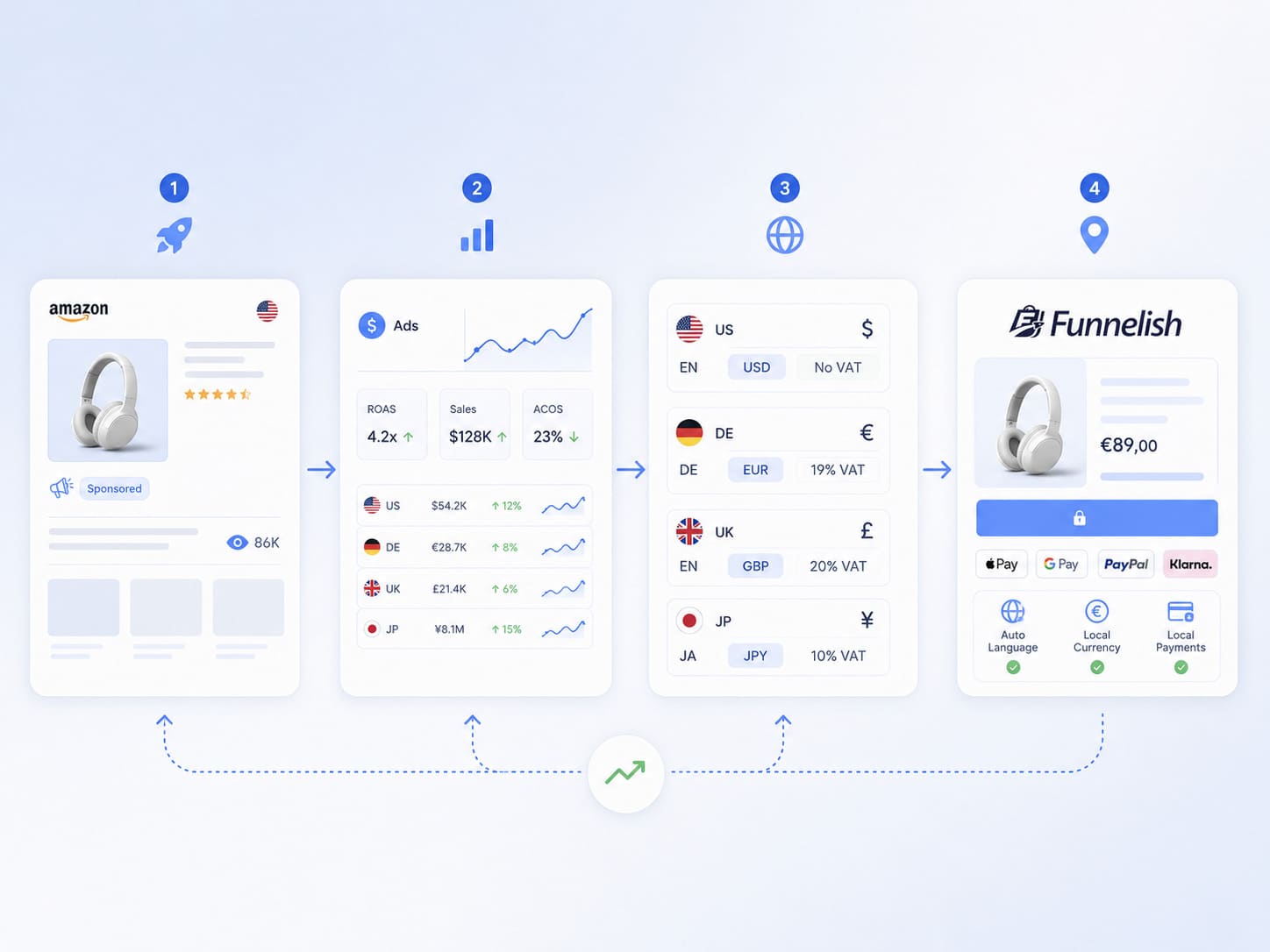
While your Amazon listings live inside Amazon's ecosystem, many sellers also drive external traffic — from social, search, or their own brand channels — to boost product sales. If you run any storefront or landing pages alongside your Amazon business, presenting the right currency, language, and offer to each visitor matters just as much off-Amazon as on it.
A tool like Funnelish makes that easier with geo-funnels that automatically adapt content, currency, and localized payment methods based on a visitor's location — no coding required — which is a natural complement when you're selling internationally and want a faster, more localized way to convert traffic from the markets you're already targeting on Amazon.
Bottom line
Learning how to sell on Amazon globally comes down to a repeatable sequence: choose the right marketplaces, set up your regional accounts, nail tax and product compliance, localize your listings properly, pick FBA or FBM, and market with Amazon Ads — then monitor and optimize each market. Expanding internationally also spreads your risk, reducing dependence on any single domestic market and letting you capitalize on busy shopping seasons around the world.
It's not effortless, but Amazon has built the infrastructure to make it genuinely accessible, even for small and mid-sized sellers. Start with one new market, prove your product, and scale from there. The sellers who go global early gain a real head start — and the whole world of Amazon customers is waiting.
Table of contents
Boost your eCommerce
sales today

24/7 support
No credit card required
Cancel anytime
24/7 support
No credit card required
Cancel anytime
