

WooCommerce Product Personalization: How to Boost Average Order Value
29 April 2026
Anna P.
8 minutes
Whether it is a custom engraved watch, a bespoke vitamin subscription, or a t-shirt featuring a photo of their dog, consumers are actively hunting for deep product customization. And more importantly? They are willing to pay a massive premium for it.
Offering personalized products often allows shop owners to increase their product price by up to 30% without seeing a drop in conversion rates. You simply cannot ignore the power of deep product personalization. But there is a massive technical elephant in the room when it comes to executing custom products at scale.
If you are running your business on standard, out-of-the-box WordPress architecture, you already know that setting up WooCommerce product personalization is a massive headache. So, how do you execute profitable customization options without breaking your website or needing a computer science degree?
Let’s break down the real money-driving hacks to customize products, what native plugins can do, and how upgrading your front-end funnel can increase sales and boost average order value.
Reality of WooCommerce Native Functionality
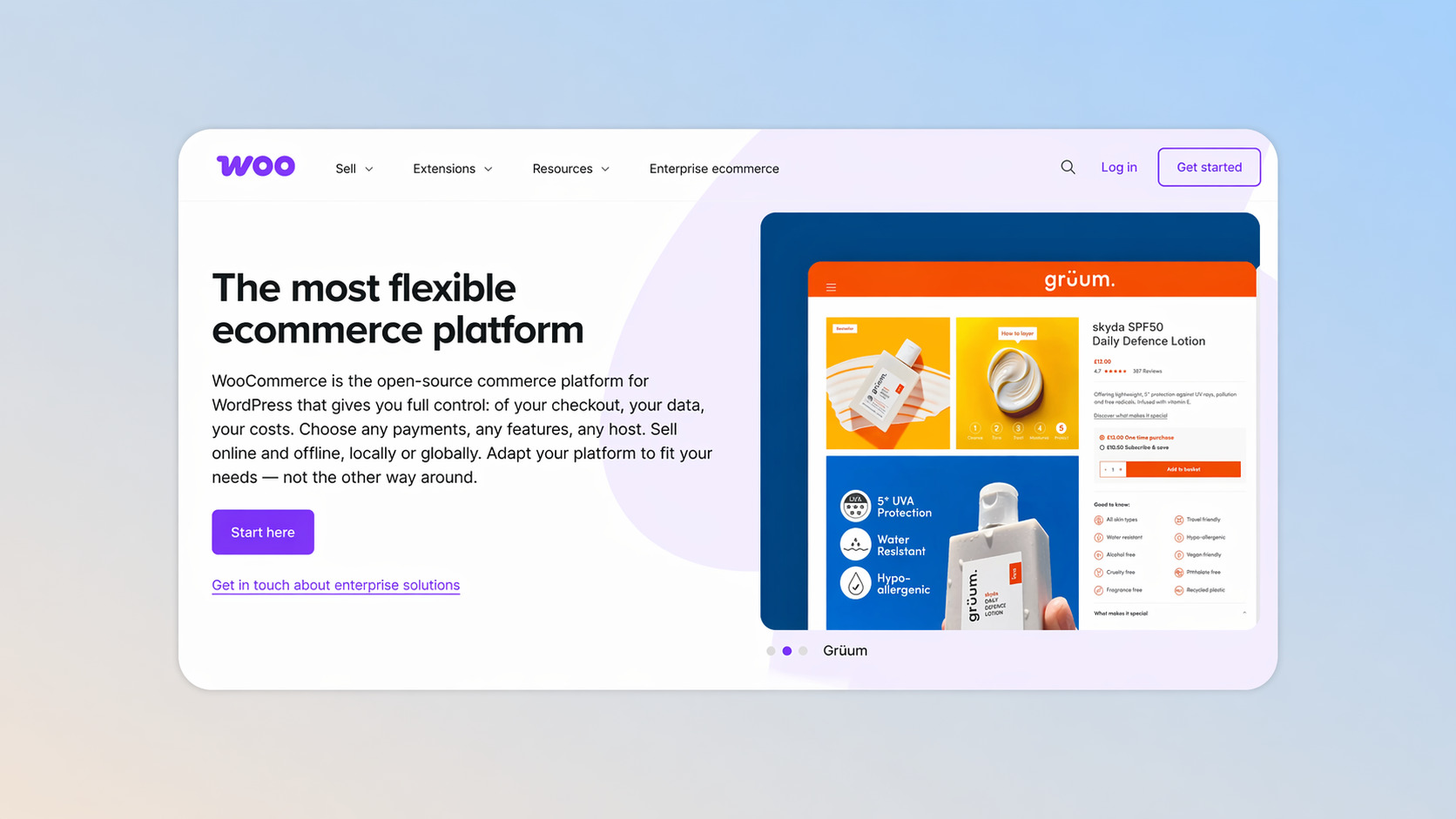
Let’s start with the hard truth about the standard WordPress dashboard.
Out of the box, a standard WooCommerce store is incredibly powerful for basic inventory management. If you want to create and sell a standard red hoodie in three sizes, the native product variations handle that perfectly. You just set up variable products, assign different prices, and you are good to go.
But what if you want customers to add custom text?
What if you need to handle file uploads for a custom phone case?
Natively, a standard WooCommerce product simply cannot do this. The core software is scarce when it comes to a deep customization experience. It does not allow for image uploads, complex text inputs, or dynamic pricing based on unique user inputs.
To sell goods where customers personalize the details, you are immediately forced to hunt for a WooCommerce plugin. Effective personalization requires tools that let buyers personalize an item seamlessly.
Clunky Plugin Ecosystem
To make your WooCommerce product page customizable and handle complex logic, most merchants turn to premium extensions.
You will likely find yourself opening a new tab and looking at search results for a WooCommerce product customizer. Popular options include the official WooCommerce Product Add-Ons extension or WP Desk’s highly rated Flexible Product Fields.
These tools are standard band-aids. They allow you to add custom fields, text fields, radio buttons, and checkboxes to your product template.
But they come with massive limitations:
Slow load times: Adding a heavy product customizer often bloats your site code, slowing down your product pages.
Complex setup: Even if you find an easy to use plugin, setting up conditional logic — where a specific field only appears if another box is checked — requires technical skills. If you use the free version of a free plugin, this feature is almost always locked, forcing you to buy the paid plugin.
Frankenstein checkout: When a user finally finishes their design process and hits add to cart, they are still forced through the notoriously clunky WooCommerce checkout.
You are losing sales at the finish line. This is exactly why high-performing stores are using a hybrid approach: letting WooCommerce manage the backend inventory, but using Funnelish to build blazing-fast, highly optimized front-end sales funnels.
Let's look at four highly profitable personalization hacks, how you would awkwardly build them in WooCommerce, and how Funnelish makes them effortless.
Hack #1: High-Margin Gift Wrapping Upsell
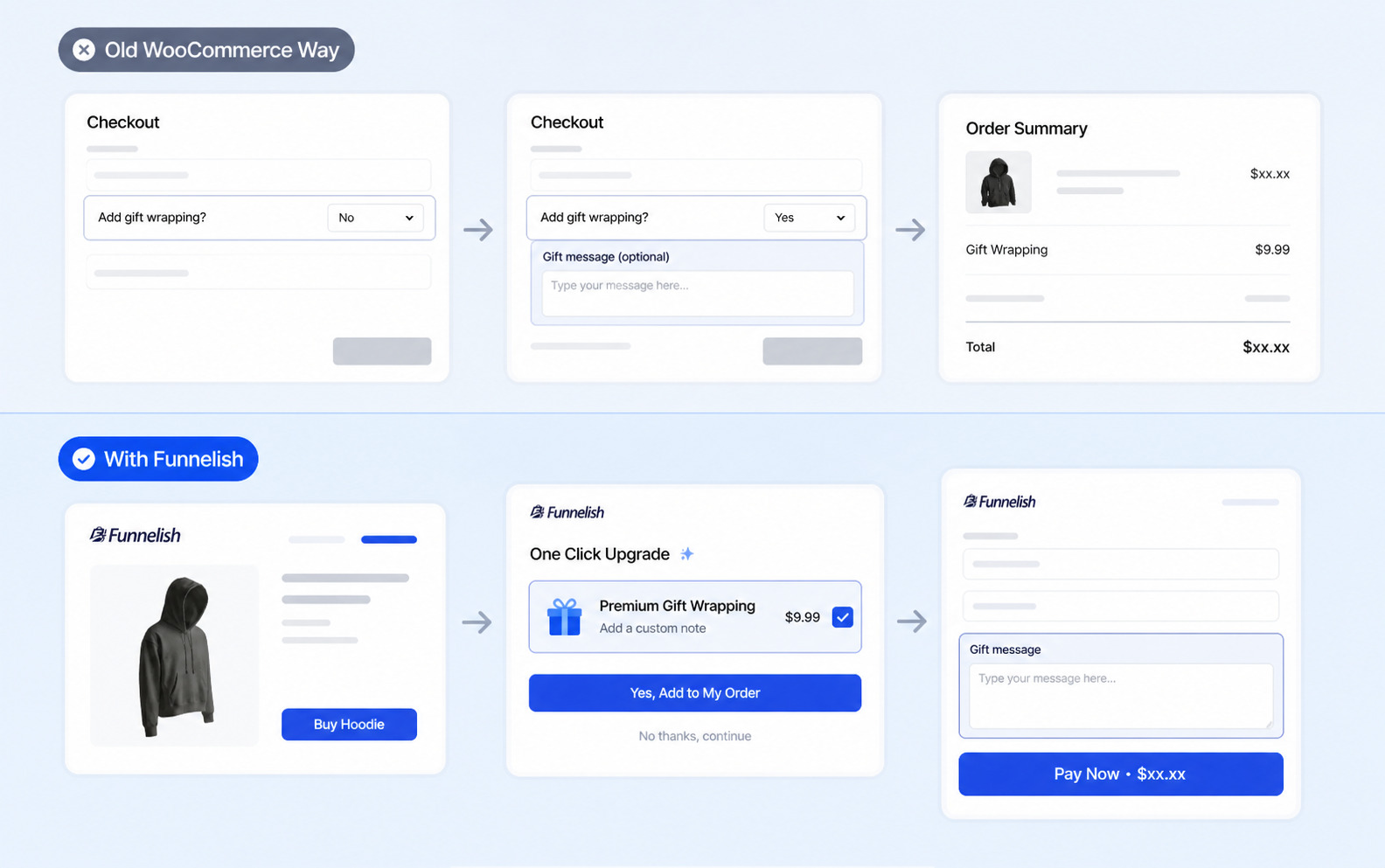
Customization isn't just about changing the physical product. Sometimes, it is about personalizing the experience. During the Q4 holiday rush, offering premium gift wrapping with a custom handwritten note is an absolute goldmine. It costs you pennies to execute, but you can charge a flat fee of $9.99 per order.
Old WooCommerce Way
To do this on a standard store, you have to add additional options to your checkout page. You need a plugin that supports conditional logic so that only when a customer selects "Yes, add gift wrapping," new custom text fields appear asking for their message. Finding the right plugin to add options without breaking your theme is notoriously difficult.
With Funnelish
Funnelish is engineered to maximize your average order value. Instead of burying your gift wrapping option on a crowded page, you use Funnelish to build a dedicated, high-converting landing page.
When the user clicks to purchase, you use Funnelish’s native Order Bump feature on the checkout form. With one single click, the customer adds the gift wrapping fee to their total. You can easily drag and drop text inputs right onto the Funnelish checkout so they can type their gift note. It is seamless and bypasses the clunky WooCommerce cart entirely.
Hack #2: Selling Print-On-Demand with File Uploads
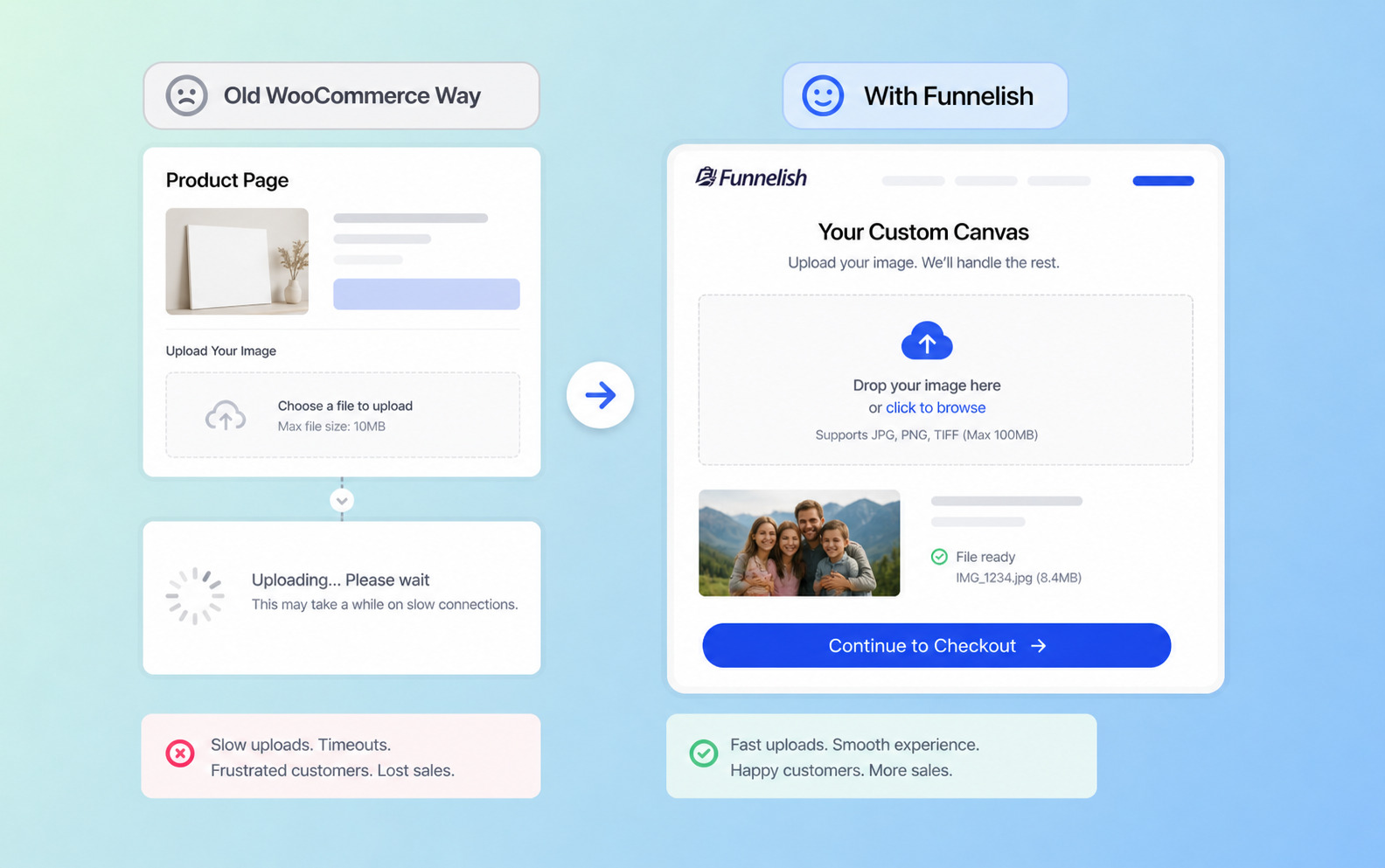
If you run a print-on-demand business, allowing customers to dictate their own designs is mandatory. Let's say you sell custom canvas prints. You need a flawless way where customers upload images so you receive print ready files without emailing back and forth.
Old WooCommerce Way
Trying to scale customizable products with large images is a recipe for disaster on a slow server. You have to install a dedicated WooCommerce extension just for files. Often, when customers try to upload massive family photos on a slow product page, the page times out. The customer gets frustrated and you lose the sale.
With Funnelish
Speed is everything. Because Funnelish pages are fully optimized to load in under one second globally, your customers won't experience that lag.
You can use Funnelish to build a dedicated page specifically for your custom canvas offer. By streamlining the design process and removing the bloated WordPress header and footer, the customer is laser-focused on uploading their file. The less friction there is, the faster you boost sales.
Hack #3: Dynamic Pricing for Custom Engraving
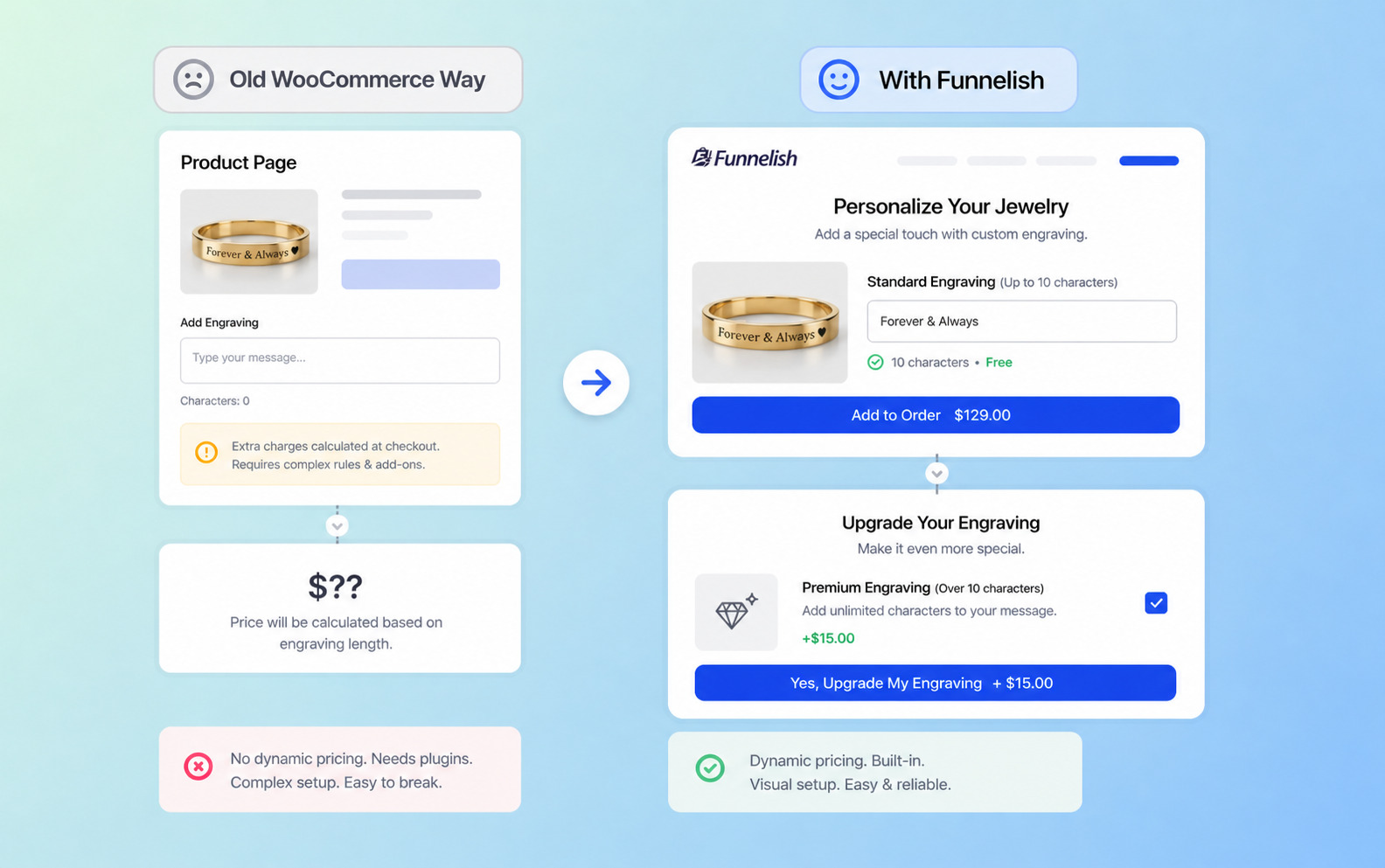
Engraving is one of the most profitable personalization options. If you are selling custom jewelry, you might want to offer free engraving for up to 10 characters, but charge an extra $15 if they want a longer message.
Old WooCommerce Way
Standard WooCommerce cannot change the price dynamically based on character counts. You would need to invest in premium add ons. From there, you have to spend hours configuring rules so that the system calculates the math correctly when customers type their custom message.
With Funnelish
Selling personalized products shouldn't require complex math. Funnelish allows you to build sophisticated pricing structures visually. Instead of relying on a fragile plugin, you can present clear, beautiful options on your sales funnel.
You can offer Standard Engraving as the main product, and then immediately present a Premium Engraving Upgrade as a one-click upsell after the initial sale is captured. By breaking the experience into micro-commitments, Funnelish helps you increase revenue with minimal effort.
Hack #4: Build-Your-Own-Bundle Experience
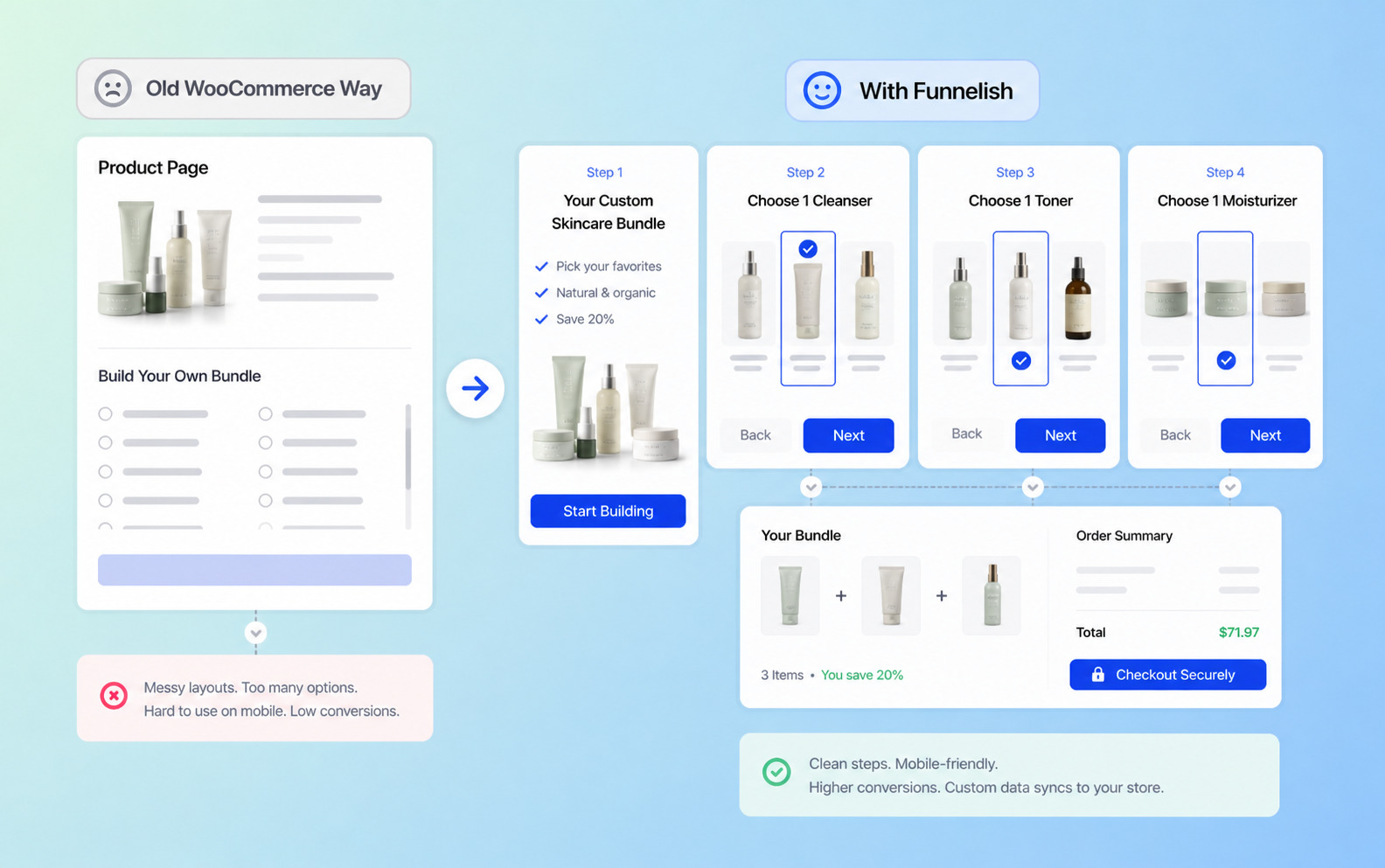
Consumers love feeling like they are in control of your product catalog. If you sell organic skincare, letting customers select their own bundle (e.g., "Choose 1 Cleanser, 1 Toner, and 1 Moisturizer") is a massive conversion booster.
Old WooCommerce Way
Building a mix-and-match bundle of custom products natively is notoriously difficult. You have to rely on complex product add ons to group items together. The resulting template is usually incredibly messy, forcing mobile users to scroll past dozens of radio buttons just to find the checkout button.
With Funnelish
Funnelish was built to solve this exact problem. Using their drag-and-drop simplicity, you can create a beautiful, step by step funnel for a specific product bundle.
Step 1: The customer lands on a stunning page highlighting the bundle's benefits.
Step 2: They select their cleanser.
Step 3: They select their toner.
Step 4: They checkout seamlessly.
Once the transaction is complete, Funnelish syncs the custom order data back to your main store for seamless fulfillment.
How to Choose the Right Plugin (If You Stay Native)
If you are absolutely committed to keeping your architecture strictly inside the native WordPress environment, you must evaluate key features carefully. Read current customer feedback before installing anything. Selling personalized items is vital to your brand's reputation.
Here is what you should look for:
Visual previews: The best tools allow customers to see a live preview applied to the product before they buy.
User friendly interface: Ensure the plugin plays nicely with your theme so your additional features don't break your mobile layout.
Extensive support: If your setup breaks during Black Friday, you need a developer who offers priority support.
While tools like WP Desk offer great functionality, remember that every additional plugin you add inherently slows down your site.
If your goal is to dramatically maximize conversions on your online store, migrating your flagship personalized items to a dedicated Funnelish sales funnel is the smartest strategic move you can make this year.
Bottom Line on Custom Products
The demand for bespoke goods is only growing. If you are just selling generic items, you are racing to the bottom on price. By offering customizable options, you instantly differentiate your brand, create an emotional connection with your buyers, and command higher profit margins.
Take a look at your best-selling product today. Ask yourself: "How can I apply personalization to make this incredibly unique?"
If you want to master product customization this year, upgrade your checkout flow, remove friction, and watch your average order value soar.
Frequently Asked Questions
How to create a custom product in WooCommerce?
To create a custom product natively, navigate to your WordPress dashboard, click Products > Add New, and select Variable product from the dropdown to create basic size or color variations. However, if you want to build personalized products with file uploads or text fields, you must install a third-party plugin to enable deep customization or use Funnelish for faster launch.
Can WooCommerce handle 50,000 products?
Yes, WooCommerce can theoretically handle 50,000 products or more, but its performance depends on your server infrastructure. If you have a massive catalog of personalized products with thousands of complex variations, a cheap shared web hosting plan will crash. You must invest in premium managed WordPress hosting.
How to create product variations in WooCommerce?
First, go to Products > Attributes and create your global attributes (like Color). Next, open the specific product, change the product type to Variable product, and click the Attributes tab to add them. Finally, click the Variations tab to generate variations and assign different prices. This is the native method, but true personalization usually requires a dedicated product customizer plugin or funnel builder like Funnelish.
Table of contents
Boost your eCommerce
sales today

24/7 support
No credit card required
Cancel anytime
24/7 support
No credit card required
Cancel anytime
