

WooCommerce vs Shopify in 2026: Honest Comparison
26 March 2026
Anna P.
Two platforms dominate ecommerce in 2026. Shopify holds up to 54% ecommerce platform market share across countries, powering approximately 4.8–6.5 million active stores worldwide. WooCommerce holds between 24–41% market share, with over 4.5 million active stores. (E-commerce Germany News) Together, they power more than half of all ecommerce on the internet.
But market share comparisons obscure the more important truth: these platforms are built around fundamentally different philosophies. Shopify is a fully hosted, all-in-one ecommerce platform. WooCommerce is a free WordPress plugin that transforms an existing WordPress site into an ecommerce store. Choosing between them isn't about which platform is objectively better — it's about which one is better for your situation, technical comfort level, and long-term goals.
Our comparison covers everything: pricing, customization, SEO, performance, payments, and who each platform serves best in 2026.
What Each Ecommerce Platform Actually Is
Before the head-to-head, it's worth being precise about what you're comparing.
Shopify is a dedicated ecommerce platform. You pay a monthly subscription, get hosting included, and build your store within Shopify's infrastructure. You don't need to manage servers, handle security updates, configure hosting environments, or maintain the underlying platform. Everything — from checkout to analytics to payment processing — lives inside Shopify's ecosystem.
WooCommerce is a free WordPress plugin. You install it on an existing WordPress site, and it adds ecommerce functionality — product pages, cart, checkout, payment gateways — to what is fundamentally a content management system. You own and control everything, but you're also responsible for everything: hosting, security, performance, updates, and plugin conflicts.
That distinction shapes every comparison that follows.
What WooCommerce vs Shopify Costs Are
This is where the platforms diverge most dramatically in how they present themselves versus what merchants spend.
Shopify Pricing

Shopify's pricing is transparent in structure, though the real cost expands beyond the base plan.
Shopify Basic costs $39/month when billed monthly, or $29/month when billed annually.
The Grow plan (formerly called Shopify) costs $105/month or $79/month annually.
Advanced costs $399/month or $299/month annually.
Shopify Plus starts at $2,300/month for enterprise stores.
On top of the subscription: third-party transaction fees apply if you use a payment provider other than Shopify Payments — 2% on Basic, 1% on Grow, and 0.6% on Advanced.
If you use Shopify Payments, those fees are waived, but you pay the credit card processing rate instead: 2.9% + 30¢ per transaction on Basic, dropping with each tier.
Add a premium Shopify theme ($150–$400 one-time) and a handful of apps ($10–$100/month each), and a mid-tier setup realistically costs $100–$200/month in total for a growing store.
WooCommerce Pricing

WooCommerce itself is free. The plugin downloads from WordPress.org at no cost. This is one of its most significant competitive advantages for budget-conscious sellers.
What isn't free is everything around it.
You need a hosting provider — typically $10–$50/month for a basic shared plan, considerably more for managed WordPress hosting that can handle real traffic.
You need an SSL certificate (often included with hosting).
You'll likely need WooCommerce extensions for specific functionality — payment gateway integrations, advanced shipping methods, subscription management, and more — which range from free to $200+ per year each.
A realistic WooCommerce setup with quality managed hosting, a premium theme, and 3–5 essential extensions runs $50–$150/month — comparable to Shopify's Basic tier, but with more variable costs that are harder to predict.
The key difference: WooCommerce costs can be controlled more precisely by a technical administrator who knows what they're doing. Shopify costs are more predictable but harder to reduce below certain thresholds.
Ease of Use for Online Stores
This is the clearest win for Shopify, and it's not close.
Shopify is designed to be operable by someone with no technical background. The interface is clean, the Shopify dashboard is intuitive, setup takes hours, and everything works together out of the box. Customer support is available 24/7. There are no hosting environments to configure, no PHP versions to worry about, and no plugin conflicts to debug.
WooCommerce requires technical competence at a level most non-developers underestimate when they start. Installing the WooCommerce plugin on a WordPress site is straightforward. What comes after — configuring hosting correctly, optimizing performance, managing plugin compatibility, handling security, setting up payment gateways properly, debugging issues when they arise — is not.
WooCommerce offers no dedicated support team. Your support comes from the WordPress and WooCommerce communities, your hosting provider, and whatever documentation exists for the plugins you've installed.
For merchants without technical expertise who want to focus on selling rather than managing infrastructure, Shopify is the rational choice. For a developer or technically capable seller who wants complete control, WooCommerce rewards that investment with genuine flexibility.
Ecommerce Store Customization and Flexibility
Here, WooCommerce wins decisively — in capability if not in ease.
WooCommerce supports over 60,000 plugins in the WordPress plugin directory. Almost any functionality you can imagine has been built by someone in the WordPress ecosystem. You can modify every aspect of your store at the code level. You can build custom integrations with almost any third-party system. You can extend WooCommerce to do things that Shopify's closed architecture simply doesn't support.
Shopify's App Store has over 7,700 apps. That's a substantial ecosystem, and most common ecommerce needs are covered. But Shopify's architecture sets limits on what's possible. You can't modify the core checkout flow below a certain level without being on Shopify Plus. Deep customization of theme code is possible but constrained. Some integrations that are trivial in WooCommerce require workarounds or expensive custom development in Shopify.
For a standard ecommerce store selling physical products, Shopify's customization capabilities are sufficient. For a seller with complex requirements — unusual product types, highly custom checkout experiences, deep integration with business systems — WooCommerce's flexibility is often the deciding factor.
Performance and Hosting
This one requires nuance.
Shopify handles hosting, performance, and security as part of the subscription. Your store runs on Shopify's infrastructure, which is engineered for ecommerce scale. Page speed is consistent, uptime is essentially guaranteed, and you never have to think about server management. When a viral product drives 10,000 simultaneous visitors to your store, Shopify handles it without you doing anything.
WooCommerce performance is dependent on your hosting environment. A WooCommerce store on quality managed WordPress hosting from providers like Kinsta, WP Engine, or Cloudways can be extremely fast — often faster than comparable Shopify stores because you have full control over caching, server configuration, and code optimization. A WooCommerce store on cheap shared hosting will be slow, unreliable, and prone to crashing under real traffic.
The honest assessment: Shopify provides reliably good performance with zero effort. WooCommerce can achieve excellent performance with significant effort and appropriate investment in hosting. For most, Shopify's consistent baseline is more valuable than WooCommerce's theoretical ceiling.
SEO Capabilities
Both platforms can achieve strong organic search rankings. The differences are structural, not fundamental.
WooCommerce, running on WordPress, has a broader content management infrastructure. Plugins like Yoast SEO and Rank Math give you granular control over technical SEO elements — meta tags, structured data, canonical tags, robots directives, XML sitemaps, and more. The blog functionality is naturally deeper because WordPress was built as a CMS first. For content-heavy SEO strategies where editorial publishing is a core traffic driver, WooCommerce's WordPress foundation is a genuine advantage.
Shopify handles the SEO fundamentals automatically and reliably — sitemaps, canonical tags, mobile optimization, SSL, and structured data are all managed by the platform. The Shopify blog is functional but more limited than WordPress for complex content strategies. One well-documented limitation: Shopify's URL structure for products includes /products/ in the path and can't be changed, which is a minor but real constraint some SEO practitioners dislike.
In practice, both platforms support strong SEO outcomes. The choice between them shouldn't be driven primarily by SEO capability — it should be driven by everything else, and then the SEO approach adapted accordingly.
Read more: Shopify SEO: 30 Hacks to Rank Higher
Payment Gateways and Transaction Fees
WooCommerce supports a wider range of payment gateways out of the box. Because it's open-source, developers have built integrations for virtually every payment processor globally — including many regional and local options that Shopify doesn't support natively. If you're selling in markets where payment preferences are highly specific, WooCommerce's payment flexibility is meaningful.
Shopify's integrated payment gateway — Shopify Payments — is available in most major markets and works seamlessly within the platform. It eliminates transaction fees and provides a clean checkout experience. The limitation is the transaction fee structure when you use third-party gateways: that 2% on Basic adds up meaningfully at volume. A store doing $50,000/month on Basic with a third-party gateway is paying $1,000/month in transaction fees alone — at which point upgrading to the Grow plan's 1% rate pays for itself.
WooCommerce charges no transaction fees of its own — you pay only the payment processor's rates (typically 2.9% + 30¢ for Stripe or PayPal in the US). This is a genuine cost advantage for high-volume WooCommerce stores, particularly those processing large transaction volumes.
Scalability
Shopify's GMV reached $378 billion in 2025 and is on pace to exceed $400 billion in 2026. (Marketplace Pulse) WooCommerce's estimated GMV is $30–35 billion annually — much smaller in transaction volume, but spread across more stores. (Wiser Review) That gap reflects a real difference in where each platform's high-end users sit.
Shopify is purpose-built to scale. The infrastructure, the app ecosystem, and the Shopify Plus tier exist to support stores from zero to hundreds of millions in annual revenue without changing platforms. The path from Basic to Plus is a continuous upgrade, not a migration.
WooCommerce can scale — and does, for stores with strong technical teams. But scaling WooCommerce requires active investment in infrastructure: upgrading hosting, optimizing database performance, managing caching, handling traffic spikes. You bear the full weight of that infrastructure work. For a store doing $10M+ in annual revenue on WooCommerce, the ongoing engineering overhead is substantial and real.
Security
Shopify manages security entirely. PCI compliance, SSL, platform security patches — all handled automatically as part of the subscription. You don't think about it.
WooCommerce security is your responsibility. You need security plugins, you need to keep WordPress core, WooCommerce, and all plugins updated, you need a hosting provider with appropriate security infrastructure, and you need a backup and recovery strategy.
Most security incidents on WooCommerce stores come from outdated plugins or themes — a problem that requires ongoing vigilance.
What's the Right Ecommerce Platform for You
Shopify is the right choice if:
You want to launch quickly without technical expertise
You value predictable costs and minimal infrastructure management
You're scaling a high-growth brand that needs reliable performance under heavy traffic
Conversion optimization, post-purchase upsells, and multichannel selling are core to your strategy
You're a dropshipping or D2C operator who needs a fast, clean storefront above all else
WooCommerce is the right choice if:
You or your team have genuine WordPress/PHP development capability
You're running a content-heavy business where SEO through publishing is a primary channel
You need specific integrations or customizations that Shopify's closed architecture can't support
You're highly cost-sensitive and willing to manage the technical overhead to reduce platform costs
You already have an established WordPress site, and adding ecommerce is a logical extension
What Neither Platform Solves by Default
Here's something both WooCommerce and Shopify have in common: neither is optimized for the conversion layer between traffic arrival and completed purchase.
A standard WooCommerce or Shopify product page is built for browsing — it has navigation, multiple products, and a generalized layout designed for the average visitor. It is not designed for someone arriving from a paid ad with high intent and low patience, where every extra second of load time and every additional form field costs you a buyer.
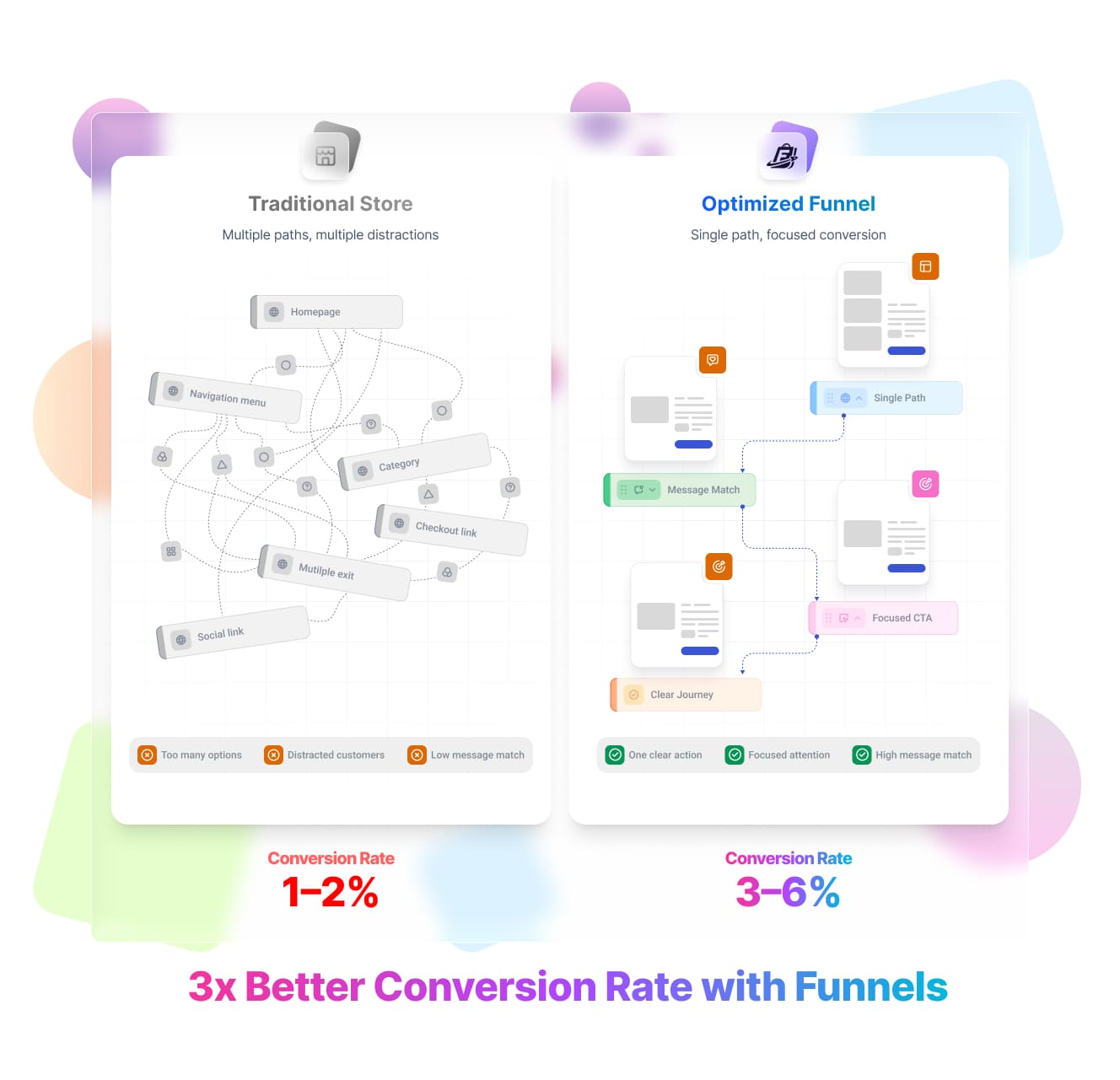
This is the gap that Funnelish addresses. Rather than replacing your Shopify or WooCommerce store, Funnelish provides the conversion infrastructure that syncs with them — dedicated landing pages that load in under a second, checkout flows stripped of unnecessary friction, and post-purchase upsell sequences built into the flow. Orders sync back to Shopify for fulfillment. You get the operational backend of Shopify with a frontend built to convert at the level that justifies the ad spend behind it.
For store owners who've already validated a product and want to push conversion rates significantly higher on existing traffic — or for operators building a high-volume ecommerce business from the ground up who want conversion-optimized infrastructure from day one — Funnelish is worth understanding as a complement to, rather than a replacement for, the platform choice you're already making.
Try Funnelish free for 14 days →
WooCommerce vs Shopify FAQs
Which is better, Shopify or WooCommerce?
Neither is objectively better — they serve different sellers. Shopify is better for merchants who want speed of launch, reliability, and minimal technical overhead. WooCommerce is better for technically capable operators who need maximum flexibility, lower ongoing costs, or deep integration with a WordPress content strategy. The right answer depends on your technical capability, budget structure, and business requirements.
What are the disadvantages of WooCommerce?
The main disadvantages are the responsibilities that come with self-hosting: security management, performance optimization, plugin compatibility issues, and the absence of a dedicated support team. WooCommerce's total cost is also less predictable than Shopify's — premium extensions, managed hosting, and developer time can accumulate quickly. And unlike Shopify, WooCommerce doesn't scale automatically; you bear the infrastructure work as your store grows.
Is WooCommerce paid or free?
The WooCommerce plugin itself is free — it's an open-source WordPress plugin available at no cost. What costs money is everything required to run it: hosting (typically $15–$50+/month for quality managed WordPress hosting), premium themes, WooCommerce extensions for specific functionality, and any developer time required for setup and maintenance.
Is WooCommerce slower than Shopify?
It depends on the hosting environment. WooCommerce on cheap shared hosting is often significantly slower than Shopify. WooCommerce on quality managed WordPress hosting with proper caching and optimization can match or exceed Shopify's load times. Shopify provides consistent, reliable performance without operator effort. WooCommerce can achieve excellent performance, but it requires deliberate investment and technical attention.
Should I switch from WooCommerce to Shopify?
The migration is worth considering if you're spending significant time on infrastructure management rather than growing your business, if platform performance or reliability is costing you sales, or if your team lacks the technical depth to maintain a WooCommerce setup at scale. It's not worth it if WooCommerce is running well, your customizations are deep and hard to replicate in Shopify, or your content strategy is tightly integrated with WordPress.
Migration from WooCommerce to Shopify is a real engineering project — factor in the time, cost, and risk of SEO disruption before committing.
Can WooCommerce handle 500,000 products?
Yes, technically — WooCommerce's architecture can handle very large product catalogs, and some stores run hundreds of thousands of SKUs. But handling that volume well requires optimized hosting infrastructure, database tuning, and potentially custom development to keep performance acceptable. It's not a plug-and-play scenario at that scale. Shopify also handles large catalogs, with somewhat less operator intervention required.
Which is cheaper, Shopify or WooCommerce?
WooCommerce is typically cheaper at low volume and for technically capable operators who can keep hosting and extension costs controlled. Shopify becomes cost-competitive (and often cheaper in total) at higher volumes where the transaction fee savings from Shopify Payments outweigh the subscription cost, and where the alternative is paying significant developer time to maintain a WooCommerce setup.
For a store doing $5,000/month or less with a developer on hand, WooCommerce is usually cheaper. For a store doing $50,000+/month without dedicated technical resources, Shopify often works out to a lower total cost of ownership.
Table of contents
Boost your eCommerce
sales today

24/7 support
No credit card required
Cancel anytime
24/7 support
No credit card required
Cancel anytime
