

Google Ads for Ecommerce in 2026: Strategy Guide
09 June 2026
Anna P.
9 minutes
For online stores, Google Ads campaigns remain one of the most direct paths to profitable growth — you put your products in front of people at the exact moment they're searching to buy. But the platform in 2026 looks very different from even two years ago.
AI now drives most of the bidding and placement decisions, Performance Max has matured into the default campaign type for ecommerce, and the economics have tightened: Google served 5.65 billion fewer impressions year over year while competition rose, which means passive, set-and-forget campaigns no longer cut it.
Let's break down how to run Google Ads for ecommerce today — the campaign types, the bidding strategy, the budgets, and the structure that produces returns.
Do Google Ads campaigns work for online stores?
Short answer: yes, when run correctly. Google Shopping ads alone account for roughly 76% of retail search ad spend, and for good reason — a product listing shows shoppers an image, price, and store name before they click, delivering a pre-qualified audience that converts noticeably better than standard text ads. Across the platform, ecommerce ROAS averages around 4:1, with top performers reaching 8:1 or higher.
The catch is that Google Ads amplifies whatever you feed it. Good strategy in, good results out; bad strategy in, wasted ad spend out. The brands winning in 2026 treat campaign architecture, product feed quality, and conversion tracking as strategic disciplines — not as a box to tick once and forget. So the honest answer to "Do Google Ads work?" is that they work for ecommerce businesses willing to manage them properly.
Step one: set up your Google Ads account and tracking
Before you create ads, get the plumbing right. You'll need a Google Ads account and a Google Merchant Center account, where your product feed lives. The product feed — your titles, images, prices, and attributes — is the single most important asset in any ecommerce campaign, because Google matches your products to a user's search query based on that feed data. Weak feed, weak results, no matter how clever your campaign structure.
Equally critical is conversion tracking. Install the Google Ads tracking code, enable ecommerce tracking in Google Analytics, and make sure purchase conversions report an accurate conversion value back to Google. This matters more than ever in 2026 because nearly every effective bidding strategy is AI-driven, and AI can only optimize toward the data you give it.
Accounts with broken or thin tracking are the most common reason campaigns often quietly underperform. Google Analytics is a free tool, so there's no excuse to fly blind.
Understanding the campaign types
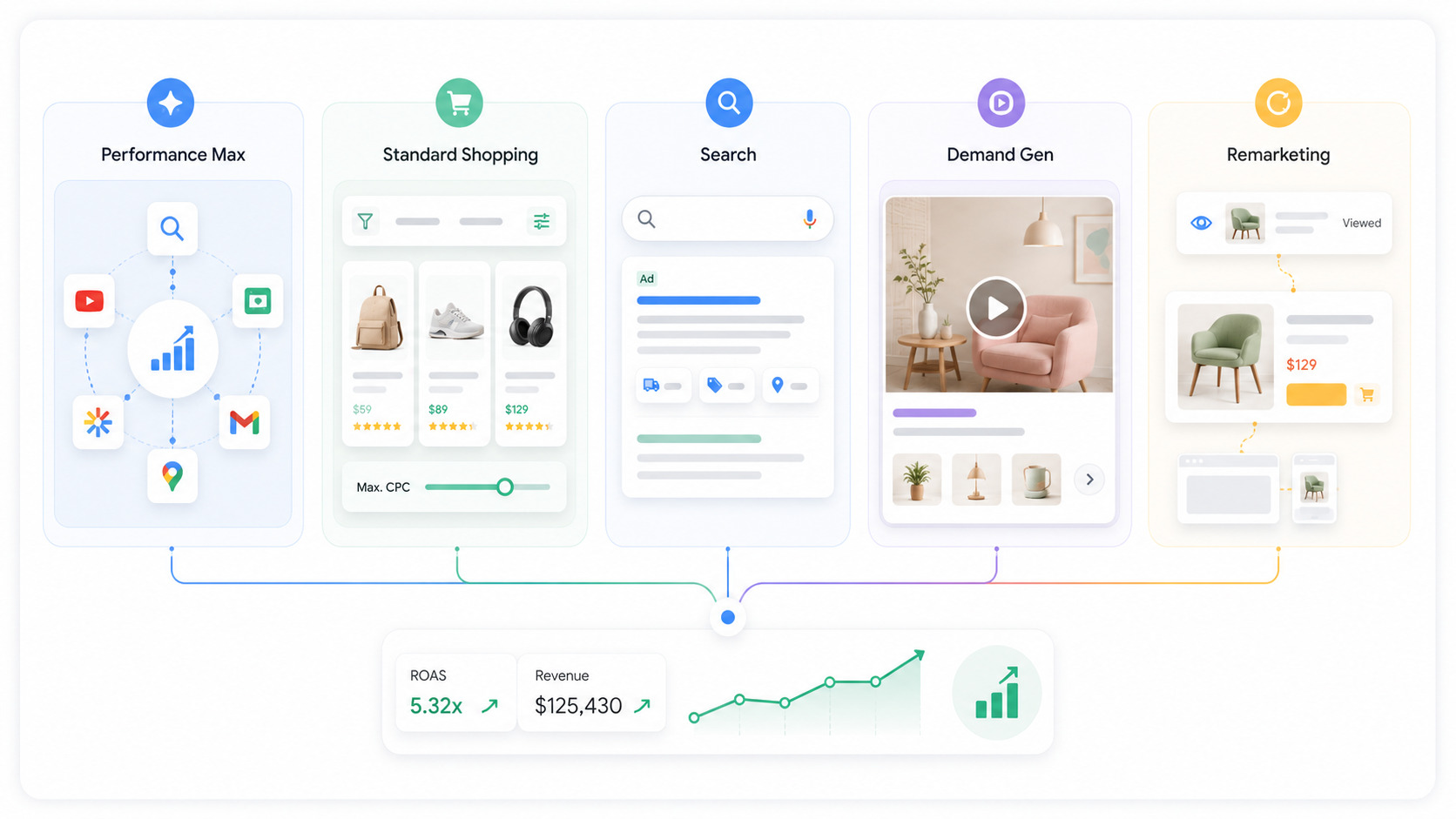
A profitable ecommerce account in 2026 rarely relies on a single campaign. Instead, the most effective accounts run a hybrid of three to five campaign types, each serving a specific purpose. Here's how the main options fit together.
Performance Max
This is the centerpiece for most ecommerce brands. A single Performance Max campaign runs across seven channels — Google Search, Shopping, YouTube, the Google Display Network, Discover, Gmail, and Maps — with Google's machine learning deciding which channel to show your ad on, which user to target, and how much to bid. It officially replaced the old Smart Shopping campaigns.
The 2026 updates matter: Performance Max now offers channel-level reporting, campaign-level negative keywords (up to 10,000), search themes expanded from 25 to 50 per asset group, and first-party audience exclusions — meaning far more control than the early black box version.
Feed it strong creative assets (headlines, descriptions, images, and video ads) and a clean product feed, and it can consistently improve ROAS.
Standard Shopping campaigns
These still exist and still matter. A standard shopping campaign gives you transparent bidding, a visible search terms report, and product-level data. Use it for your highest-margin products, your bestsellers that need precise bid control, and to defend branded product searches. Many advanced accounts run standard shopping campaigns alongside Performance Max in a deliberate hierarchy rather than choosing one or the other.
Search campaigns
Search campaigns built around text ads capture high-intent search queries directly on the search engine results pages. You create ad groups around relevant keywords, write effective ad copy, and use ad extensions (sitelinks, callouts, prices) to take up more space. Dynamic Search Ads are a useful complement: instead of you supplying keywords, Google matches your ads to searches based on your landing pages, which is handy for catching the long tail across large catalogs.
Demand Gen campaigns (which replaced Discovery campaigns)
They run visually rich video ads and image ads across Google-owned properties like YouTube, Discover, and Gmail — strong for upper-funnel demand and reaching potential customers before they're actively searching. YouTube ads specifically are powerful for product storytelling and app downloads if you have mobile apps.
Remarketing ads
Remarketing campaigns, including dynamic remarketing ads, re-engage people who visited your online store but didn't buy — dynamically showing them the exact products they viewed. Given that most shoppers don't convert on the first visit, this is some of the highest-ROI inventory available.
Bidding strategy: when to trust AI
Your bidding strategy determines how Google spends your money. The big shift is that AI-powered Smart Bidding — chiefly Target ROAS and Maximize Conversion Value — now outperforms manual management for many ecommerce advertisers. Target ROAS bidding offers the best balance of efficiency and transparency for stores, letting you tell Google how much revenue you want back for each dollar of ad spend.
But there's a crucial threshold backed by the data: automated bidding strategies need 30–50 conversions per month to generate enough signal to optimize effectively. Below that, the algorithm is essentially guessing, and Manual CPC or a simpler strategy may serve you better while you build conversion volume. A practical path: start newer or lower-volume campaigns on Manual CPC or Maximize Conversions, accumulate data, then graduate to Target ROAS once you clear the threshold.
One more 2026 development worth knowing: Google's AI Max for Search moved out of beta in April 2026. Google reports advertisers who activated it saw around 14% more conversions at similar efficiency — and notably larger lifts for campaigns previously locked into exact match and phrase match keywords. It's worth testing, but as always, verify the impact against your own conversion data rather than taking the platform's word for it.
Read more: Facebook Ads for Ecommerce in 2026: Why Most Campaigns Leak Money
Keywords, search terms, and negative keywords
Even in an AI-driven world, keyword research still anchors your search campaigns. Identify relevant keywords with real search volume that match buyer intent, group tightly themed terms when you create ad groups, and write ad copy that mirrors the user's search query — relevance lifts your Quality Score, and a Quality Score of 8–10 can mean up to 37% lower CPC than the median.
Just as important is pruning. Check your search terms report regularly to see the actual search queries triggering your ads, and add negative keywords to block irrelevant or unprofitable traffic.
For ecommerce, a robust negative keyword list — filtering out "free," "DIY," "jobs," and competitor terms you don't want — is one of the fastest ways to stop wasting money. Use match types deliberately: exact match for your proven money terms, broader match types (paired with strong negatives and Smart Bidding) to discover new ones.
Where your clicks land decides whether you profit
You can nail your campaign structure, bidding, and ad copy, but every click lands on a page — and that page decides whether you make money. With ecommerce Search conversion rates averaging just 2.81% and mobile now driving 65% of clicks but a smaller share of conversions, the post-click experience is where most budgets quietly leak.
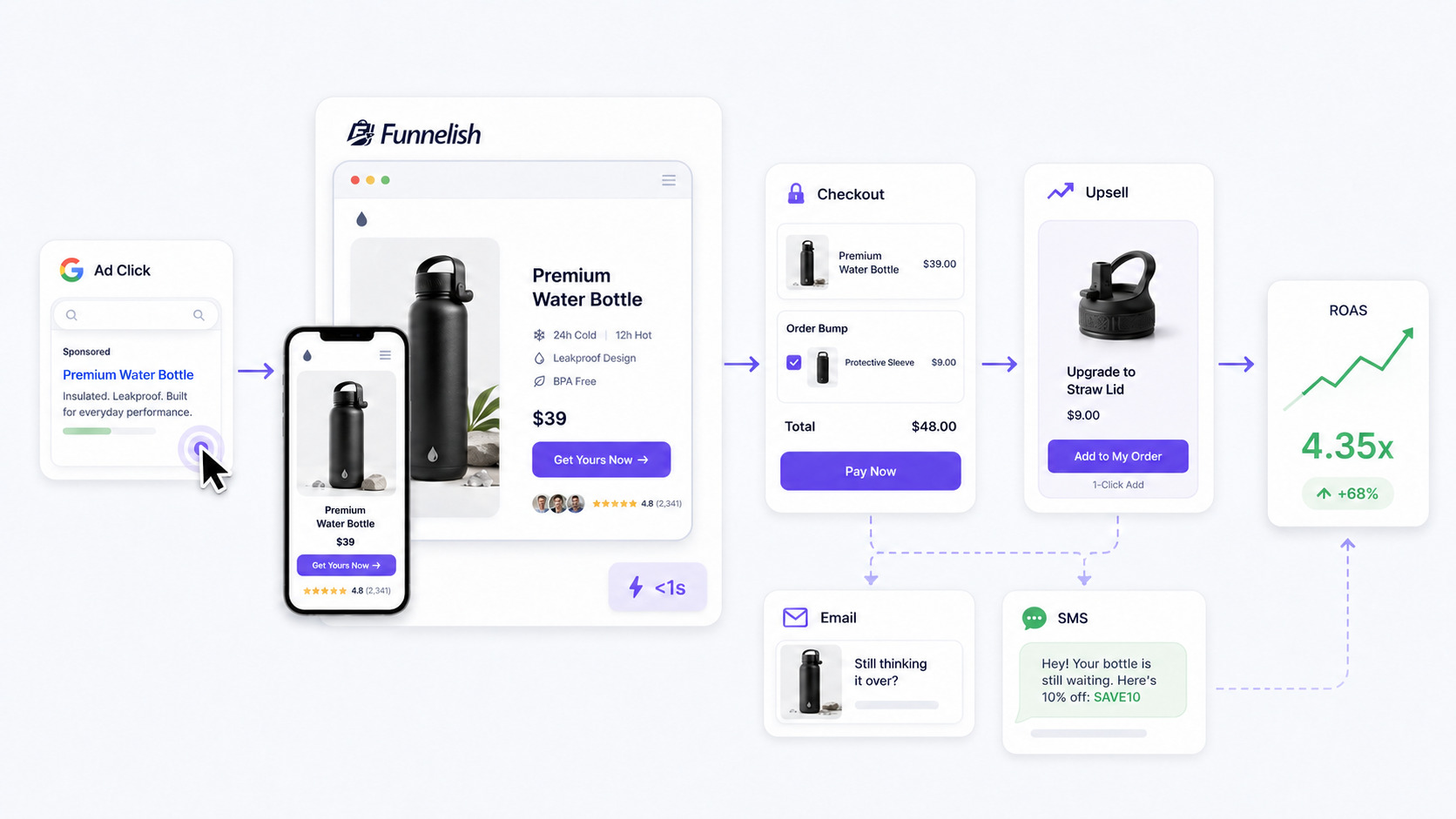
Two factors matter most: speed and focus. Slow pages bleed mobile shoppers before they see your offer, and sending paid traffic to a generic category page dilutes the intent you just paid for. A dedicated landing page or sales funnel — one offer, one clear call to action — is much better than a standard product page for ad traffic.
You can bring it to life with Funnelish, a tool that fits naturally into a Google Ads strategy: its drag-and-drop page builder lets you spin up campaign-specific landing pages without a developer, and because those pages are engineered to load in under a second, you keep the expensive clicks you worked to win.
From there, the goal is to extract maximum conversion value from every visitor — which is exactly what Smart Bidding optimizes toward. One-click upsells and order bumps lift average order value, improving your ROAS without raising ad spend, and the higher conversion value you report feeds straight back into Google's bidding algorithm, helping it find more profitable buyers.
For the majority who don't purchase on the first click, automated abandoned-cart emails and SMS recover sales from shoppers who already showed intent — a natural complement to your remarketing ads. Pair tight campaign architecture with a fast, focused funnel, and the whole system compounds.
Read more: Snapchat Ads in 2026: Guide for E-Commerce Brands
How much should you budget? (The money questions)
Budget is the most common source of anxiety for new advertisers, so let's address the specific questions directly — with the caveat that the right number always depends on your product price, margins, and conversion rate.
Is $10 a day enough for Google Ads?
It can work for a narrow, tightly targeted ecommerce campaign — think a single product, a small set of exact match keywords, and a specific location. At a $300 monthly spend you won't gather data fast, and you almost certainly won't hit the 30–50 monthly conversions that Smart Bidding needs, so stick to Manual CPC and modest expectations. It's a testing budget, not a scaling one.
Is $20 a day good for Google Ads?
For many small ecommerce stores, around $600 a month is a reasonable starting point. It's enough to run a focused Shopping or Performance Max campaign and begin collecting meaningful conversion data, especially if your products carry healthy margins. It's good as a launch budget — enough to learn what works before you scale, though still tight for competitive product categories.
Is $1,000 enough for Google Ads?
Yes — $1,000 a month is a solid working budget for most small-to-mid ecommerce businesses. It typically generates enough conversion volume to unlock automated bidding strategies like Target ROAS, supports a small hybrid structure (Performance Max plus a branded Search campaign, say), and gives the algorithms room to optimize.
The key is concentration: $1,000 spread across many campaigns and product categories accomplishes little, while $1,000 focused on your best products and clearest buyer intent can be genuinely profitable.
The universal principle: start with a daily budget you can sustain for at least 60–90 days, concentrate it rather than spreading it thin, judge performance on ROAS and conversion value rather than clicks, and scale the campaigns that prove profitable. With ecommerce cost-per-acquisition averaging roughly $24–$45, you need enough runway to clear that cost reliably before a campaign can be judged.
Bringing it together
Google Ads for ecommerce in 2026 rewards advertisers who respect how the platform now works: an AI-driven system that needs a clean product feed, accurate conversion tracking, and a deliberate multi-campaign structure to perform.
Build on Performance Max and Standard Shopping in a sensible hierarchy, layer in Search, remarketing, and Demand Gen as your goals dictate, lean on Smart Bidding once you have the conversion volume to support it, and never stop pruning with negative keywords and the search terms report.
Then make sure every click you pay for lands on a fast, focused ecommerce funnel built to convert — because the most sophisticated campaign in the world still can't fix a leaky funnel. Get both halves right, and Google's unmatched reach turns into measurable, repeatable sales.
Table of contents
Boost your eCommerce
sales today

24/7 support
No credit card required
Cancel anytime
24/7 support
No credit card required
Cancel anytime
