How to Start an Ecommerce Business
01 August 2026
Anna P.
23 minutes
Quick answer: To start an ecommerce business, pick a niche you can defend, validate that people want the product before you buy any of it, register a legal structure and get an EIN, build an ecommerce website on a platform that handles checkout properly, sort out shipping and returns including the FTC rules that apply to you, then drive traffic through search engine optimization, email and paid ads. Expect the first sale within weeks and real profit within a year or two.
Selling online is no longer a niche activity. E-commerce accounted for 16.9% of total US retail sales in the first quarter of 2026, growing 9.8% year over year while total retail grew 3.9%, according to . The category is expanding roughly two and a half times faster than the market it sits inside.
That's the good news and the warning in one number. A growing market attracts competitors, so the businesses that work are the ones that pick a specific audience and serve it properly rather than opening a general store and hoping. Here's the sequence that gets you there.
1. Decide what you're selling
The business idea comes before everything, and it's where new business owners tend to move fastest and think least. Start from a niche rather than a product. A niche gives you a target audience whose problems you can learn, which makes every later decision easier: what to stock, what to write on your product pages, which channels to use, what to say. A general store has to compete on price and selection against companies with vastly deeper pockets.
Look for the gap by reading complaints. Customer reviews on competing products, especially the three-star ones, are the closest thing to free market research you'll find. People describe exactly what didn't work and what they wish existed. is worth an hour too, mostly to check that interest in your category is stable or rising rather than a spike you've caught on the way down.
Practical constraints matter as much as passion. Products that are easy to pack, hard to break, and cheap to ship are kinder to a new ecommerce business than anything fragile, bulky or perishable. Your own products give you margin and defensibility but tie up cash. Reselling gets you moving faster with thinner returns.
2. Choose a business model that fits your money and time
Once you know roughly what you're selling, the model determines how much capital you need and how much control you keep. Two questions decide it: who you're selling to, and how you get hold of the stock.
Business to consumer is the default for most online stores: you sell directly to the people using the product.
Business to business means selling to other businesses, usually with larger orders, longer sales cycles and invoicing rather than card checkout. (More about B2B vs. B2C)
Consumer to consumer covers marketplaces where you're the platform connecting independent sellers rather than the seller.
Direct to consumer describes brands that make their own products and skip retail entirely, and it's worth understanding the trade-offs before you commit, which we've covered in our guide to .
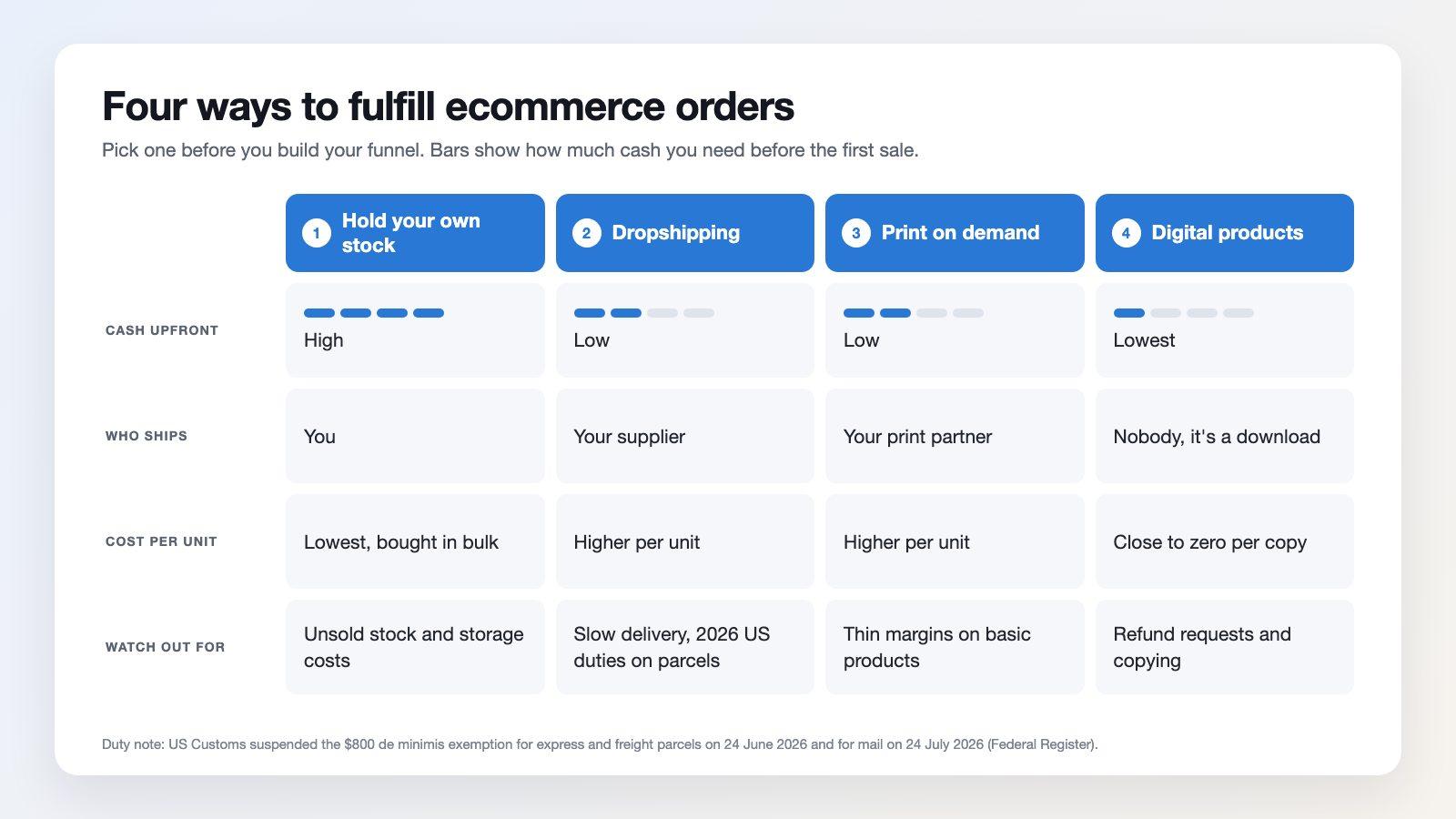
Then there's how you source. Holding inventory gives you the best margins and the most risk. Dropshipping model lets you sell without buying stock up front, at the cost of thin margins and no control over fulfilment, and it's worth reading an honest assessment of before building a business on it.
Print on demand services sit in between for anything you can put a design on. Digital products and software as a service remove shipping from the equation altogether, which solves a lot of problems and creates a marketing one, since nothing is stopping a competitor from copying you. Whichever you lean toward, the model that lets you test cheaply and switch later is usually the right place to begin.
3. Validate demand before you spend money
Validation means getting evidence that strangers will pay, before you commit to inventory. Run a small ad budget to a landing page describing the product and measure whether anyone clicks through and tries to buy. Take pre-orders. Sell a handful of units through an existing marketplace to see whether the listing converts at all. If you're sourcing from suppliers, order samples and test the actual product before you order a pallet of it, and our notes on cover how to run that cheaply.
What you're looking for is a stranger paying full price without a personal connection to you. Friends buying out of kindness tells you nothing. Once you have that, you can order inventory with some confidence about what will move.
This is also the right moment to write a business plan, since you finally have numbers to put in it. It doesn't need to be long. Who you sell to, what you sell, what it costs, what you'll charge, how you'll reach potential customers, and what the first year looks like in cash. A business plan of two pages is enough to expose a broken model, and you'll need a fuller one if you ever approach a lender. Pick a business name you can live with too, ideally one that's available as a domain and doesn't box you into a single product category.
4. Make your business legal
The admin is duller than the marketing and considerably cheaper than getting it wrong later. Choose a legal structure first. A sole proprietorship is simplest and leaves your personal finances exposed, since there's no separation between you and the business. An LLC or corporation creates that separation, which is why it's the common choice once real money starts moving.
For the United States, for example, the lays out the trade-offs on tax, liability and paperwork without trying to sell you anything. After that, get an Employer Identification Number. It's free, it takes minutes, and you apply for it . You'll need it to open a business bank account, which you want anyway so your business finances stay separate from your personal money. Sorting that out in week one saves a genuinely unpleasant afternoon at tax time.
Licenses and permits vary by state and product category, and sales tax registration depends on where you have obligations. Neither is expensive. Both are much easier to handle before you have orders than after.
What varies far more than cost is how much attention your specific category needs. Some products are barely regulated. Others carry federal registration, lab testing or labeling duties that apply from your very first sale, and a few can't legally be sold or shipped by an ordinary online store at all. The table below is an orientation map for the US, with links to the agency that writes each rule.
US product categories that need regulatory attention
Product category | Who regulates it | What it means in practice |
Food and beverages | FDA | Facilities that manufacture, process, pack or hold food generally must complete food facility registration and renew it every two years. Nutrition and allergen labeling rules apply to the packaging. |
Dietary supplements | FDA and FTC | Structure/function claims are allowed, disease claims are not. FDA covers labeling and manufacturing; the FTC expects you to hold evidence before you advertise, set out in its supplements advertising guide. |
Cosmetics and skincare | FDA | The Modernization of Cosmetics Regulation Act added facility registration and product listing. A small-business exemption exists for lower-revenue sellers, but it does not cover eye-area products, injectables, products for internal use, or products designed to stay on for more than 24 hours. |
Medical devices, including many wellness gadgets | FDA | If it diagnoses, treats or measures a condition, it may be a device. That triggers , and sometimes premarket review. Contact lenses, including cosmetic colored ones, are devices and need prescription verification. |
Children's products and toys | CPSC | Items designed primarily for children 12 and under need third-party testing at a CPSC-accepted lab and a . Total lead content is capped at 100 ppm, and lead in paint or surface coatings at 90 ppm. Tracking labels are required. |
Electronics that transmit or use radio frequency | FCC | Wireless and most digital electronics need before marketing, either full Certification or Supplier's Declaration of Conformity depending on the device, plus correct FCC labeling. |
Anything containing lithium batteries | PHMSA (DOT) | Lithium cells and batteries are regulated hazardous materials. Packaging, marking and carrier requirements apply even when the battery is inside the product, and . |
Alcohol | TTB plus every state | You need federal permitting through and separate state-by-state licensing for direct shipping. Age verification and adult signature are standard, and USPS will not carry it. |
Tobacco, vapes and nicotine products | FDA and ATF | FDA regulates tobacco products including premarket authorization. The adds ATF registration, monthly state reporting, age verification and adult signature. USPS will not mail vaping products. |
Hemp and CBD | FDA plus state law | Hemp under 0.3% THC is federally lawful, but as a food ingredient or supplement, and state rules differ sharply. Check every state you ship to. |
Firearms, ammunition and certain parts | ATF | Requires a , and firearms generally cannot be shipped directly to a consumer. Transfers run through a licensed dealer. |
Pesticides, disinfectants and antimicrobial claims | EPA | Saying a product kills germs, bacteria or mold can make it a pesticide under FIFRA, which requires before sale. This catches more cleaning and "antibacterial" products than sellers expect. |
Clothing, fabric and textiles | FTC | Fiber content, country of origin and manufacturer identity must be disclosed under the , plus care labeling. |
Jewelry and precious metals | FTC | Quality markings and claims about diamonds, gemstones, pearls and precious metals follow the . Terms like "gem" and "cultured" are constrained. |
Animal products, exotic leather, wildlife-derived goods | USFWS | Commercial import or export of wildlife and wildlife products requires a license and often CITES paperwork, covered by the . |
Pet food and treats | FDA | Labeling and facility rules apply much as they do to human , and state feed registration is often required as well. |
Any category, if you claim "Made in USA" | FTC | The claim requires that all or virtually all of the product is made domestically, under the . |
Things an ordinary online store cannot sell or ship
Item | Why |
Marijuana, including medical | Federally illegal regardless of state law, and explicitly barred from the mail under . |
Prescription drugs and controlled substances | Require licensure and registration with the and state boards. Not available to a general retailer. |
Counterfeit or replica branded goods | Trademark infringement. Marketplace and payment bans usually arrive before the legal problem does. |
Ivory, endangered species products and many wildlife parts | Restricted or banned under the Endangered Species Act and CITES. |
Explosives, most consumer fireworks, and many aerosols or flammables by mail | Hazardous materials rules bar them from ordinary mail, and carrier-specific rules vary. |
Stolen goods and recalled products | Selling recalled items is unlawful even if the stock is sitting in your warehouse. |
This is an orientation map rather than legal advice, and rules change, so confirm current requirements with the agency before you list anything from these categories. And if your first product falls into a heavily regulated row, that isn't automatically a reason to abandon it. Regulation raises the barrier for your competitors too, which is part of why those categories are often less crowded than they look.
5. Build the store
Your e-commerce platform decides how much time you spend building versus selling, so pick for the checkout rather than the theme gallery. Whatever you choose needs to handle the essentials well:
a fast, mobile-friendly storefront
a checkout that doesn't leak customers
reliable payment processing
enough flexibility to change things without a developer
A large share of online shopping happens on mobile devices now, so a site that's awkward on a phone converts badly regardless of how it looks on your laptop.
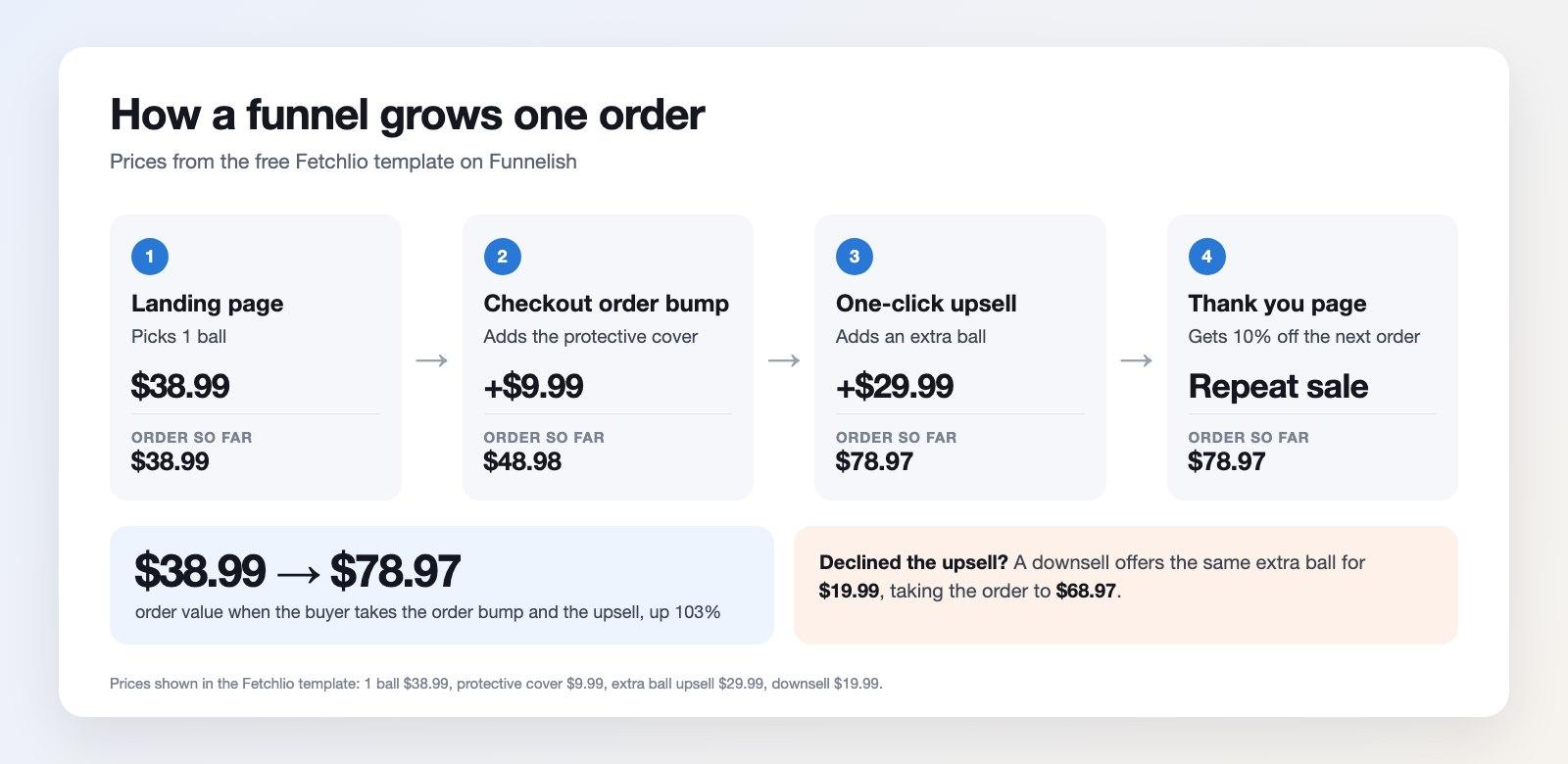
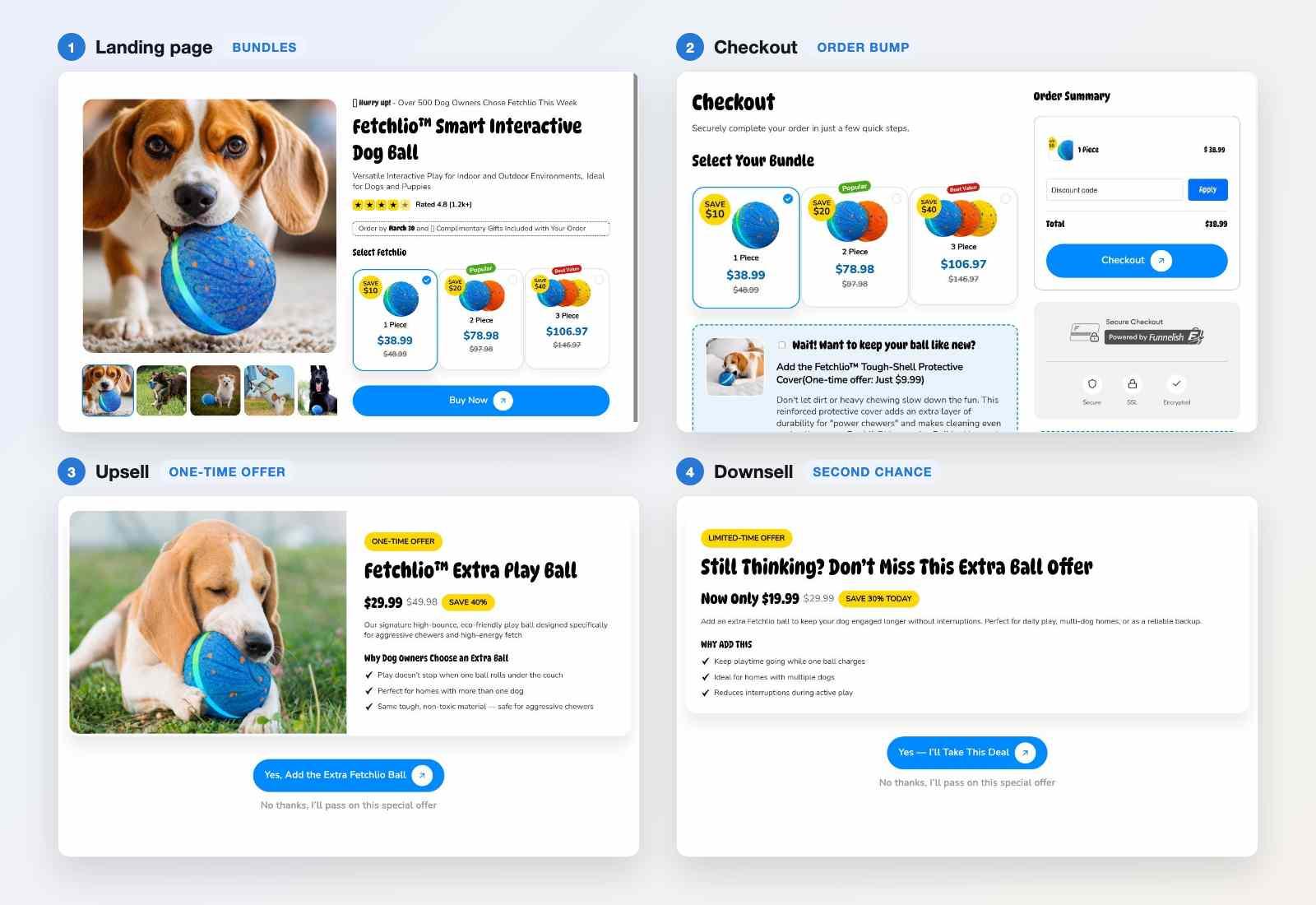
This is what Funnelish is built for. You get a for product and landing pages, one-click upsells and order bumps at checkout, as a default rather than a plugin, and that report on revenue instead of vanity metrics. If you'd rather see the numbers before committing, the pricing is public and there's a free trial at sign-up.
You'll also need a way to manage inventory once orders start arriving. Most ecommerce platforms include basic inventory management, and getting it right prevents the two failures that damage a young ecommerce store fastest: overselling stock you don't have, and running out of your best seller during a campaign.
Whichever route you take, spend your setup time on product pages. High quality images, detailed descriptions, visible shipping and return terms, and honest specifications do more for conversion than any design decision. Understanding how the pieces fit together as a will save you rebuilding it twice.
6. Sort out shipping, including the rule nobody mentions
Shipping strategy is part logistics and part law, and the legal half rarely appears in guides on how to start an ecommerce business. The logistics are straightforward enough. Decide your rates, work out whether free shipping above a threshold makes sense for your margins, choose carriers, and write a returns policy in plain language. Set delivery expectations you can meet, because the gap between promised and actual delivery is one of the most reliable sources of refund requests and bad reviews.
Here's the part worth knowing before you take your first order. Under the FTC's Mail, Internet, or Telephone Order Merchandise Rule, you must have a reasonable basis for any shipping claim you make. If your site doesn't clearly state a shipping period, require you to have a reasonable basis for believing you can ship within 30 days of receiving a properly completed order.
If you can't ship in time, the obligation is specific. You have to notify the customer of the delay, give a revised date, and explain their right to cancel for a full and prompt refund. For a definite delay of up to 30 days you may treat silence as consent. For longer or open-ended delays, and for any second delay, you need the customer's express consent, and if they don't give it you must refund them without waiting to be asked.
Small stores break this rule constantly, usually by advertising delivery windows their supplier can't hold. Building the notification into your fulfilment process from day one costs nothing and removes a category of problem you don't want while you're finding your feet.
7. Price it so the business survives
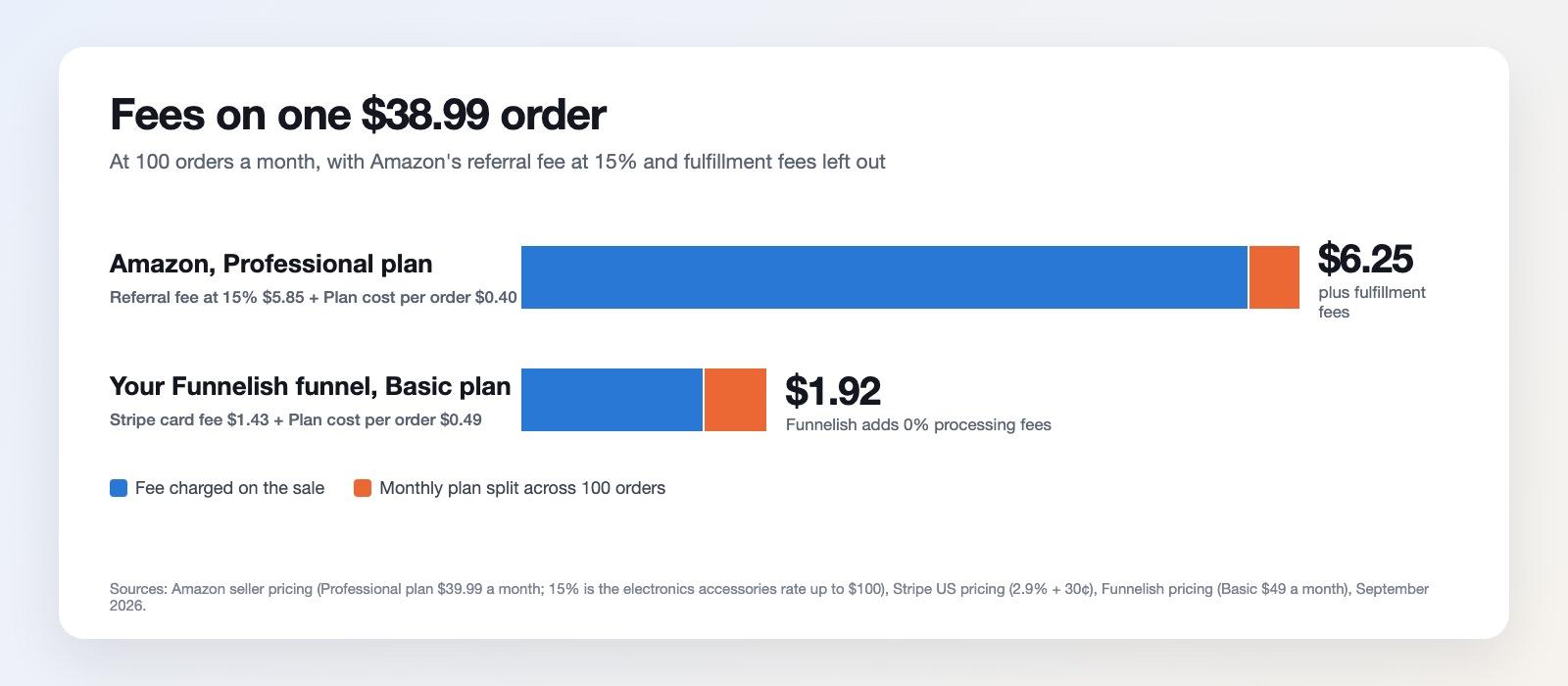
Work your price up from costs rather than down from what competitors charge. Add the landed cost of the product, payment processing fees, packaging, shipping if you're absorbing it, your expected return rate, and a share of your marketing costs. What's left over is your margin, and it needs to be big enough that customer acquisition doesn't eat it. Plenty of stores discover months in that they've been buying customers at a loss because marketing costs were never included in the price.
The quickest way to see whether a price works is to lay one order out line by line. Here's a worked example for a product selling at $60, with the kind of numbers a small store carrying its own stock might see. Your figures will differ, but the shape of the calculation won't.
Unit economics of a single $60 order
Line | Amount | % of price |
Selling price | $60.00 | 100.0% |
Product landed cost (including freight and duty) | −$15.00 | 25.0% |
Payment processing (2.9% + $0.30) | −$2.04 | 3.4% |
Packaging and pick/pack labor | −$2.50 | 4.2% |
Outbound shipping you absorb | −$7.00 | 11.7% |
Returns provision (8% of orders at roughly $13 each) | −$1.05 | 1.8% |
Contribution margin before marketing | $32.41 | 54.0% |
Customer acquisition cost | −$20.00 | 33.3% |
Overhead per order (platform, apps, tools) | −$2.00 | 3.3% |
Operating profit per order | $10.41 | 17.3% |
The number to memorize is the contribution margin before marketing, $32.41 here. That's the absolute ceiling on what you can pay to acquire a customer and still break even on the first order. Pay more than that and every sale costs you money, no matter how good the ad account looks.
Now watch what happens when one variable moves.
What breaks the model
Scenario | Operating profit | Margin |
Base case above | $10.41 | 17.3% |
You run a 20% discount (price drops to $48) | −$1.24 | −2.6% |
Acquisition cost rises from $20 to $30 | $0.41 | 0.7% |
Return rate doubles from 8% to 16% | $9.36 | 15.6% |
The same customer buys again, no acquisition cost | $30.41 | 50.7% |
Three things fall out of that table. A routine 20% promotion turns a profitable order into a loss, because the discount comes entirely out of the thin slice left after costs. A $10 rise in acquisition cost, which can happen in a single quarter when ad auctions tighten, wipes out almost the whole margin. And the second order from an existing customer is worth nearly three times the first, since you've already paid to acquire them.
That last row is the one to build the business around. If your first order barely breaks even but your second is worth $30, the question stops being how to sell more and becomes how to sell again, which is why and earning repeat purchases matter more than squeezing another point out of your ad spend.
Give yourself room for discounting too. If your margin only works at full price, your first promotion will hurt.
8. Get your first customers
Marketing is where the ecommerce business becomes real, and using several sales channels beats depending on one. on your category and product pages compounds and keeps delivering organic traffic long after the work is done, though it takes months to arrive. Paid ads do the opposite: instant traffic, instant feedback on your messaging, and it stops the moment you stop paying. You'll probably want both, using or social platforms to learn quickly while SEO builds underneath.
Marketplaces
An online marketplace is worth considering alongside your own website, at least early on. Marketplaces bring their own traffic, which is useful while your online business has none, though you pay for it in fees and you don't own the customer relationship. Selling in both places is common: the marketplace for discovery, your own site for margin and repeat business.
Social Channels
Social media marketing works best when it looks like content rather than advertising, and short video on social media platforms like remains the cheapest reach available to a new brand with no audience. Spread your digital marketing efforts across two or three channels rather than betting everything on one, since any single platform can change its rules overnight. Whatever you spend there, collect email addresses from day one. is the only channel you own outright, and abandoned cart and post-purchase sequences will out-earn most of your paid spend once they're running.
Reviews & Loyalty
Customer service belongs in this section rather than in operations. Fast and decent replies turn one-time buyers into repeat ones, and that early customer loyalty is worth more than it looks when you have no reputation yet. Positive reviews from satisfied customers do more to attract customers than any campaign a small business could afford to buy. For a new store with no reputation, that's the most valuable asset you can build.
Those reviews don't only belong on your own product pages. Shoppers check several places before buying, and AI shopping assistants now pull from a spread of them when they answer a question about your brand, so the same fifty reviews are worth considerably more when they exist in three or four locations instead of one. Here's where they can live.
Placement | What it is | Worth knowing |
Your own product pages | First-party review apps such as Judge.me, Yotpo, Okendo, Loox, Stamped or Junip collect and display reviews on your site | The only place you fully control. Render reviews as crawlable text and mark them up with structured data so they can appear as rich results |
Google store ratings | A seller-level rating shown next to your ads and listings, fed by including its own post-purchase survey | Free, runs on autopilot once enabled, and lifts click-through on paid listings |
Google product ratings | Star ratings on individual products, submitted through a Merchant Center reviews feed | Needs a before ratings display, currently 50 per product |
Google Business Profile | The local listing and its review stream | Relevant if you have any physical presence, a workshop, or a service element. Set it up through |
Independent review platforms | , Reviews.io, Feefo, Sitejabber, ResellerRatings | Carry weight because they sit outside your control. Trustpilot in particular ranks well for "brand + reviews" searches, which is what a hesitant buyer types |
Better Business Bureau | Business profile plus complaint handling | Matters more for trust-sensitive and higher-ticket categories than for impulse purchases |
Marketplaces | Amazon, eBay, Etsy, Walmart Marketplace, TikTok Shop | Reviews stay locked to the marketplace and can't be moved to your site, which is part of the trade for their traffic |
Social platforms | Facebook recommendations, Instagram tags and comments, TikTok, YouTube | Unstructured but persuasive. Video reviews from real buyers travel further than any text review |
Communities and forums | Reddit, Discord servers, niche category forums | Increasingly the source AI assistants quote when someone asks whether a brand is legitimate. You can't post these yourself, but you can be worth talking about |
Category-specific sites | Yelp for anything service-adjacent, G2 and Capterra for software, Tripadvisor for travel, Houzz for home goods | Only worth pursuing where your category has an obvious home |
Syndication networks | Bazaarvoice, PowerReviews | Push your reviews out to retail partner sites. Relevant once you sell wholesale as well as direct |
Start with your own pages and Google, since those two cover the moment of decision and cost nothing but setup time. Add one independent platform when you have steady order volume, and let the social and community mentions happen on their own.
One rule applies everywhere on that list. The FTC's took effect on 21 October 2024 and bans buying or creating fake reviews, offering incentives conditioned on leaving a positive one, suppressing or hiding negative reviews, reusing reviews from one product to prop up another, and undisclosed reviews written by employees or family.
Civil penalties currently run to $53,088 per violation. Asking every customer for an honest review is fine. Offering a discount for a five-star review is not, and neither is quietly filtering the two-star ones out of your widget.
9. Track the numbers that tell you something
You need a small number of key performance indicators, checked often enough to catch problems while they're still cheap. The fastest way to make sense of them is to lay your store out as a funnel and see where people fall out of it. Here's what that looks like for a store converting at 2%, which is an ordinary result rather than a good one.
Where 10,000 visitors go
Stage | Reaching it | Drop from last step | What controls this step |
Sessions | 10,000 ██████████ | Which channels you're buying and what you promised in the ad | |
Viewed a product | 5,000 █████ | −50% | Homepage and category navigation, search |
Added to cart | 800 ▊ | −84% | Product page, images, price, shipping clarity |
Reached checkout | 480 ▌ | −40% | Cart page and any cost that appears late |
Purchased | 200 ▎ | −58% | Checkout length, payment options, trust signals |
Two things jump out of a funnel like that. The biggest single leak sits between viewing a product and adding to cart, which is where 84% of the remaining people leave, so that's where your effort belongs before you buy more traffic. And the 600 people who built a cart and never bought represent a 75% cart abandonment rate, which is roughly the documented average, meaning it's normal rather than a crisis. Normal is still worth attacking, since those shoppers already told you what they wanted.
Build the same table for your own store once a month. It takes twenty minutes in your analytics and it tells you more than any dashboard summary, because it points at a specific page instead of a general mood.
Numbers worth tracking, and how to work them out
Metric | How to calculate it | How often | What it tells you |
Conversion rate | Orders ÷ sessions | Weekly | Whether the store itself works |
Average order value | Revenue ÷ orders | Weekly | What each order is worth before costs |
Customer acquisition cost | Marketing spend ÷ new customers | Weekly | What a customer costs to buy |
Contribution margin per order | Price minus all variable costs, as in section 7 | Monthly | Your hard ceiling on acquisition cost |
CAC payback | CAC ÷ contribution per order | Monthly | How many orders before a customer pays for themselves |
Repeat purchase rate | Customers with 2+ orders ÷ total customers | Monthly | Whether the business compounds or just churns |
Cart abandonment | 1 − (orders ÷ carts created) | Weekly | How much friction sits in cart and checkout |
Return rate | Returns ÷ orders | Monthly | Whether your pages describe the product honestly |
Weekly numbers are for spotting breakage. Monthly ones are for deciding where to put money. Checking the monthly numbers weekly mostly produces anxiety, since the sample is too small to mean anything yet.
Reading the symptoms
What you're seeing | Usual cause | First thing to check |
Traffic climbing, sales flat | The traffic is wrong, or product pages aren't convincing | Conversion rate split by channel, since one bad channel can hide good ones |
Plenty of add-to-carts, few orders | A cost surprise or checkout friction | Buy something from your own store on a phone and count the steps, then read our |
Healthy conversion, still no profit | Acquisition cost has passed your contribution margin | Recompute the unit economics from section 7 with this month's numbers |
Orders fine, nobody returns | No post-purchase sequence, or a product people don't reorder | Share of customers placing a second order within 90 days |
Mobile converting far below desktop | Page speed or a layout that breaks on small screens | Load time measured on mobile data rather than office wifi |
Returns creeping up | Descriptions or sizing overpromise | The stated reasons on recent returns, which are usually specific |
Cart abandonment deserves a note of its own. Treat it as a diagnostic rather than a target, because it never goes to zero and chasing it directly leads to gimmicks. When it climbs sharply, something specific has usually broken: a shipping cost appearing too late, a payment method failing silently, a page loading slowly on mobile. Fix the cause and the number follows. If you want a fuller list of what moves it, our guide to covers the common culprits.
What it costs and how long it takes
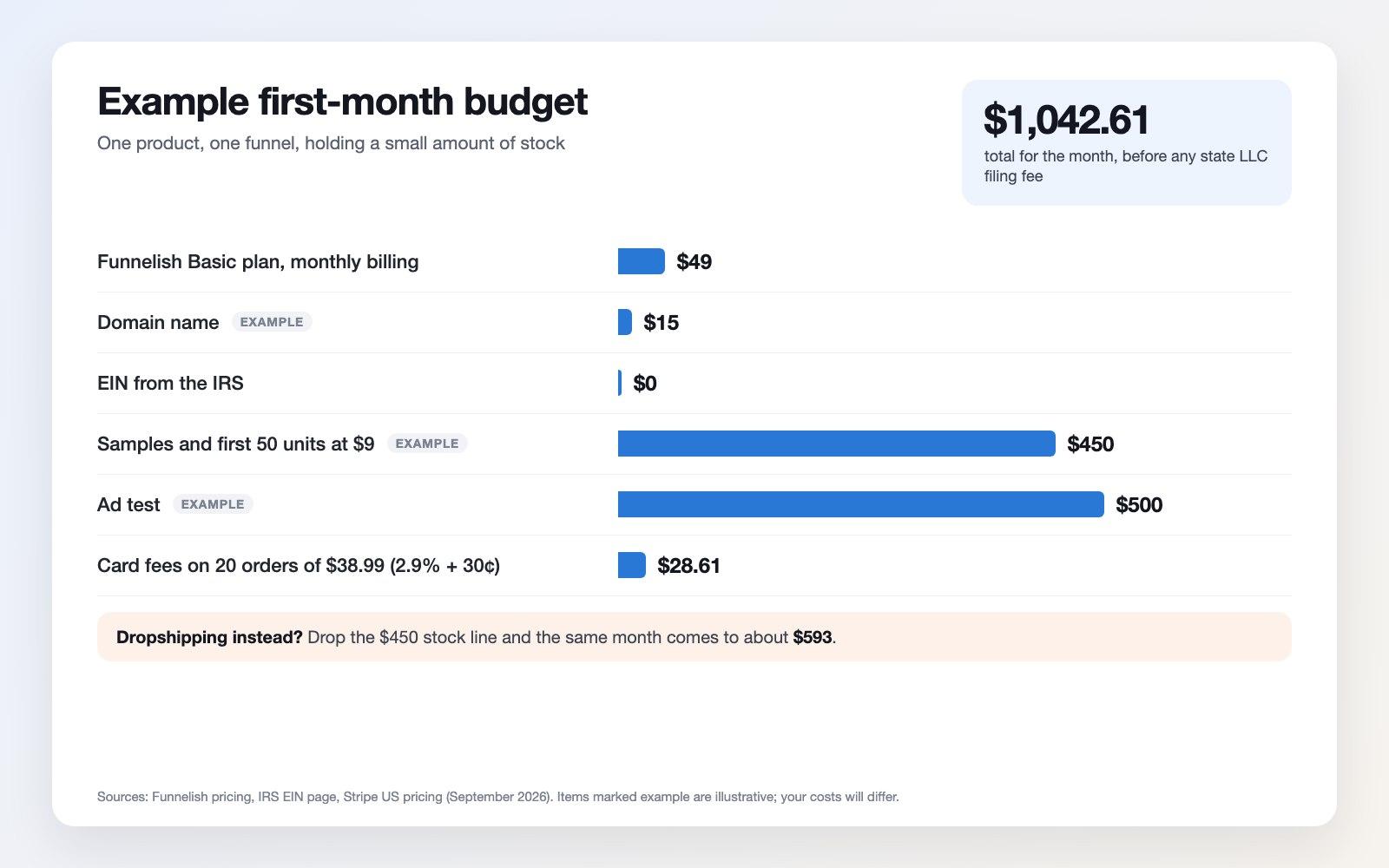
Costs vary enormously by model, and the honest range runs from a few hundred dollars to tens of thousands. A dropshipping or print-on-demand store can genuinely launch for the price of a domain, a platform subscription and a small ad budget. A brand holding its own inventory needs stock, photography and packaging before it sells anything.
Budget for the unglamorous items people forget: business registration, a payment processor's fees, product photography, samples, and enough ad spend to learn something. If the launch budget leaves nothing for marketing, you have a website rather than a business.
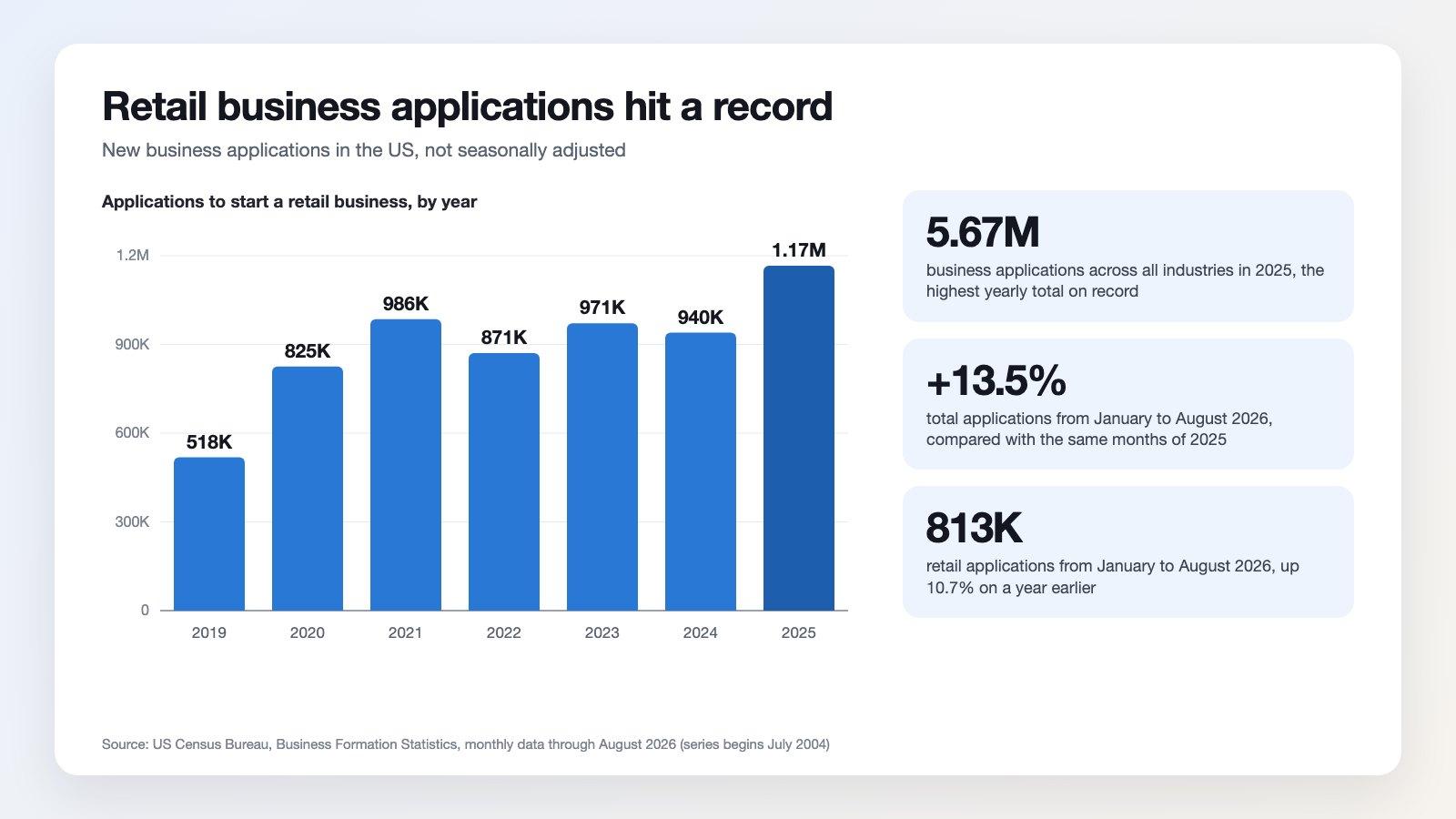
On timing, expect the first sale in weeks and profitability considerably later. Taking a year or two to reach reliable profit is normal, and treating that as the plan rather than a failure is what keeps people from quitting at month four. The track how many new business applications get filed each month, which is a useful reality check on how many people are starting alongside you. Plan to survive long enough to get good rather than to get lucky.
Start Your Ecommerce Business with Funnelish for Free
Frequently asked questions
How do I start an ecommerce business with no money?
Choose a model that doesn't require inventory. Dropshipping, print on demand and digital products let you list items before you own them, so your only up-front costs are a domain, a platform subscription and whatever you spend on marketing. Validate demand with a small ad budget before scaling, and reinvest early revenue rather than borrowing.
How much does it cost to start an ecommerce business?
Anywhere from a few hundred dollars for a dropshipping store to tens of thousands for a brand carrying its own stock. The recurring costs are your ecommerce platform, payment processing fees and marketing. The one-off costs are registration, photography, samples and any initial inventory. Leave room in the budget for advertising, since a store nobody visits doesn't sell.
Do I need to register a business to sell online?
You can trade as a sole proprietor in many places, but it leaves your personal assets exposed. Forming an LLC or corporation separates business and personal liability, and an EIN from the IRS is free and needed for a business bank account. License and sales tax requirements depend on your location and product category.
What are the main ecommerce business models?
Business to consumer, business to business, consumer to consumer and direct to consumer describe who you sell to. Dropshipping, wholesale, private label, print on demand and digital products describe how you source what you sell. Most new stores start with a low-inventory model and move toward owning their products as margins allow.
How long does it take to make money from an ecommerce business?
First sales often arrive within weeks of launching, but reliable profit commonly takes a year or more once you account for marketing costs and returns. Stores that reach profitability faster usually do it by validating demand before buying inventory and by selling repeatedly to the same customers instead of constantly acquiring new ones.
What legal rules apply to shipping in the US?
The FTC's Mail, Internet, or Telephone Order Merchandise Rule requires a reasonable basis for your shipping claims, and a reasonable basis for shipping within 30 days if you state no timeframe. If you can't meet it, you must notify the customer, offer a revised date and the right to cancel, and issue a prompt refund if they don't consent to the delay.
Which ecommerce platform should I use to start?
Pick for checkout quality, page speed and how easily you can change things without a developer, since those determine your conversion rate. Funnelish is built around exactly that, with a page builder, one-click upsells and built-in analytics, and a free trial so you can test the setup before committing to a plan.
Table of contents
Boost your eCommerce
sales today

24/7 support

No credit card required

Cancel anytime

24/7 support

No credit card required

Cancel anytime