

How to Build High-Converting Sales Funnels for Shopify
13 April 2026
Anna P.
15 minutes
A Shopify store and a Shopify sales funnel are not the same thing. They look similar on the surface — both have product pages, both accept payments, both sit under the same domain. But they're built on fundamentally different assumptions about how customers move through the customer journey and decide to buy.
A traditional Shopify storefront is built for browsing. Navigation menus, collection pages, product grids, search bars — the architecture assumes a potential customer who arrives, explores, compares options, and eventually decides. That model works for organic traffic and existing customers who already know what they want.
A high-converting sales funnel is built for converting. Every element of the experience — the landing pages, the checkout flows, the post purchase sequence — is designed around a single customer, a single decision, and a single outcome. It removes optionality and distraction and creates momentum from the first click to the confirmation page and then uses that momentum to drive more sales and more revenue after the sale.
The distinction matters most when you're running paid ads. Every visitor to a traditional online store has a known acquisition cost. When that potential customer lands on a collection page with twelve navigation options and a checkout that wasn't designed for conversion — that customer acquisition cost becomes increasingly expensive relative to what it produces. Shopify funnels exist to fix that. They turn paid traffic into paying customers instead of browser sessions that go nowhere.
This guide explains why the traditional storefront model bleeds money on paid ads, and how to transition to a funnel structure that converts — step by step, no coding required.
What a Shopify Sales Funnel Is
The term sales funnel gets used loosely enough that it's worth being precise about what it means in the context of an ecommerce business.
An effective sales funnel is a sequential customer journey where each funnel stage has one job: move the customer to the next stage. Every page, every message, every offer is designed with that single objective in mind. There's no browsing and no exploring collection pages. There's a path — and the funnel's job is to keep potential customers on it until they become paying customers, and then loyal customers who make repeat purchases.
AIDA Framework
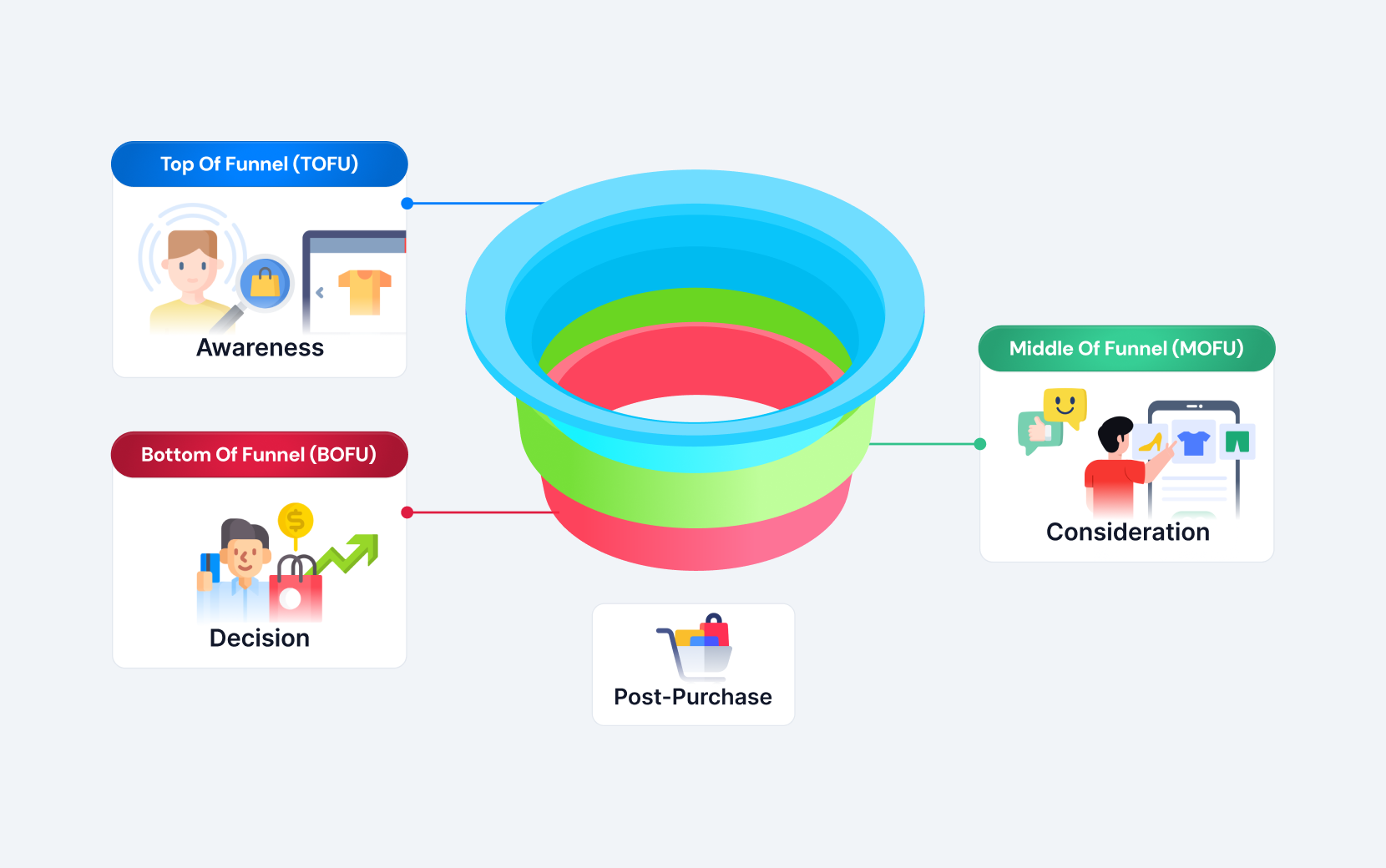
The AIDA framework is the simplest model for mapping these four stages in practice:
Awareness — the potential customer discovers your product through a paid ad, a YouTube video, organic content, or a referral. This is the top of the funnel. Your job at this stage is to drive traffic and create enough interest that the customer takes the next step into the funnel.
Interest — the customer engages with your offer on a dedicated landing page. No navigation menu, no competing products, no links to collection pages. One message: here's the problem, here's the solution, here's why this product solves it for your target audience.
Desire — the customer is convinced the product is right for them but needs social proof, urgency, or clear value to commit. Read reviews, guarantees, and transparent pricing all operate at this funnel stage to build enough trust that the customer moves to action.
Action — the customer completes the purchase. The checkout flow exists at this stage. Friction here costs you the sale and the customer acquisition cost you already paid to bring them in.
What happens after the action is where high converting sales funnels diverge most sharply from traditional online stores. A storefront ends at the purchase. A funnel continues — with one-click upsells, cross-sell offers, order bumps, follow-up email automation, and abandoned cart recovery sequences that turn first time purchases into repeat purchases and build lifetime value that makes the entire ecommerce business more profitable.
Why the Traditional Shopify Store Fails Paid Ads
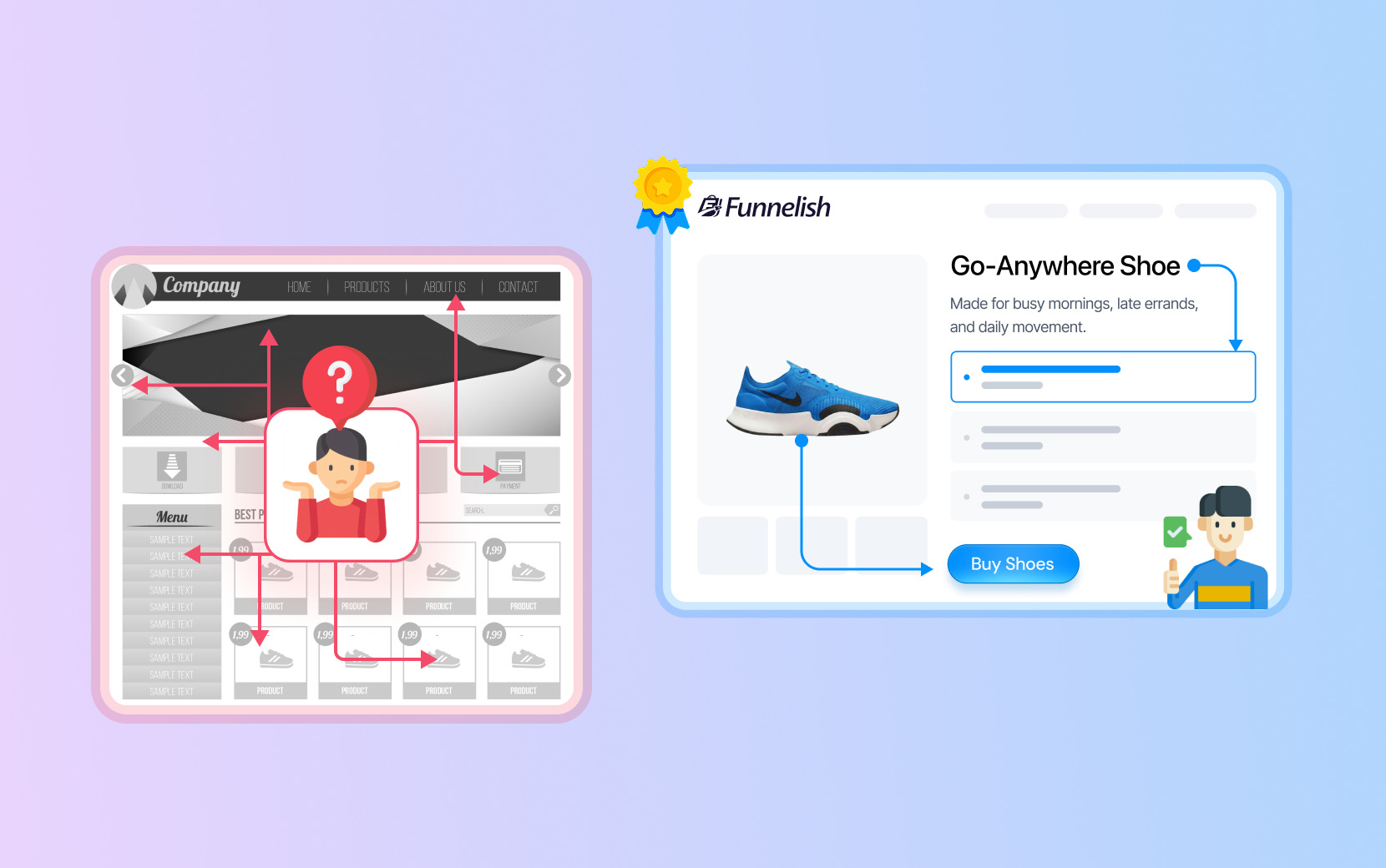
The traditional Shopify storefront was designed around organic discovery. A customer searches for a product, finds your online store, browses the collection pages, read reviews, and decides to buy. The multi-page navigation makes sense for this customer journey because the customer is guiding themselves through it at their own pace.
Paid ads don't work this way. A customer who clicks a Meta ad for a specific product is not browsing. They clicked because that specific offer spoke to a specific problem they have right now. When they land on a collection page with twelve other options, navigation menus, and links to your blog, the momentum that paid ad created is immediately diffused. The customer who arrived ready to buy is now a browser again — and browsers don't convert at the rate that paying customers do.
This is the core problem the traditional storefront creates for store owners running paid ads: decision fatigue at exactly the moment the potential customer was closest to buying. Every additional option is an additional reason to delay or leave. The customer acquisition cost is already spent. The conversion is lost.
The second major failure of the traditional storefront for paid traffic is what happens after checkout. The thank you page is the highest-intent moment in the customer journey — the customer has already committed, already paid, already become a paying customer. A traditional Shopify store wastes this moment. No one-click upsells and no cross-sell offers means post-purchase revenue capture. The transaction ends at exactly the value the customer arrived with, and the opportunity to generate more money from the same customer acquisition cost disappears.
Four Stages of an Effective Shopify Sales Funnel
Understanding the four funnel stages in practical, operational terms — not just as marketing theory — is what separates store owners who build funnels that generate more sales from those who build funnels that don't convert.
Stage One: Traffic and Awareness
Traffic is the input to your funnels for Shopify. Paid ads — Meta, Google, TikTok — are the most controllable traffic source because you can specify who sees your message. YouTube video ads work well for products that need demonstration. Organic content and email course sequences feed the top of the funnel at lower customer acquisition cost but with less control over timing and intent.
The critical insight at this stage: Traffic quality is determined by targeting, but traffic value is determined by what happens after the click. An effective sales funnel can make average traffic profitable. A weak funnel makes even excellent traffic unprofitable. Optimizing your paid ads before optimizing your funnel structure is working in the wrong order.
Your ideal customer profile at this stage should be specific enough to write a landing page for. If you can't describe the exact problem your target audience has, what they've already tried, and why your product solves it better than alternatives, your landing pages won't convert your paid ad traffic into paying customers regardless of how well the ad performs.
Stage Two: Landing Pages and the Initial Offer
The landing page is where traffic converts into customers — or doesn't. Every element of a high-converting landing page has one job: move the potential customer toward the purchase decision without giving them a reason to pause, compare options, or leave.
A high-converting landing page for a Shopify sales funnel has no navigation menu, no links to collection pages, and no competing offers. It has a single, specific offer, a headline that speaks to your target audience's problem, social proof that lets potential customers read reviews and build trust, and a checkout button visible before the customer has to scroll. The product page is replaced by a conversion-optimized landing page built for the traffic source and the offer.
Order bumps — low-friction add-ons presented at the checkout stage — are one of the highest-ROI elements of any funnel. A potential customer buying a $49 product who sees a relevant $12 add-on at checkout will accept it at meaningful rates, because the purchase decision is already made and adding a small amount feels inconsequential.
Funnelish's funnel builder creates these landing pages with a drag-and-drop editor — no coding required — with sub-second load times that keep conversion rates high on paid ad traffic. Ready-to-use funnel templates are built around conversion rate optimization so the starting point for any new funnel is a structure that already works, not a blank canvas.
The Shopify integration means every order placed through a Funnelish funnel syncs automatically — inventory, variants, customer data, and automate fulfillment all happen through your Shopify store without any manual work from your sales team.
Stage Three: Checkout Optimization and Order Bumps
The checkout flow is where customer intent converts to revenue — or where friction ends the transaction. Every unnecessary step, every form field that isn't required, and every page load that takes more than a second is a checkpoint where potential customers become lost sales.
Checkout optimization at this funnel stage means a one-page checkout where possible, all express payment options visible and enabled, trust signals near the payment field, and order bumps configured for relevant low-cost additions. For store owners running high-volume paid ads, even a 15% order bump acceptance rate on a $15 add-on meaningfully moves the revenue-per-customer number without any additional customer acquisition cost.
Funnelish's customizable checkout supports multiple payment options — Stripe, PayPal, Apple Pay, Google Pay, Klarna, SEPA, and more — making sure no paying customer is lost because their preferred payment method wasn't available. Advanced analytics at the checkout stage give store owners the Shopify data they need to make informed decisions about where checkout friction is costing them money and what to fix first.
Stage Four: Post-Purchase Offers, Upsells, and Retention
The post purchase stage is where the biggest gap exists between traditional Shopify stores and purpose-built Shopify funnels — and where the most revenue is left uncaptured by store owners who haven't made the transition.
Immediately after checkout, before the customer reaches the thank you page, one-click upsells present a complementary product that can be accepted with a single tap. Cross-sell offers can follow in sequence. If the customer declines the first upsell, a downsell fires automatically at a lower price point. The post purchase sequence runs without any manual intervention from your sales team.
Beyond the immediate post purchase sequence, marketing automation tools — email automation, abandoned cart recovery, and personalized emails based on purchase history — extend the funnel's revenue capture across the customer's lifetime. These tools build the repeat customers and loyal customers that reduce dependence on paid ads over time and improve the lifetime value of every customer the funnel acquires.
Read more: 20+ Ways to Boost Conversions + Tools
Step-by-Step Guide: How to Transition from Storefront to Sales Funnel
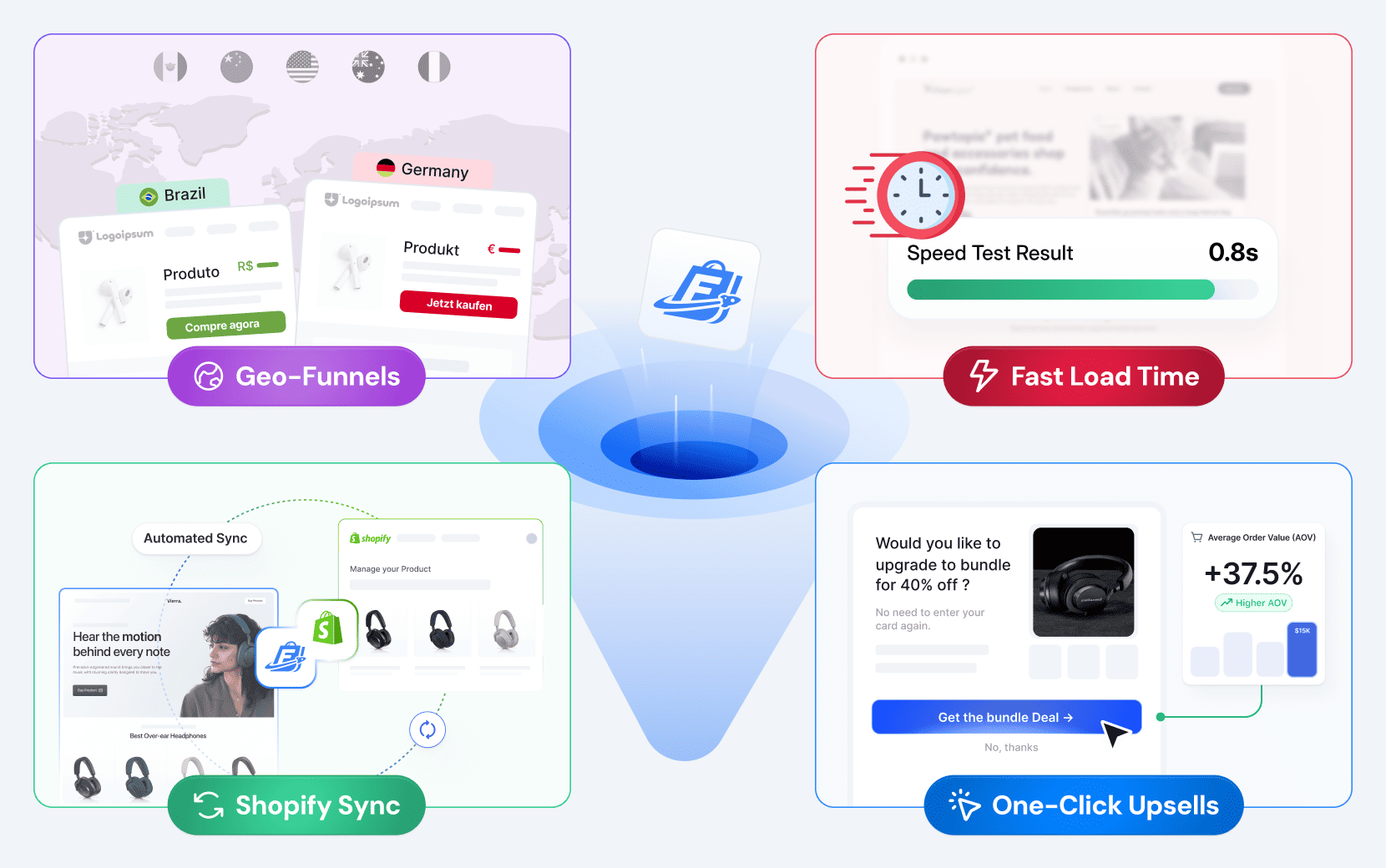
The transition from a traditional Shopify storefront to an effective sales funnel doesn't require rebuilding your online store. It requires adding funnel software alongside your store and directing paid ad traffic through the funnel rather than to your storefront.
Step 1: Identify Your Hero Product and Ideal Customer Profile
Start with one product — the one that converts best, has the highest margin, or is the most natural entry point for new customers. Define your ideal customer profile: the specific problem they have, what they've already tried, and why your product solves it better. Every element of your funnel — the landing page copy, the checkout flow, the post-purchase upsell — is built around this one customer and this one offer.
Don't try to funnel your entire catalog simultaneously. The discipline of building around a single offer and a precise target audience is what makes the funnel work.
Read more: One-Product Funnel That Turns Strangers into Loyal Customers
Step 2: Build Dedicated Landing Pages
Create landing pages for your hero product that exist separately from your Shopify collection pages and product page. No navigation menu, links elsewhere in your online store, or competing offers. Only one message, one customer, and one outcome.
The structure that converts on paid ad traffic: a headline that states the outcome or the problem solved, a subheadline introducing the solution, social proof that lets potential customers read reviews and build trust, benefit-focused product explanation, objection handling, and a checkout button above the fold and again at the bottom.
Funnelish's shared components feature means trust badges, guarantee sections, and review blocks are built once and reused across every funnel page. Make a change in one place and it updates across your account — without wasted time from your sales team maintaining multiple pages manually.
Step 3: Configure Checkout Flows with Order Bumps
Connect your checkout to the landing page with minimum friction. One-page checkout, all payment options visible, express payments enabled for mobile users, and an order bump configured for a relevant low-cost add-on. Test the checkout flow on mobile before running any paid ads — the majority of paid social traffic converts on mobile devices.
Funnelish's Shopify integration handles fulfillment — every order syncs to Shopify automatically, so your operational backend generates more sales without any additional manual work.
Step 4: Create Upsells and Cross Sell Sequences
Identify the most logical complementary product and create upsells to present immediately post purchase. The one click upsells in Funnelish require no additional payment entry from the customer — they accept with a single tap, and the product is added to their order automatically. Configure a cross-sell or downsell to fire if the primary upsell is declined.
The post-purchase sequence runs automatically on every order. Your sales team doesn't touch it. It generates more money from every paying customer the funnel acquires.
Read more: 10 Funnel Strategies from Top Brands to Scale Profitably
Step 5: Connect Email Automation and Abandoned Cart Recovery
Plug your funnel's customer data into your email marketing platform to trigger personalized emails — post-purchase follow up, abandoned cart recovery, and repeat purchase sequences that drive loyal customers back to your funnel for their next order.
Funnelish triggers abandoned cart sequences natively for customers who drop off before completing checkout — no external marketing automation tools required to manage the connection between funnel events and email delivery. The abandoned cart sequence is the highest-priority email automation for any ecommerce business running paid ads, because it recovers high-intent potential customers at near-zero cost.
Step 6: Drive Traffic Through the Funnel, Not the Storefront
Once the funnel is built and tested, redirect paid ad traffic — Meta, Google, YouTube video campaigns — to your funnel landing pages rather than your Shopify product page or collection pages. Your online store remains as the operational backend. The funnel handles customer acquisition and conversion.
Use Funnelish's advanced analytics alongside Shopify data to track funnel-level performance: landing page conversion rate, checkout completion rate, upsell acceptance rate, and revenue per visitor. These key metrics give store owners the informed decisions capability they need to know where to optimize and when to scale.
A/B test landing page variations to find the messaging and offer structure that converts best for your target audience. Geo-split testing — built into Funnelish's geo-funnel feature — automatically shows different pricing, payment methods, and offers by visitor location, so each market gets a funnel experience optimized for how they actually buy.
Step 7: Optimize, Then Scale
The funnel is not a one-time setup — it's a system you iterate toward growth. Identify the funnel stage with the biggest drop-off and fix it first.
If landing page conversion rate is below 2% on cold paid ad traffic, the issue is the offer or the match between the ad creative and landing page message.
If checkout abandonment is high, the issue is friction in the checkout flow.
If upsell acceptance is near zero, the post-purchase offer isn't relevant enough.
Fix the biggest leak, let the data from Shopify analytics and Funnelish advanced analytics stabilize, then fix the next one. Once the funnel converts profitably on a test budget, scale: increase paid ad spend with the existing creative, knowing that the funnel structure underneath it is built to turn more traffic into more paying customers at a predictable cost.
Storefront vs. Funnel: What the Economics Look Like
To make the comparison concrete for store owners evaluating the transition: a Shopify store sending paid ads traffic to a collection page with a 1.5% conversion rate and a $55 AOV generates $0.825 in revenue per visitor. At a $1.50 CPC, that's a losing position before COGS.
The same traffic sent through a high converting sales funnel — a dedicated landing page at 3% conversion rate, a $65 AOV from an order bump, and a 6% post purchase upsell acceptance rate adding $22 — can generate approximately $2.10 in revenue per visitor. At the same $1.50 CPC, the ecommerce business is profitable. The traffic is the same. The product is the same. The customer acquisition cost is the same. The funnel structure is what changes the economics and makes it possible to generate more money from every paid ad click.
This is why the transition from storefront to funnel is a unit economics decision for any ecommerce business running paid ads — and why store owners who continue sending paid traffic to a traditional Shopify storefront without a dedicated funnel are competing at a structural disadvantage against those who have made the transition.
Start your free 14-day Funnelish trial →
Shopify Funnels FAQs
Does Shopify have a funnel?
Shopify doesn't have a native funnel builder. The platform is built as an online store — product pages, collection pages, cart, and checkout — which works for browsing customers but isn't optimized for the sequential, single-path customer journey of an effective sales funnel. Store owners who want funnel infrastructure use a dedicated funnel builder alongside their Shopify store.
Funnelish integrates directly with Shopify — syncing orders, inventory, and customer data — while providing the landing pages, optimized checkout flows, one-click upsells, abandoned cart sequences, and marketing automation tools that the native Shopify setup doesn't include.
What is the 7-step sales funnel?
The most common extended sales funnel framework breaks the customer journey into:
Awareness (potential customer discovers your brand)
Interest (customer engages with your offer on a landing page)
Evaluation (customer reads reviews and compares options)
Intent (customer decides they want your product)
Purchase (transaction is completed)
Post-purchase (one-click upsells, cross-sell offers, follow-up)
Loyalty (repeat purchases, personalized emails, and loyal customers who refer others)
The AIDA framework condenses this into four stages — Awareness, Interest, Desire, Action — which is the more practical model for building Shopify funnels because it maps to the pages and sequences you actually need to build.
Who is the best funnel builder for Shopify?
The best funnel builder for a Shopify ecommerce business is one that integrates natively with Shopify rather than replacing it. Funnelish is built for ecommerce stores — with a drag-and-drop page builder, no coding required, built-in checkout with multiple payment options, one click upsells, geo-funnels, abandoned cart recovery, and direct Shopify integration for orders and automate fulfillment.
The key criteria when you compare options in the funnel builder market:
Does it sync orders to Shopify automatically?
Does it support post-purchase upsells natively?
Does it load fast enough for paid ad traffic?
Does it provide advanced analytics to make informed decisions?
Funnelish covers all four and more functionality for advanced digital sales funnel.
How do I set up a funnel in Shopify?
The practical step by step guide:
Identify your hero product and ideal customer profile.
Build dedicated landing pages with no navigation menu.
Configure checkout flows with all payment options enabled and an order bump.
Create upsells and cross-sell offers for the post-purchase sequence.
Connect email automation for abandoned cart recovery and personalized emails.
Drive traffic through the funnel rather than your Shopify storefront.
Your Shopify store handles inventory and automate fulfillment throughout — the funnel sits in front of it and handles customer acquisition and conversion. The full process is covered step by step in the guide above.
What are common funnel mistakes?
The five most damaging shopify funnels mistakes in practice:
Driving paid ads traffic to a collection page or product page instead of a dedicated landing page
Building landing pages that include navigation or competing offers
Skipping one click upsells and leaving revenue on the table at the highest-intent post purchase moment
Not testing checkout flows on mobile before running paid ad traffic
Optimizing ad creative before the funnel itself converts
No amount of creative optimization compensates for a funnel that leaks at checkout or wastes the post purchase moment. Fix the funnel first, then scale traffic.
Table of contents
Boost your eCommerce
sales today

24/7 support
No credit card required
Cancel anytime
24/7 support
No credit card required
Cancel anytime
