Brand Teardown: How Build-A-Bear Turns a $28 Bear Into a $59.50 Order
Build-A-Bear took $529.8M in fiscal 2025 revenue at a 56.1% retail margin. We walked its online builder and read the funnel against its SEC filings.
On this page8 sections
- 01What do the numbers say?
- 02Why is Customize the big blue button?
- 03How much can you add to a $28 bear?
- 04Why put the add-ons in a builder instead of the cart?
- 05Who gets stopped by the birth-year box?
- 06Why does the page offer to send the bear unstuffed?
- 07Three things I'd test here
- 08What to take back to your own store
Build-A-Bear sells a teddy bear for $28. That's the whole product. It's a bear.
Now look at the product page. The biggest button on it doesn't say Add to Bag. It says Customize, and it opens a flow where you add a scent, a sound, a hoodie and a pair of shoes before the bear reaches the cart.
We walked that flow and wrote down the prices. It's the reverse of the setup we found at e.l.f. That brand wants more products in your basket. This one wants more money attached to a single product.
What do the numbers say?
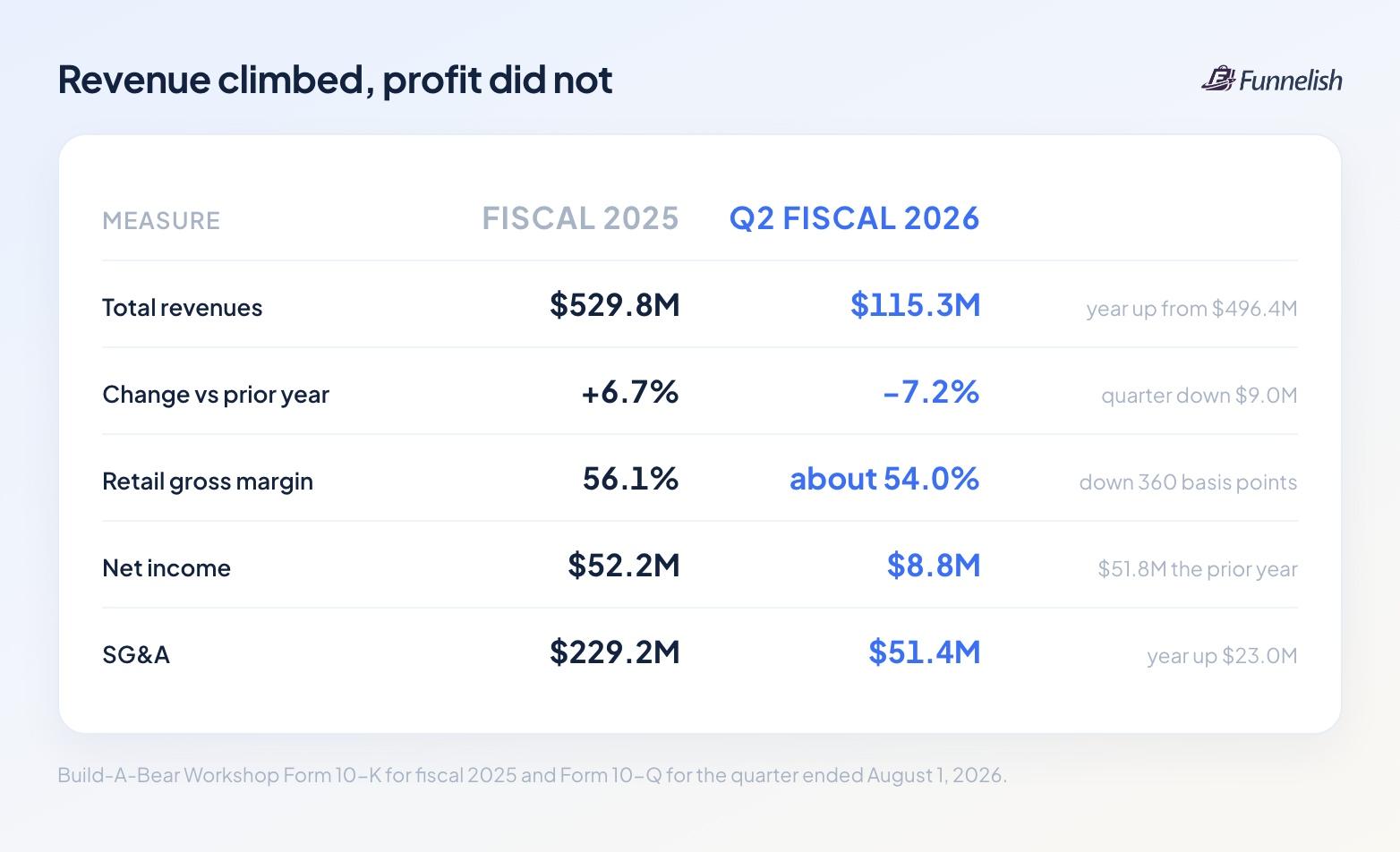
| Measure | Fiscal 2025 | Q2 fiscal 2026 |
|---|---|---|
Total revenues | $529.8M | $115.3M |
Change against the prior year | up 6.7% | down 7.2% |
Retail gross margin | 56.1% | about 54.0% |
Net income | $52.2M | $8.8M |
SG&A | $229.2M | $51.4M |
Fiscal 2025 ended January 31, 2026. Revenue came to $529.8M, the highest of the three years the filing shows, against $496.4M the year before. The company kept $52.2M of that, against $51.8M a year earlier.
Put those two numbers together and you can see the problem. Build-A-Bear sold $33.4M more and kept $0.4M more of it. Selling and admin costs came in $23.0M higher across the same twelve months.
The annual report blames inflation, "predominately through rising store labor costs," and lists price increases on its most wanted products among the responses.
Then the company reported the quarter ended August 1, 2026 down 7.2%. The quarterly filing breaks that decline into parts, and one part belongs in this teardown: it shows digital sales down $1.1M for the quarter. Retail gross margin fell 360 basis points over the same three months. The filing blames occupancy costs and heavier promotion.
That's why the funnel below matters. Every dollar it adds to an order arrives in a year when the company needs it.
Why is Customize the big blue button?
Open the Happy Hugs Teddy Bear page and you get two buttons stacked on each other. Customize is wide, filled and blue. Add to Bag runs underneath with a thin outline and a quantity dropdown beside it.
Above both of them there's a help link that reads "What does Customize mean?"
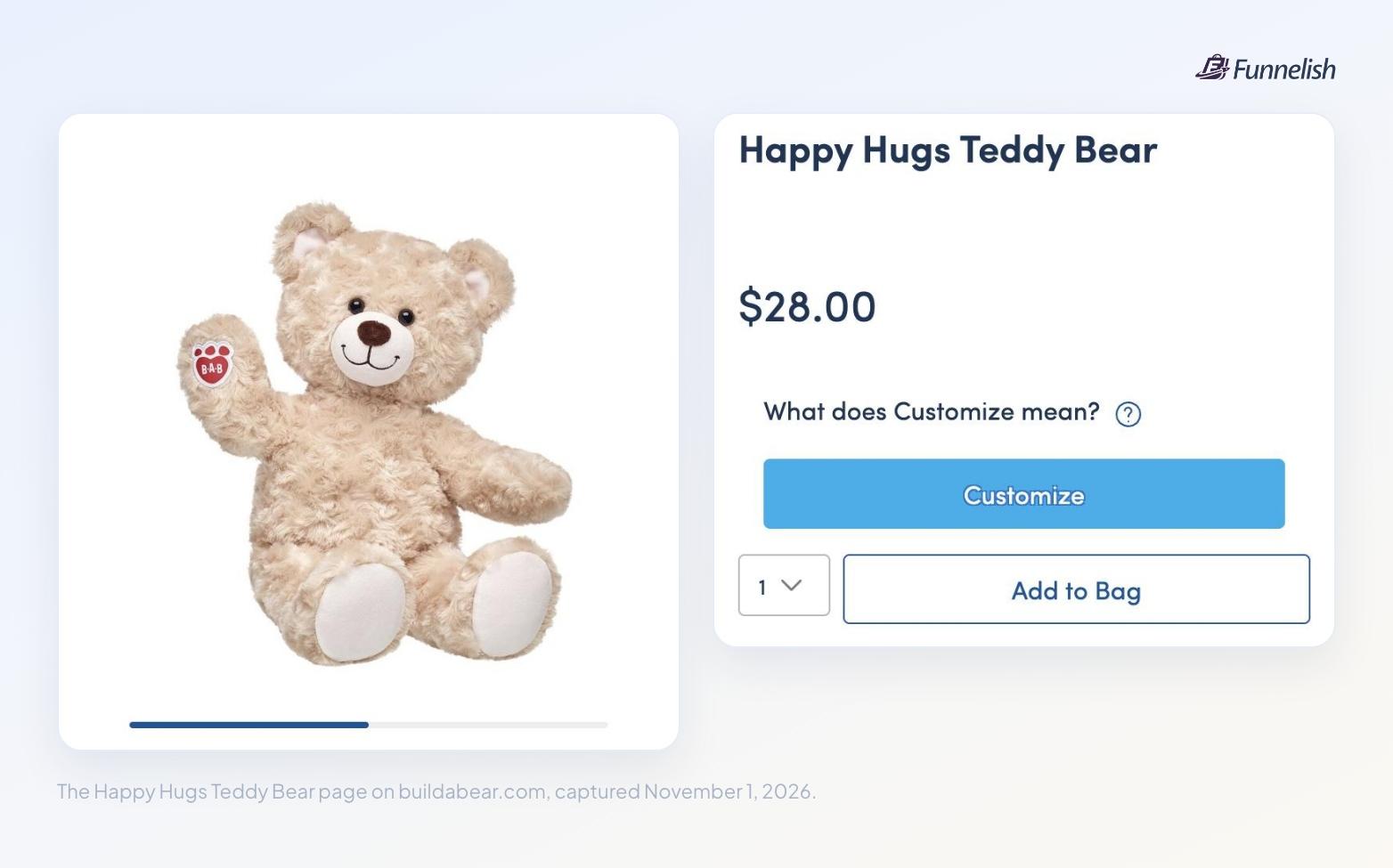
Read the order of those three elements and you know what the page wants. Buying the bear on its own remains available. It's the second choice, and you have to look past the first one to find it.
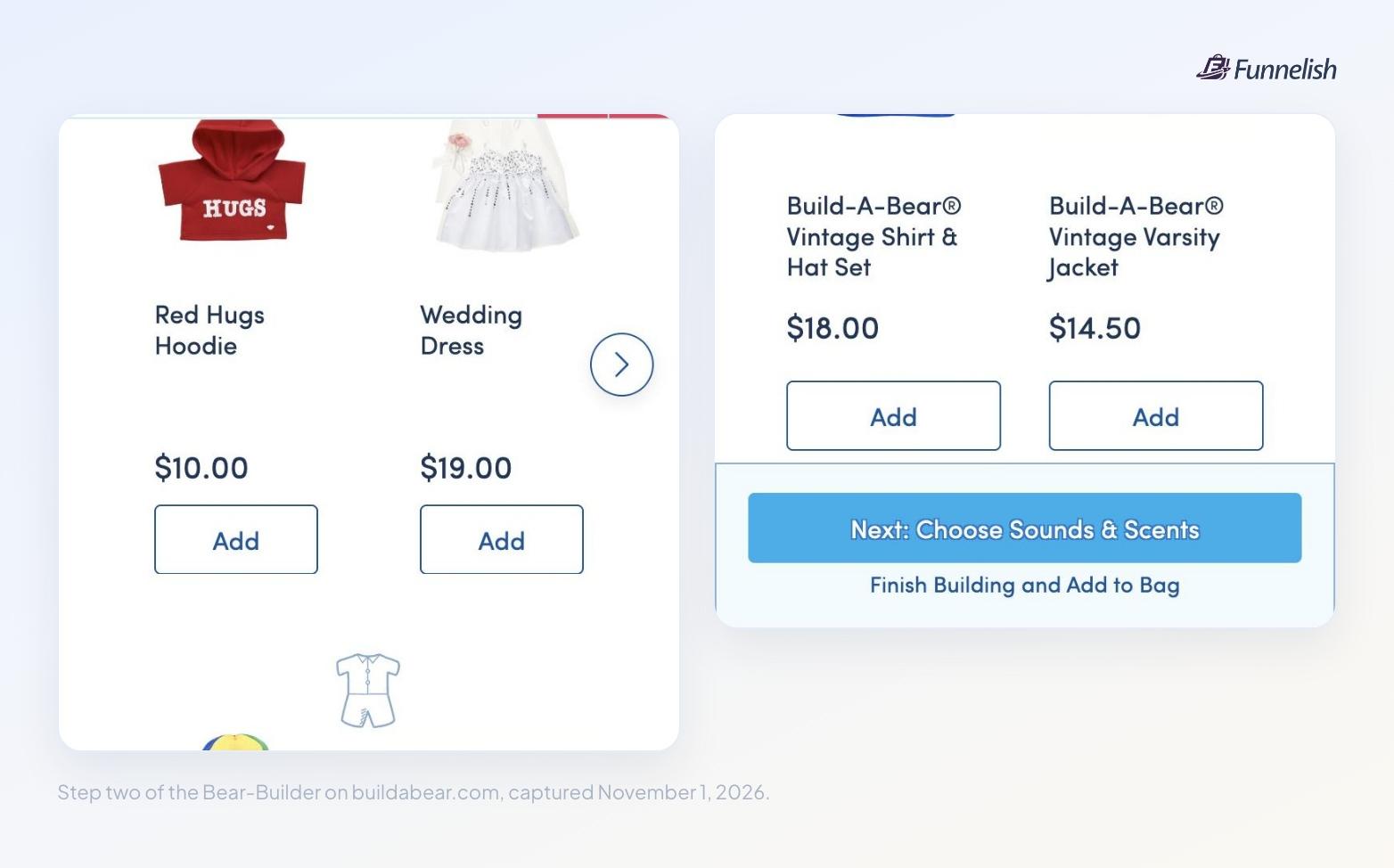
The builder repeats the same move. At the end of the clothing step, the blue bar across the bottom reads Next: Choose Sounds & Scents. Under it, in plain blue text with no button around it, you'll find Finish Building and Add to Bag.
You can leave the flow at any point. The page gives that exit the smallest treatment on the screen.
How much can you add to a $28 bear?
We priced one path through the builder, picking a modest option at each step.
| Step | Item | Price | Running total |
|---|---|---|---|
Start | Happy Hugs Teddy Bear | $28.00 | $28.00 |
Scent | SCENTiments scent | $5.00 | $33.00 |
Sound | Heart-Shaped Heartbeat Effect | $7.50 | $40.50 |
Clothing | Red Hugs Hoodie | $10.00 | $50.50 |
Shoes | Black Canvas High-Tops | $9.00 | $59.50 |
Four add-ons, and you've more than doubled the order. None of them costs more than $10 though.
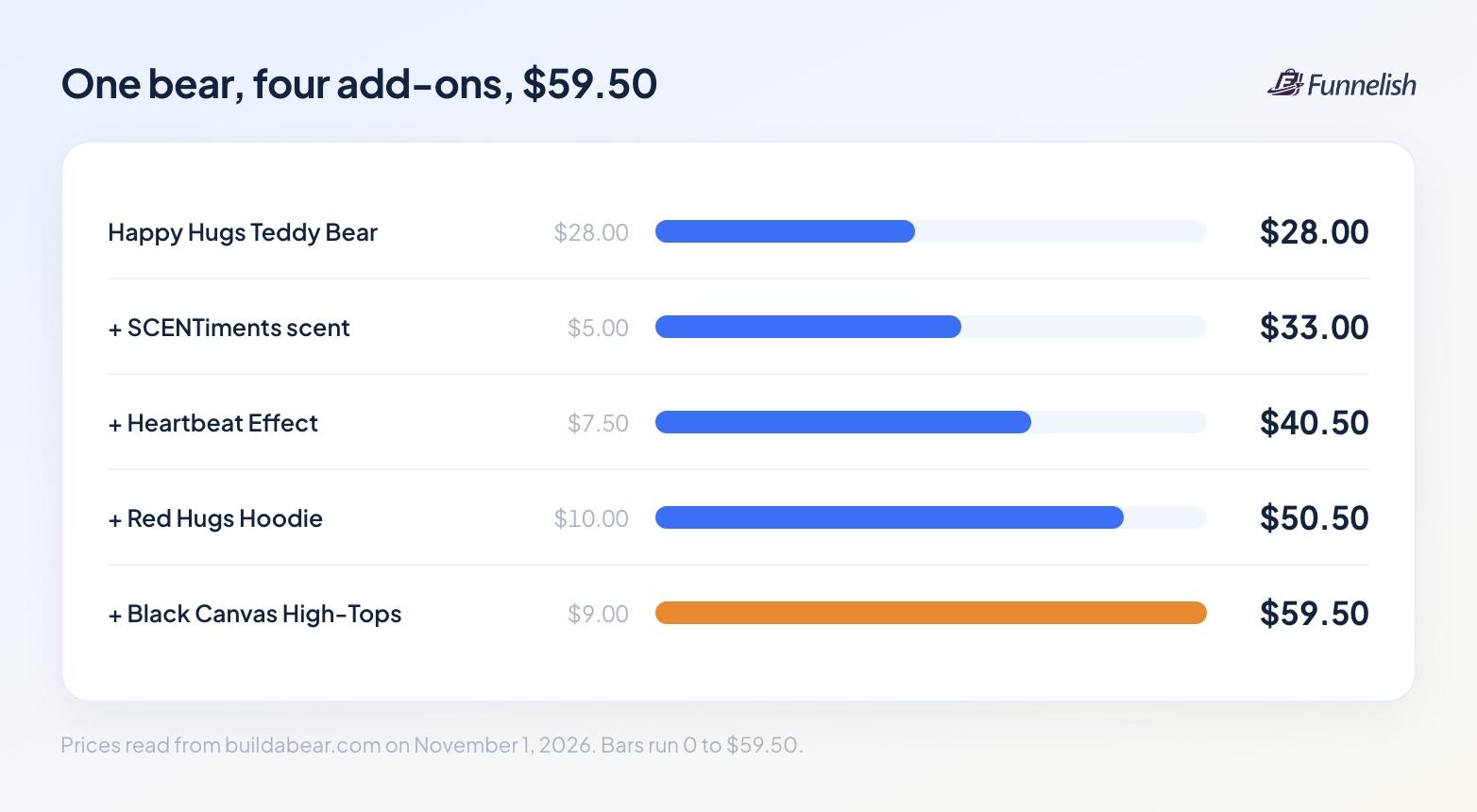
The pricing is the point. Scent inserts go for $5.00. A t-shirt costs $7.50 and a pair of high-tops costs $9.00.
Sound chips cost $7.50, and a recorded message costs $9.50. None of those numbers asks the shopper to stop and think.
Price each piece low enough and it stops looking like a separate purchase. Five dollars for a scent reads differently once you've committed $28 to the bear it goes into.
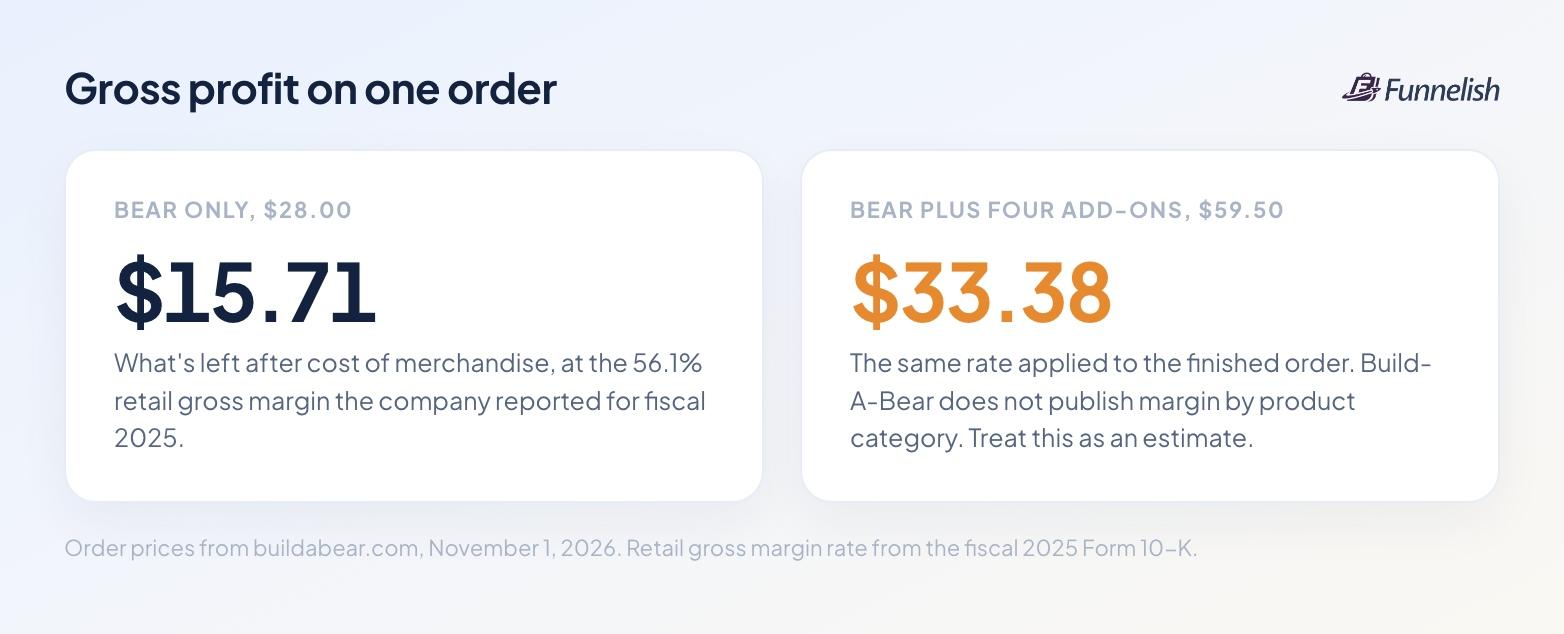
Apply the 56.1% retail gross margin Build-A-Bear reported for fiscal 2025 and the $28 order leaves around $15.71. The $59.50 order leaves around $33.38. That rate covers the whole retail business, stores included, and the company doesn't publish margin by product category. Treat both figures as estimates.
Why put the add-ons in a builder instead of the cart?
A cart upsell asks a question the shopper has already answered. They picked what they came for, they're on their way out, and a panel appears offering one more thing.
The builder asks earlier, and it asks differently. Step two doesn't offer you a hoodie as an extra. It asks what your bear should wear. Nothing has been settled yet, because the thing you're buying isn't finished.
The mechanic is worth copying. The add-ons aren't attached to the order. They're attached to the product, and the product stays unfinished until you say it's done.
You can build this without a custom front end. Put the add-on step on the page itself, reuse one block across every product, and keep the total updating as items go in. Shared components in Funnelish handle the reuse part: edit the add-on block once and every product page carries the change.
Who gets stopped by the birth-year box?
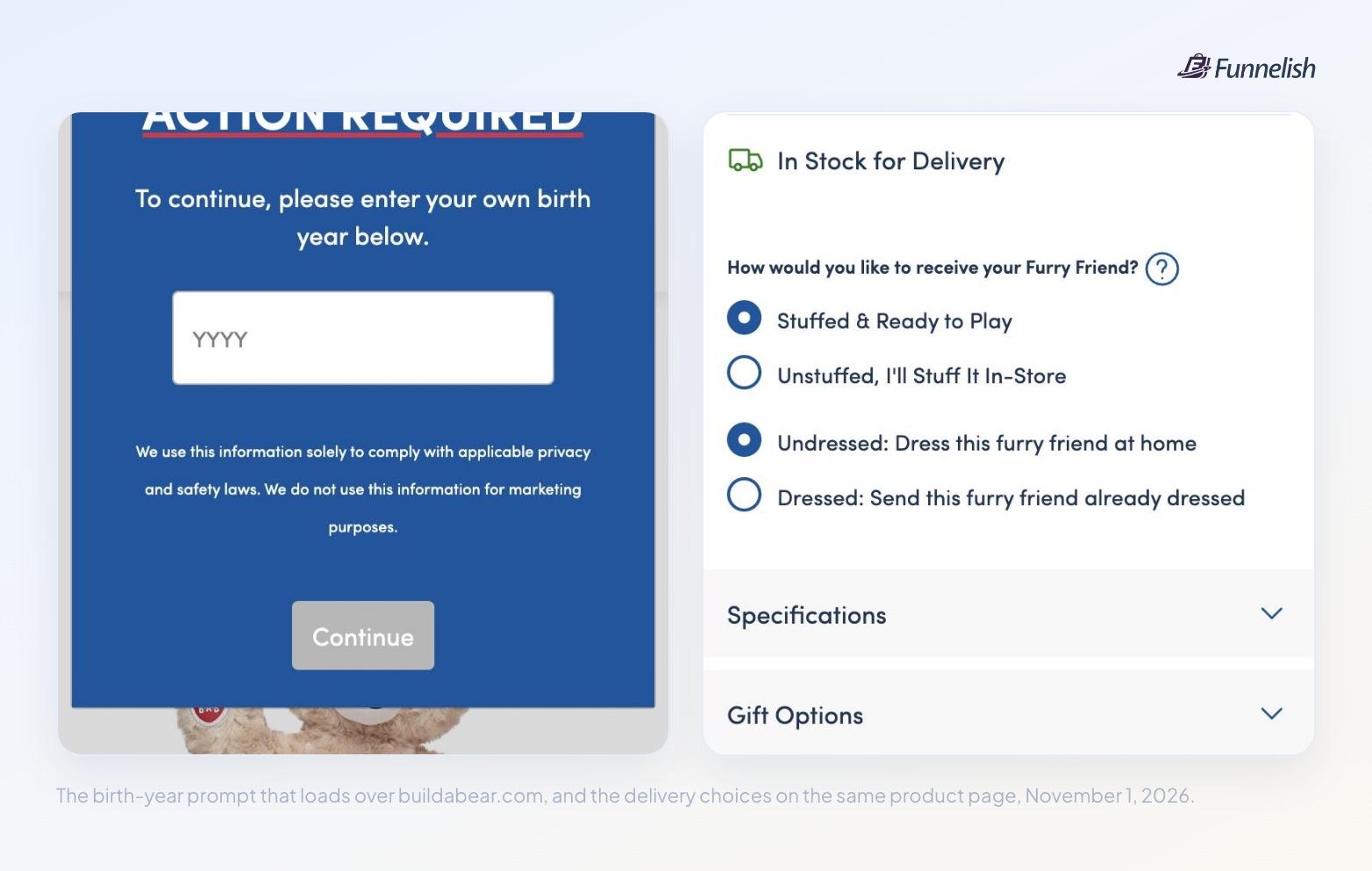
Load a page on buildabear.com and a blue panel covers it. The heading reads ACTION REQUIRED in capitals. Underneath, a line asks you to enter your own birth year, and a four-digit field waits below it next to a Continue button. The page behind the panel won't scroll while it's open.
Build-A-Bear sells to children, and a company in that position has rules to follow that a shoe brand doesn't. The panel arrives before the catalog does, on a first visit, including a cold ad click. We left it blank. The filings show $1.1M less in digital sales over three months. We can't connect those two facts and we won't pretend otherwise. Before saying anything stronger, we'd want the drop-off rate on that one modal.
Why does the page offer to send the bear unstuffed?
Scroll past the buy box and you reach four radio buttons under the question "How would you like to receive your Furry Friend?"
- Stuffed & Ready to Play
- Unstuffed, I'll Stuff It In-Store
- Undressed: Dress this furry friend at home
- Dressed: Send this furry friend already dressed
Read the second one again. An online product page is offering to ship you an unfinished product and have you walk into a store to finish it.
For this company the trade makes sense on its own terms. The annual report calls the in-store build its signature experience and counts 64 net new locations opened in fiscal 2025. It also describes stores as mini distribution centers that support digital demand. The two channels are built to prop each other up, and an unstuffed shipment is one of the few ways a website can hand a customer to a store.
If you don't run stores, the transferable piece is narrower. Give people a reason to pick the slower option, and make that option the one carrying your add-ons.
Three things I'd test here
- Move the age gate behind the first personal-data field. The modal's own markup lists what it guards: email boxes, registration forms, the party booking form. Firing it on page load guards the catalog as well, and there's no personal data in a catalog. You get little from page speed work when a blocking panel loads ahead of the page.
- Show the running total inside the builder. The builder runs four steps: a furry friend, clothes and shoes, sounds and scents, accessories. Every item carries a price and no total appears on screen. Someone who adds a $19.00 wedding dress and a $17.50 Batman costume finds out at the cart. Put the number on screen as it climbs and you'd lose some add-ons and rescue some abandoned carts. Test it instead of guessing.
- Open with the cheapest add-on. Step two starts with clothing, where the suggested items run $7.50 to $20.00. Scents cost $5.00, and the builder shows them a step later. Leading with the smallest number is worth a test of its own, and right now the builder leads with its biggest. However, in some cases leading with the biggest raises AOV significantly, which might be the case here.
What to take back to your own store
Here's the short version.
- If your product can be configured, configure it before the cart.
- If you sell one thing, build a cheap second thing that belongs to it.
- Price that second thing low enough that the shopper doesn't go hunting for a cheaper one.
Build-A-Bear was formed in 1997 and has sold bears this way ever since. Its own filing flags the risk in raising prices on popular products. An add-on ladder gives you a second lever, and it leaves the headline number on the product page alone. That's the part to copy. Direct-to-consumer brands on Funnelish can lay the same steps out and watch where people leave.
Written by
Anna P.
Writes for the Funnelish blog: playbooks on funnels, checkout, payments and growth for DTC brands.


