

Funnelish v3 Is Live 🎉: Build a Full Funnel From One Prompt
21 October 2026
Anna P.
8 minutes
Funnelish v3 is our biggest release yet, and it changes the part of the job that used to take days.
Describe your product, your audience, and your offer. Funnelish AI builds a complete, conversion-focused funnel from that prompt, and then helps you fine-tune any element once it's done. What comes after the build is new, too. There's a Customer Portal your buyers log into, payment routing that recovers declined charges, automations rebuilt from scratch, and a settings area that finally holds everything in one place.
Here's what's in it.
Funnelish AI Builds the Whole Funnel
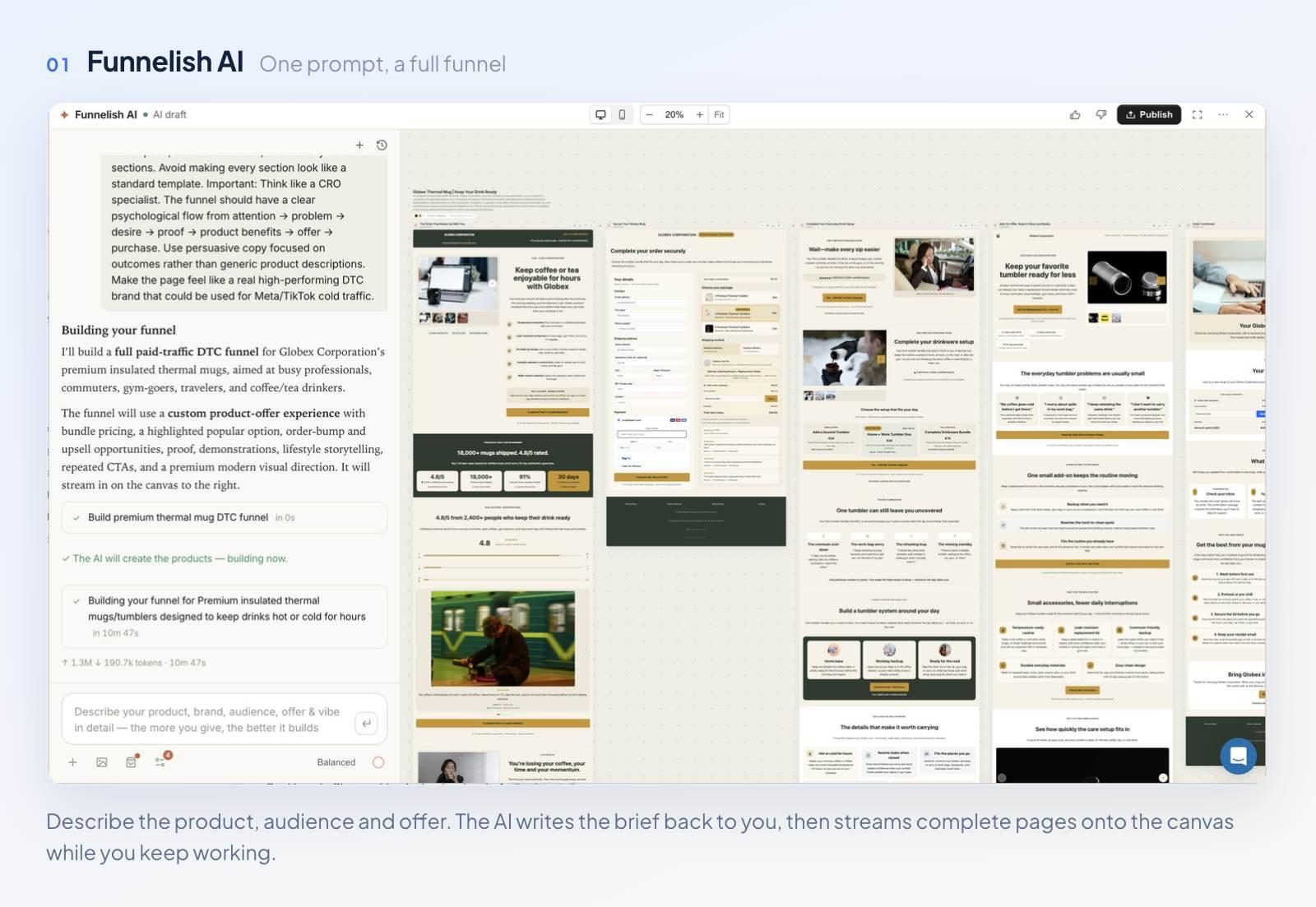
One prompt in, a full funnel out, with every page editable afterwards.
Give Funnelish AI a description and it'll generate a complete sales funnel. It'll also build a blog, a customer portal, or a shared component.
You don't have to write a brief at all: point it at a live URL instead. Ask it to take inspiration from your store, or clone an existing live funnel outright.
Before it starts, the generation settings let you set your theme and language and choose between AI-generated images and your own uploads. You can pick products from your catalog, or let the AI create new ones.
While it builds, the chat bar takes changes in real time, and you can redirect it without starting over. The sidebar is draggable too. Push it aside and carry on working elsewhere in your account until the build finishes.
When it's done, rate each page or section with the thumbs up and down buttons. Hit Publish and the project becomes a funnel, with every page open to manual editing in the page builder.
AI Inside the Page Builder
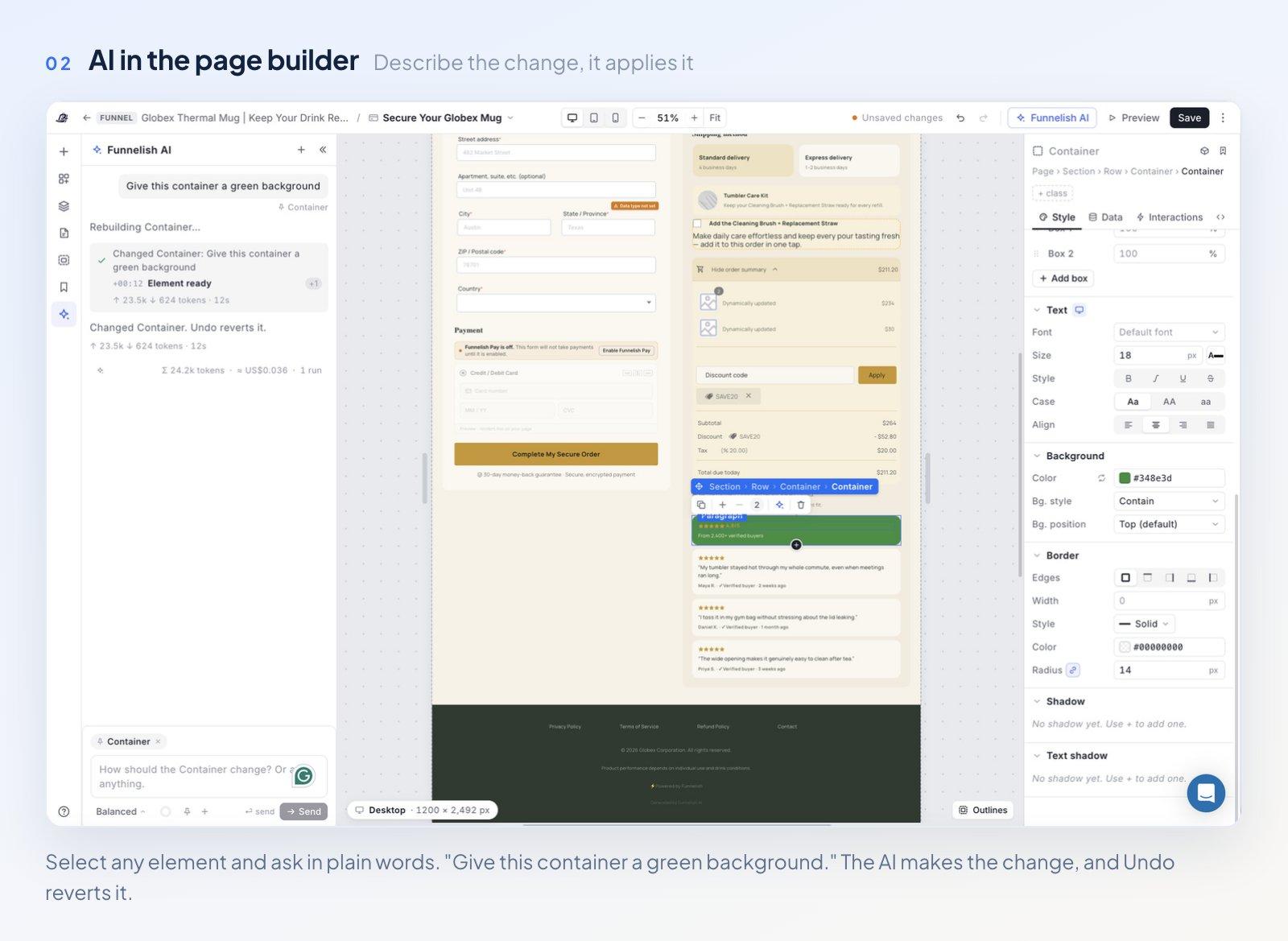
Select an element, describe the change, and the AI applies it.
Funnelish AI now works at the element level too. Select anything on the page, click the AI icon in the toolbar, and pick what you need.
For copy, there are one-click actions: make it punchier, make it shorter, or fix spelling and grammar.
For design, you can describe the change in plain words. "Give this container a green background." "Add a blue border." "Add more padding." The AI applies it, and Undo reverts it.
There's a new Animations element as well. Pick from a library of free Lottie animations, or describe what you want and let Funnelish AI build a custom one.
The editor itself got faster to work in. You can now switch between funnel steps, or create a new step, without leaving the page editor.
Customer Portals
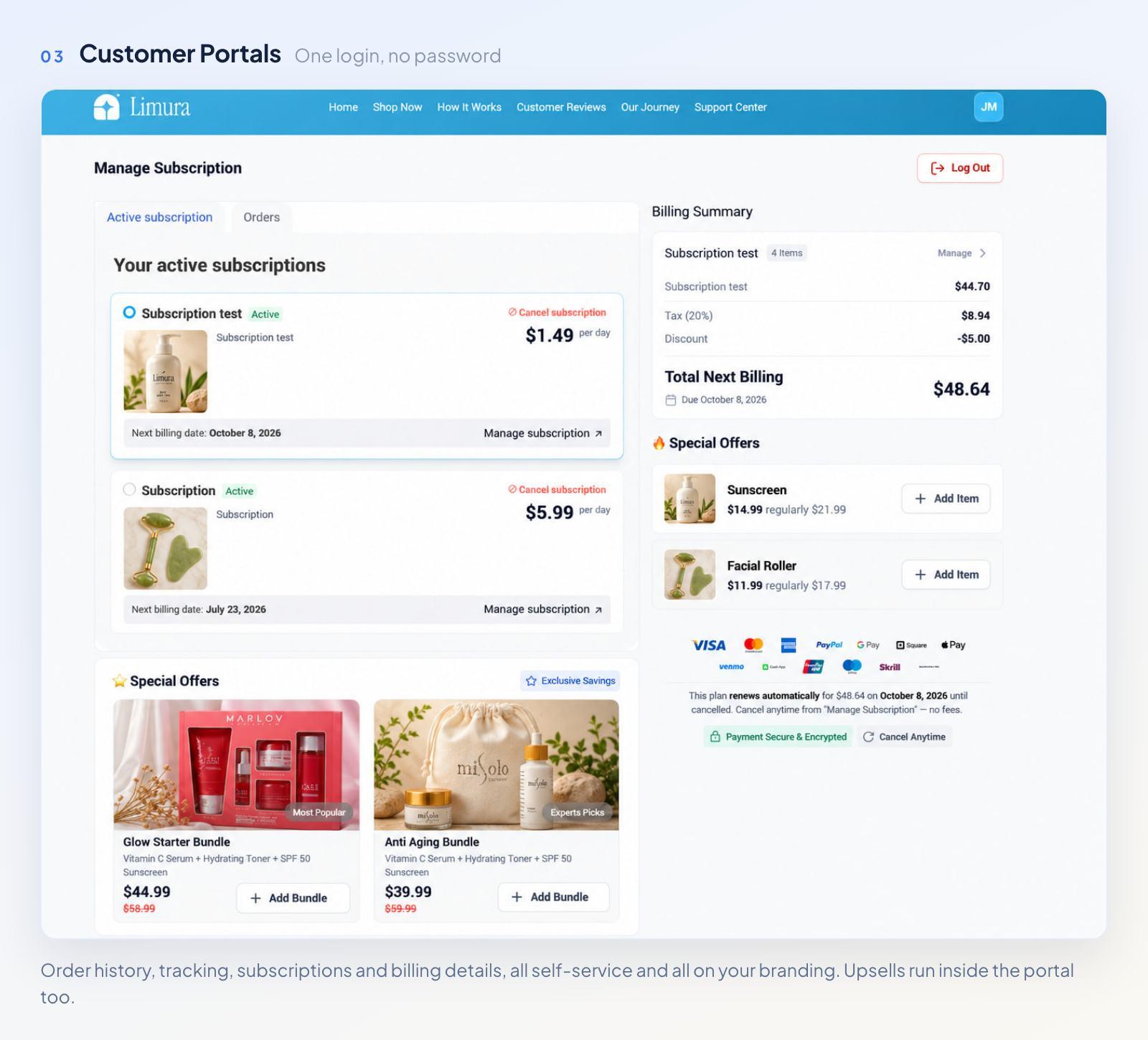
One login, and the ‘where is my order?’ emails stop piling up
Your customers get a branded, self-service portal where they'll handle the basics on their own. There's no code involved, and far fewer "where's my order?" emails in your inbox.
Inside it, customers can view their full order history and track orders, manage their subscriptions, update billing and payment details, and log in securely with no password.
The portal sells, too. Offer relevant products while a customer checks an order or manages a subscription, and the visit earns something instead of only costing you support time. Design and branding are yours to control, and built-in analytics track portal access.
The customer portal works with Funnelish managed subscriptions on every gateway, and with gateway subscriptions on Stripe, PayPal, Airwallex, and Authorize.net. Updating a payment method inside the portal is available on Stripe, Airwallex, and Authorize.net.
Disclosure: Funnelish is an Authorize.net reseller partner, and this link is tracked to our partner account.
Payment Routing, and Authorize.net
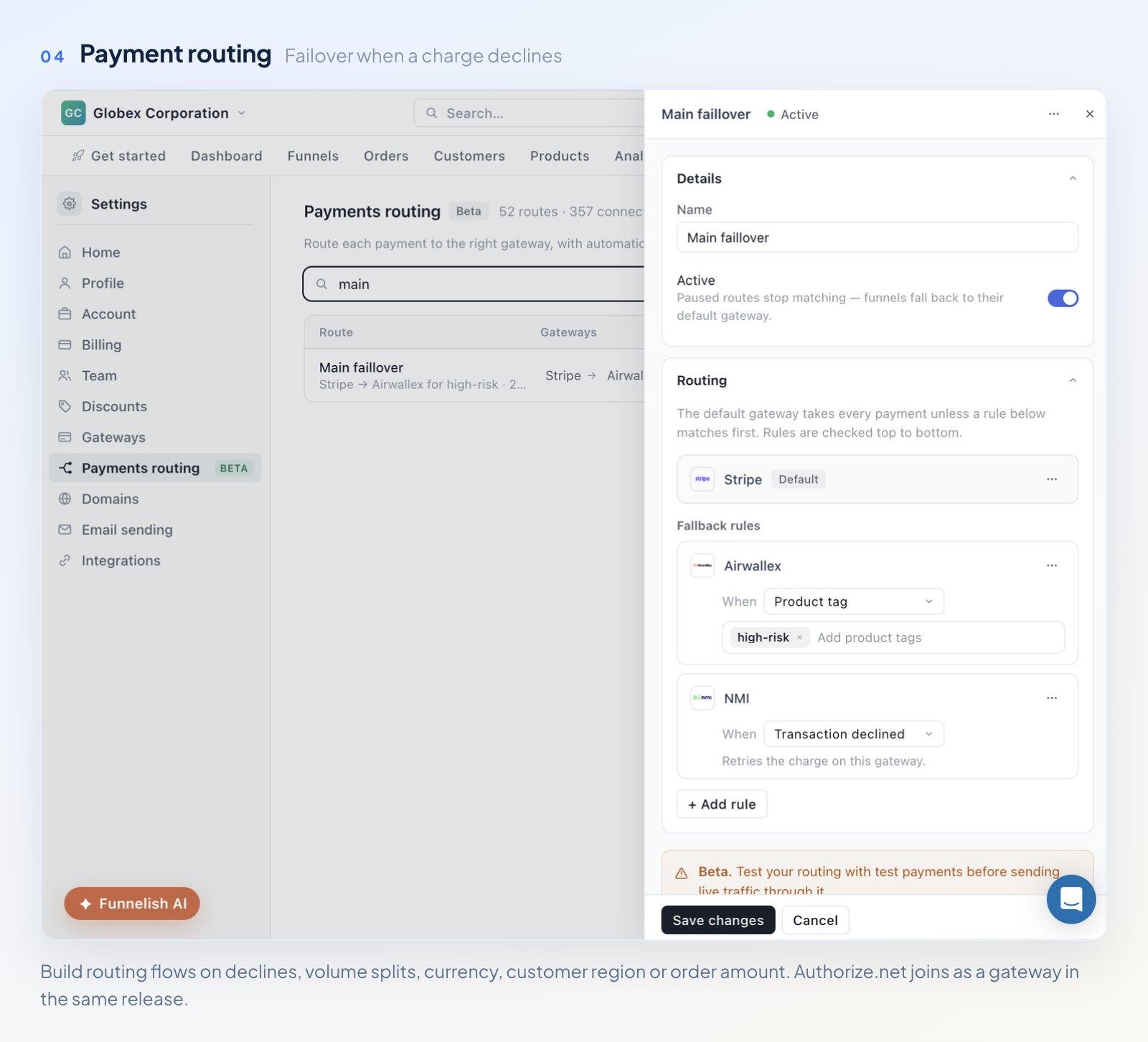
Route each charge to the right gateway, and fail over when one declines.
Payment routing is smarter and more flexible in v3. You'll send each payment to the right gateway, with automatic failover when a charge gets declined.
Routing flows run on conditions you set in advance:
A declined transaction
Volume split between gateways
Currency
Customer location or region
Order amount
Fewer lost sales, and real control over where your volume goes. It's under Settings.
Authorize.net joins as a new gateway in the same release. It's one of the most established gateways in the US, and it works with a wide range of merchant accounts, including those for higher-risk products and industries that mainstream processors turn away. If your brand sells in one of those categories, you'll process through Authorize.net and leave the rest of your Funnelish setup alone. Connect it from Settings, then Gateways.
Analytics Dashboard, Rebuilt
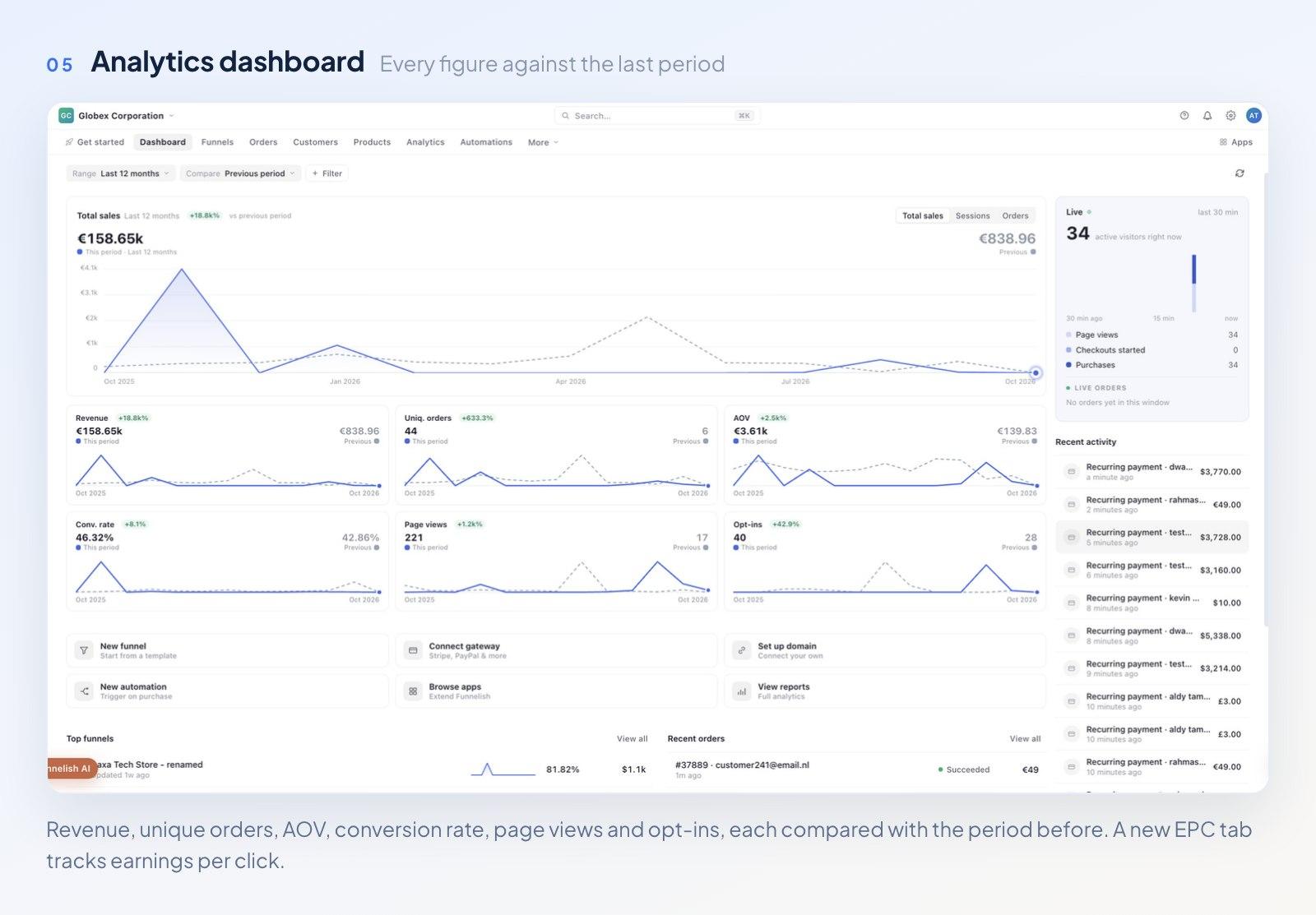
Every chart shows this period against the last one.
The dashboard's been redone, and performance now reads at a glance.
Pick any date range, say the last twelve months, and you'll compare it against the period before. Every chart shows both, and growth or drops are obvious without doing the arithmetic.
The main chart switches between total sales, sessions, and orders. Under it, cards for revenue, unique orders, AOV, conversion rate, page views, and opt-ins each carry this period against the previous one. A new EPC tab tracks earnings per click, the closest thing to what a visitor is worth.
The live panel covers the last thirty minutes: active visitors, page views, checkouts started, purchases, and live orders. Recent activity now shows payment amounts, and top funnels appear beside recent orders. Quick shortcuts create a funnel, connect a gateway, set up a domain, or build an automation in one click. All of it feeds the analytics you already use.
Global Products
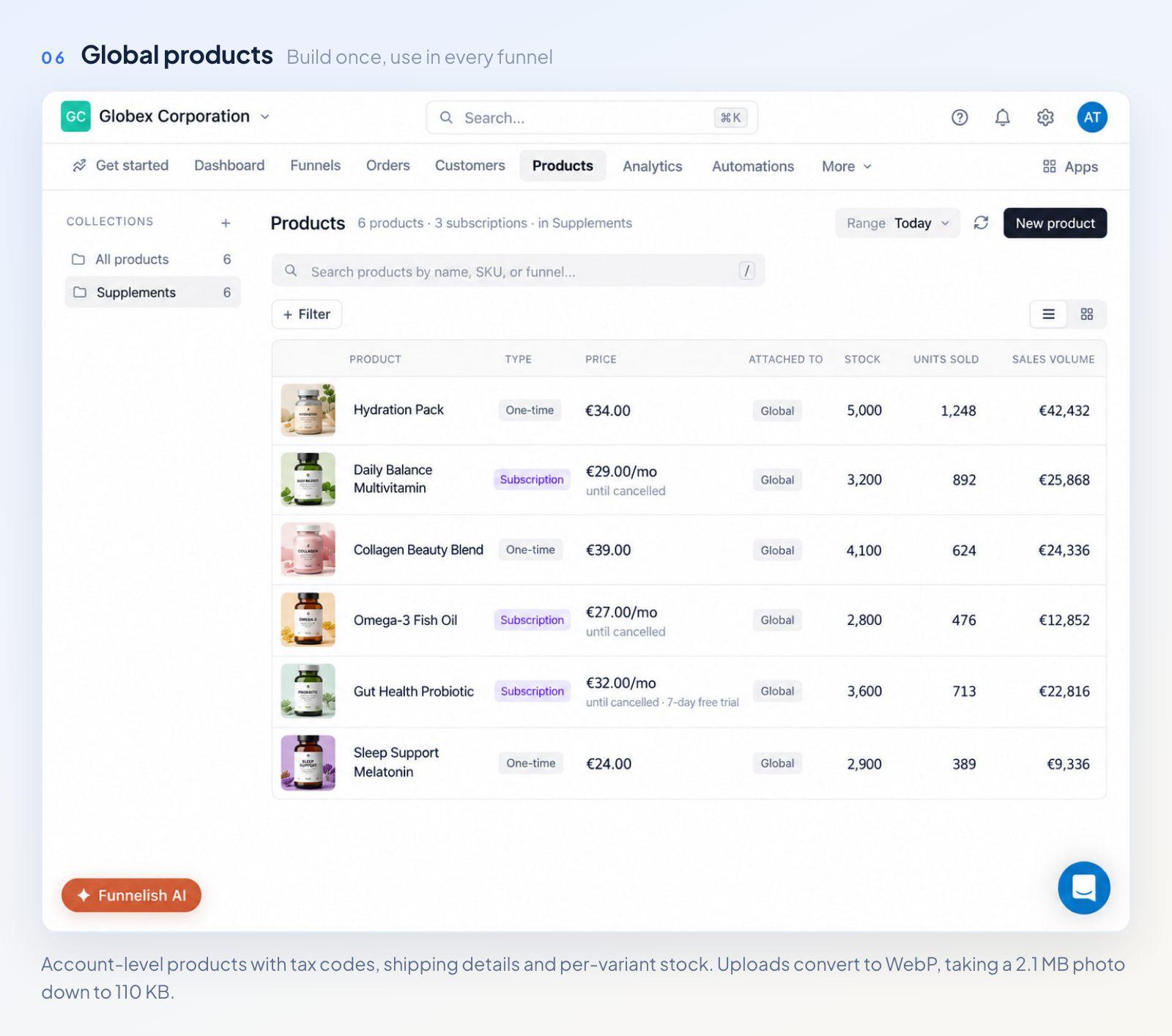
Build a product once, use it in every funnel.
There's a dedicated Products tab at account level now, where you create and manage products and set each one Active or Draft. Funnels have their own Products tab, and there you either pick from the global list or create a product tied to that funnel alone. No more rebuilding the same product in every funnel.
Product settings have got deeper:
Tax. Choose whether to charge tax on a product and pick a tax code, and the right rate applies in each region. The ships-from address drives the calculation.
Shipping. Turn it on for physical products and add the weight, HS code, and country of origin, and those feed shipping rates and customs labels.
Variants. Set stock, compare-at price, SKU, barcode (GTIN), and ships-from location per variant. You'll mark one variant sold out without touching the others.
Lighter images. Funnelish can convert a product image to WebP on upload. A 2.1 MB photo becomes 110 KB, 95% smaller, and loads in about half a second on a slow mobile connection instead of eleven.
There's a new Product List element built for global products. It pulls straight from the global list, ships with five themes (Bold, Soft, Minimal, Editorial, and Midnight), and lays products out as rows, cards, or a compact list. Use it on all new pages, because the old Product List element's on its way out.
Automations, Rebuilt
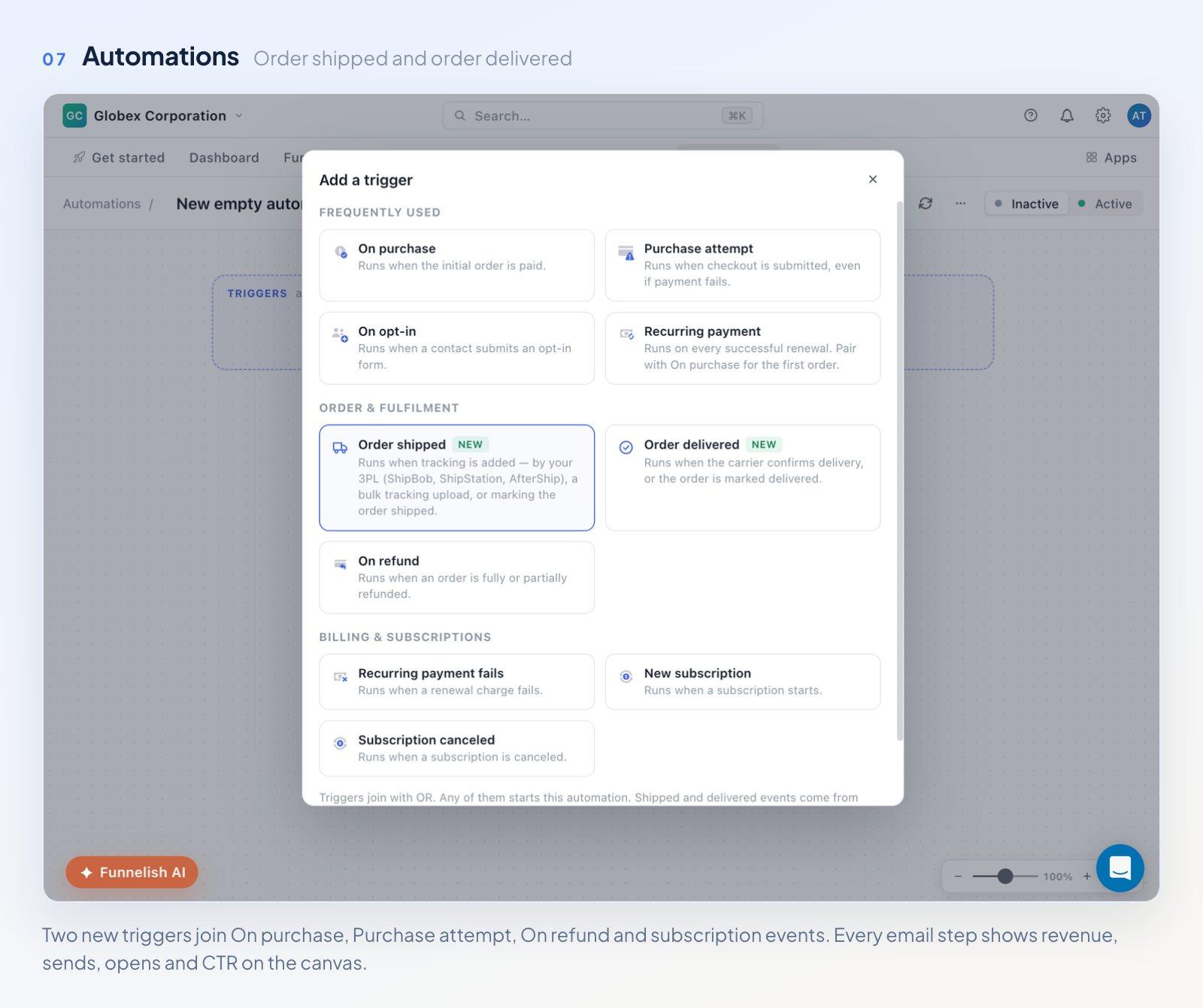
Email stats now live on the canvas, step by step.
Global automations were rebuilt from scratch, with new triggers, new email actions, and stats built in.
There are two new triggers.
Order shipped runs when tracking is added, whether that comes from a ShipBob or AfterShip integration, a bulk tracking upload, or marking the order shipped by hand.
Order delivered runs when the carrier confirms delivery, or when you mark it delivered.
They join the triggers you already have, including On purchase, Purchase attempt, On refund, and subscription events. Add as many as you like, and any one of them starts the automation.
The Send email action now gives you four ways to build. Start from a ready-made template for order confirmation, shipped, delivered, abandoned cart and more. Build visually with the drag-and-drop editor. Write a plain rich-text email that reads like a person sent it. Or code it in HTML with a live preview.
Every email step carries its own stats on the canvas: revenue, sent, opens, and CTR. You'll see which emails earn their place without opening anything.
Email Identities and Your Own Domain
You decide who your emails come from. Create a sending identity with a sender name, a sending address, and an optional reply-to address. Replies go to the reply-to when it's set, and to the sender address otherwise. Identities can't use anything but verified sending domains, including the shared Funnelish one.
To send from your own domain, add a root domain or a subdomain. We'd suggest a subdomain like mail.mystore.com. Then add two DNS records: DKIM is required, and DMARC is recommended. Once the domain verifies, you can create identities on it.
Fulfilment: ShipBob, AfterShip, and Tracking Sync
ShipBob and AfterShip both arrive with v3. ShipBob is a 3PL partner that stores, packs, and ships your orders, and connecting it brings tracking details back into Funnelish automatically once a parcel ships. AfterShip follows parcels across carriers and keeps shipping and delivery status current on your orders.
A new gateway setting sends each parcel's carrier and tracking number back to your payment gateway once an order is fulfilled. Sharing tracking that way helps with disputes and keeps your gateway account in good standing. It works with PayPal, new in this release, plus Stripe, Airwallex, and Klarna, including all their payment methods. It fires when tracking is added by hand through Orders or automatically through ShipBob, and you turn it on from the gateway's settings with the Sync fulfillment details back toggle. The rest of your fulfilment setup stays where it was.
One Home for Settings
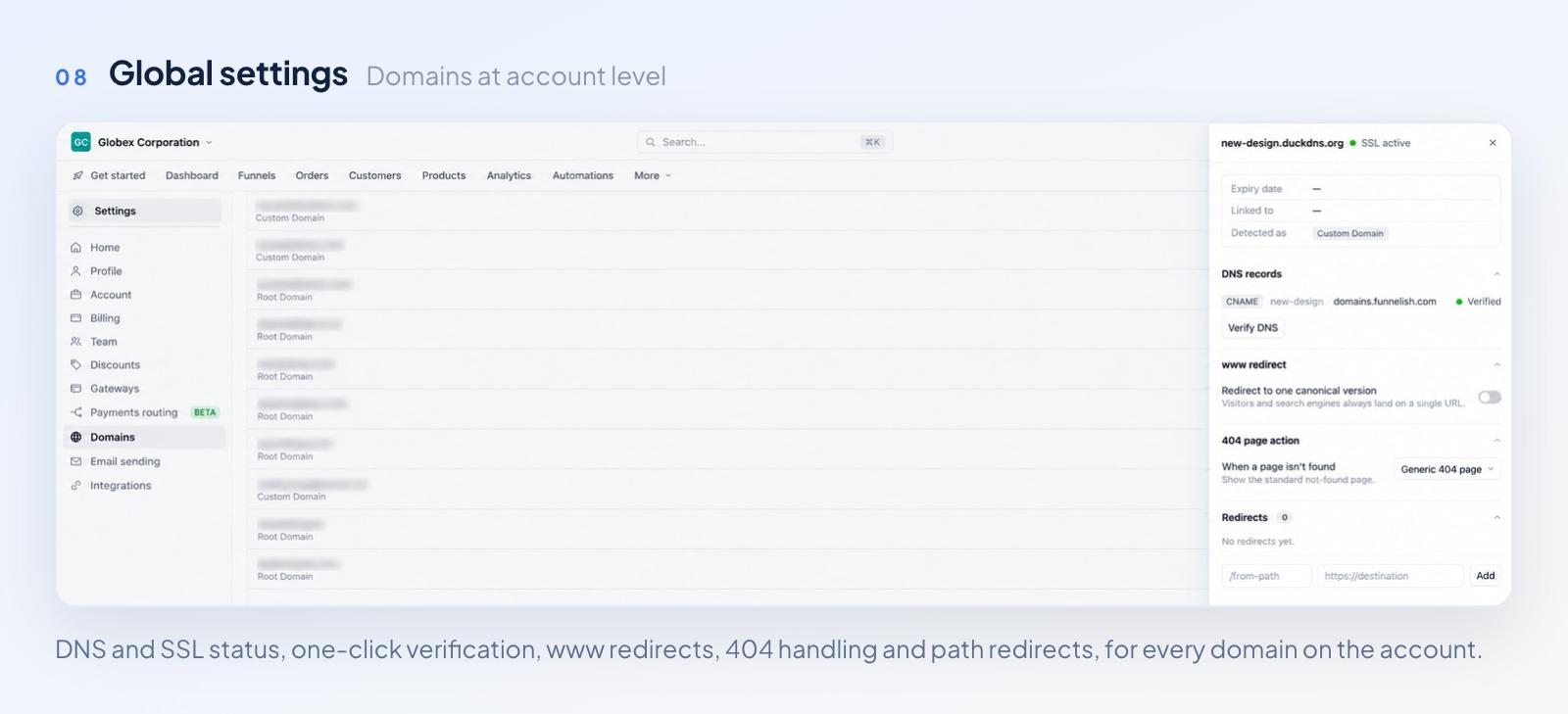
Domains, gateways, billing and email, all at account level.
The new global Settings area holds your profile, account, billing, team, discounts, gateways, payment routing, domains, email sending, and integrations in one place. It's all at account level, and it's all in one screen.
Domains are global now too. Add and manage them at account level, root domains and custom subdomains both. For each one you can check DNS records and SSL status, then verify DNS in a click. You can also turn on a www redirect that lands visitors and search engines on one version, choose what happens on a 404, and redirect any path to a new destination.
Start Building
Funnelish v3 is live in your account now. Whether you're launching a first product or scaling a growing DTC brand, it's built to help you launch faster, recover more payments, and keep customers coming back.
Funnelish AI's the place to start. Describe your product and watch the first funnel build itself.
For the full release notes, including the details we've summarized here, read the v3 announcement in the Funnelish community. Tell us what you think while you're there, because what you ask for shapes what we build next.
Table of contents
Boost your eCommerce
sales today

24/7 support
No credit card required
Cancel anytime
24/7 support
No credit card required
Cancel anytime
