

Checkout Conversion Rate Benchmarks: Which Number Are You Even Measuring?
28 October 2026
Anna P.
15 minutes
TL;DR: Checkout conversion rate benchmarks range from 20% to 65% in published sources because they don't share a denominator. Measured from sessions, a typical store converts around 2 to 3%. Measured from carts created, roughly 30%. Measured from checkouts started, roughly 65%. All three describe the same funnel. Before you compare your store to any industry average, work out which starting point the benchmark used, then rebuild your own numbers the same way.
Go looking for ecommerce conversion rate benchmarks and you'll get told 2%, 30%, 40%, 55% and 65.1%, sometimes on the same page. None of those writers are lying. They're counting from different places and calling it the same metric. That's why average conversion rates you find online rarely match anything happening in your own online store.
So let's fix that first, then give you numbers you can compare against.
Why Published Checkout Benchmarks Disagree
Four different measurements travel under the name checkout conversion, and they answer different questions.
Metric | Denominator | Typical range | What it tells you |
Ecommerce conversion rate | All sessions | 2 to 3% | Whole-funnel health, heavily driven by traffic quality |
Add to cart rate | All sessions | 8 to 10% | Whether product pages persuade |
Cart to order | Carts created | About 30% | The full cart-plus-checkout leak |
Checkout completion rate | Checkouts started | 60 to 70% | Your checkout flow on its own |
Run one funnel through all four and the contradiction disappears.
Stage | Count | Rate vs previous | Rate vs sessions |
Sessions | 100,000 | ||
Carts created | 8,932 | 8.9% | 8.9% |
Checkouts started | 4,086 | 45.7% | 4.1% |
Completed purchase | 2,660 | 65.1% | 2.66% |
Same store, same month. You could honestly report an online store conversion rate of 2.66%, 29.8% or 65.1% and each would be true. So quoting a benchmark without its denominator tells nobody anything, and the average ecommerce conversion rate you keep reading is whichever slice the author happened to pick.
There's a second thing hiding in that table. Only 45.7% of people who build a cart ever reach the checkout form, so more than half your cart abandonment lands before the checkout gets a chance to fail. Fixing your payment step won't touch it, and neither will anything else people label checkout friction. That leak belongs to your cart page and your landing pages.
Read more: What Is Landing Page Conversion?
What Is a Good Checkout Conversion Rate?
Above 65% completion from checkout started, above 30% from cart created, and above 3% from sessions. If your numbers are lower, fixing the checkout will get you more orders. If they're already higher, you'll make more from order bumps and upsells than from chasing another percentage point.
Treat those figures as a starting line. They make a poor target, because category swings are enormous. High consideration purchases behave nothing like impulse ones. A store selling replenishable goods with strong purchase frequency will beat a jewelry store on every measure and lose to it on average order, because customers spend more per visit when they buy rarely. Your category average matters more than any global average, and your own historical performance matters more than both. If you run Shopify, the average Shopify store converts near the low end of the site-wide range. Useful context. Bad goal.
Baymard Institute has tracked cart abandonment across 50 separate studies and puts the documented average at . Christian Holst, their Research Director and co-founder, describes it plainly: "a whopping 2 out of 3 users choose to abandon their purchase."
The number worth knowing comes right after it. Baymard calculates that the average large ecommerce site can lift conversion 35.26% through checkout design alone, counting only the usability problems they have documented as fixable. On $250,000 a month, that's $88,150 more per month from the same traffic.
What Causes the Drop-Off

Baymard asked people why they abandoned. Here's the full list, including the line most articles quietly delete.
Reason | Share |
Just browsing, with no intent to buy yet | 42% |
Extra costs too high (shipping, tax, fees) | 40% |
Delivery was too slow | 20% |
Didn't trust the site with card details | 19% |
Site required account creation | 18% |
Checkout too long or complicated | 17% |
Website errors or crashes | 17% |
Unsatisfactory returns policy | 13% |
Couldn't see total cost upfront | 12% |
Card declined | 10% |
Not enough payment options | 9% |
Peer-reviewed work points the same way from a different angle. Liat Hadar, Yael Steinhart, Gil Appel and Yaniv Shani ran two large field datasets and four experiments for the Journal of Consumer Research, and found that , with guilt doing the work in between. What people put in the cart predicts whether they finish, before your checkout design gets a vote.
Read that first row again before you read the rest. A large share of abandonment isn't a checkout problem at all, and no amount of design work converts somebody who was comparison shopping on their lunch break. Chase the rows below it.
Shipping costs top that fixable list, and by a wide margin.
How to Reduce Conversion Drop-Off in Checkout
Show every cost before the payment step, allow guest checkout, cut the form down, and add express payment buttons. These target the largest documented abandonment reasons, and you can fix all four this month.
Put shipping costs on the product page. Extra costs lead the fixable reasons at 40%. Free shipping thresholds beat free shipping everywhere, since they lift average order while removing the objection. State the threshold where people meet it before they commit, and repeat it in the cart.
Offer guest checkout. Forced account creation drives 18% of abandonment. Let people buy, then invite them to create an account on the thank you page when the pressure's off.
Cut the form. Baymard's checkout benchmark puts the average US checkout at 23.48 form elements, or 14.88 counting only the form fields. Their testing says an ideal flow needs 12 to 14 elements, 7 to 8 fields. Ask only what shipping and billing need. Default the billing address to the shipping address with a checkbox to change it, and use address autocomplete so a shipping address takes one tap instead of six fields.
Add express payment buttons. Apple Pay, Google Pay and Shop Pay skip the form entirely for returning users by pulling stored payment details and the shipping address from the device. On mobile devices, where typing is the enemy, that removes most of the work.
Fix the errors. Site errors and crashes account for 17%, about the same weight as a complicated checkout. Baymard found 21% of benchmarked sites accept only one payment method, and 15% still don't auto-format spaces in the card number field. Small mechanical failures like those turn into real lost sales.
How to Increase Checkout Conversion Rates
Work the stage with the widest gap first, then raise average order value. A 10% relative gain earns the same revenue wherever you win it, so take it where it's cheapest to buy.
Start by finding your own numbers instead of borrowing anyone's. In Shopify analytics or GA4, pull sessions, add to cart, reached checkout and completed purchase for the last full month. Calculate the rate between each pair. The widest drop is your first job.
Ecommerce sales respond faster to fixing a bad stage than to buying more traffic, so start there. Then work in this order.
Page speed. Slow checkouts lose buyers who'd already decided. Site speed is measurable and fixable, it helps your organic search performance, and few changes boost conversion rates for less effort.
Trust signals near the button. A guarantee, a returns link and security badges belong beside the pay button, because 19% of abandonment traces back to card distrust and doubt peaks with a card in hand.
Payment options. Offer cards, wallets, and whatever local method your market expects. Nine percent abandon over missing options.
Order bumps. A small relevant add-on inside the order summary raises average order without touching conversion. Nothing else in the funnel earns as cheaply.
Post-purchase upsells. Offered after payment, so a decline costs you nothing.
Points 4 and 5 matter because the funnel has two exits. You can move more people through, or you can make each one worth more. When conversion work gets expensive, pricing strategy and order value get cheap.
Read more: Upselling Techniques: Digital Upsells + Physical Products
What Is Guest Checkout Conversion?
Guest checkout conversion measures the completion rate for buyers who pay without creating an account. It beats account-required checkout because it drops a step people resent, and forced account creation causes a documented 18% of cart abandonment.
Make guest checkout the default path and leave account creation optional afterward. First time visitors have no reason to want a password with your name on it, and they're the group most likely to leave. Repeat customers behave differently. A saved account speeds them up and lifts repeat purchases, so put the account offer after the sale, never in front of it.
Watch guest and account checkout sessions separately, because blending them hides which one is failing.
How Does Currency Conversion Work at Checkout?
The shopper's browser or IP reveals their location, and your store either shows converted prices in their currency or charges in your base currency and leaves the conversion to their card issuer. Showing local currency before the payment step converts better, because a foreign total reads as a risk.
Handle this badly and it fails in one of two ways. Someone sees prices in your currency, does rough mental math, and gives up before guessing what their bank will charge. Or the price converts but the payment method doesn't, so a German shopper expecting a bank transfer method meets a card-only form.
Geo funnels handle both at once. detect visitor location and serve multi-currency checkout, local payment methods and region-specific offers from a single URL with no redirect, so you keep one funnel instead of maintaining copies per market. That matters most if a meaningful share of your ecommerce traffic arrives from outside your home market and converts worse than the overall average.
Read more: Geo-Targeting for Global Sellers
Benchmarks by Device, Channel and Category
Device, traffic channel and category explain most of the variance between stores. Your device mix and traffic source decide more than your design does.
Device
The Salesforce Shopping Index tracks more than 1.5 billion shoppers across 67 countries. Salesforce reported mobile at 78% of global retail traffic and 66% of orders, with both up 4% year over year. So phones deliver the visitors and desktops finish more of the orders. Mobile tends to convert below desktop, for mechanical reasons: small screens, typing, interruptions. How wide that gap runs varies enough by store that it's worth measuring on your own traffic instead of borrowing a number for it.
Check mobile performance on its own. A healthy blended number will hide a bad phone experience for months.
Traffic Channel
Email and direct traffic tend to convert above cold paid social, because those people already know you. Our own checkout data complicates that one: traffic landing from inside the Facebook and Instagram apps converts better than traffic arriving in Safari or Chrome, so split paid social out before you write it off. Organic search converts somewhere in between. Referral traffic varies with the referrer. Compare your blended rate to an industry average and you learn almost nothing when your channel mix differs. Split conversion data by traffic source before you draw conclusions.
Category
Food and beverage converts several times higher than jewelry, and neither store is doing anything wrong. Purchase frequency, price sensitivity and consideration time drive that spread. Compare yourself to your category, and mostly to yourself last quarter.
One more timing note: major shopping events distort everything. Black Friday brings volume and a different intent mix. Hold such weeks separate or they'll pollute your baseline.
Order Bump Benchmarks Nobody Publishes
Plenty of sources benchmark cart abandonment. Almost nobody publishes what an order bump does. The platforms that could measure it mostly don't sell one.
You can tell whether a bump is working from these, and you can start recording them this week:
Bump attach rate. What share of completed orders include the bump.
Bump take rate. What share of buyers who saw it accepted it.
Average order lift. Order value with a bump against order value without.
Worked example, so you can see the shape. Take 1,000 completed orders at an $80 average order, with a $12 bump accepted by 25%:
Measure | Without bump | With bump offered |
Orders | 1,000 | 1,000 |
Bumps accepted | 0 | 250 |
Bump revenue | $0 | $3,000 |
Total revenue | $80,000 | $83,000 |
Average order | $80.00 | $83.00 |
Lift | 3.8% |
A bump priced near 15% of your average order tends to attach better than one priced near half of it, and the offer has to make sense beside what's already in the cart. Record your own three numbers for a month and you'll have a benchmark that beats anything you could borrow.
A Checkout Built the Way the Data Suggests
Our luxury jewelry funnel template is free to use, and its checkout follows the list above rather than a style guide.
Element | What it addresses |
Three price tiers on one page | Raises average order without extra traffic |
Order summary visible beside the form | Answers "Couldn't see total cost upfront", 12% |
Guarantee line directly under the pay button | Answers card distrust, 19% |
Costs shown before the payment step | Answers extra costs, 40% |
Short form, billing defaults to shipping | Answers complicated checkout, 17% |
Post-purchase upsell and downsell | Order value with no conversion risk |
Every page opens in the as drag and drop, so testing a shorter form or a different guarantee takes an afternoon. Run the test on your own traffic and it'll answer critical questions no benchmark can.
Funnelish Checkout Benchmarks
Everything above came from studies measuring storefronts. These numbers come from Funnelish checkouts, and they cover the stages a storefront study can't see.
Methodology: 4.4 billion checkout events and 64 million orders from 11,930 merchant accounts across 73 currencies. Order-level figures cover 1 November 2025 to 30 June 2026. Session-level figures cover March 2026 with bot traffic removed. Every table below names its own denominator, for the reason this article started with.
Same Funnel, Four Denominators
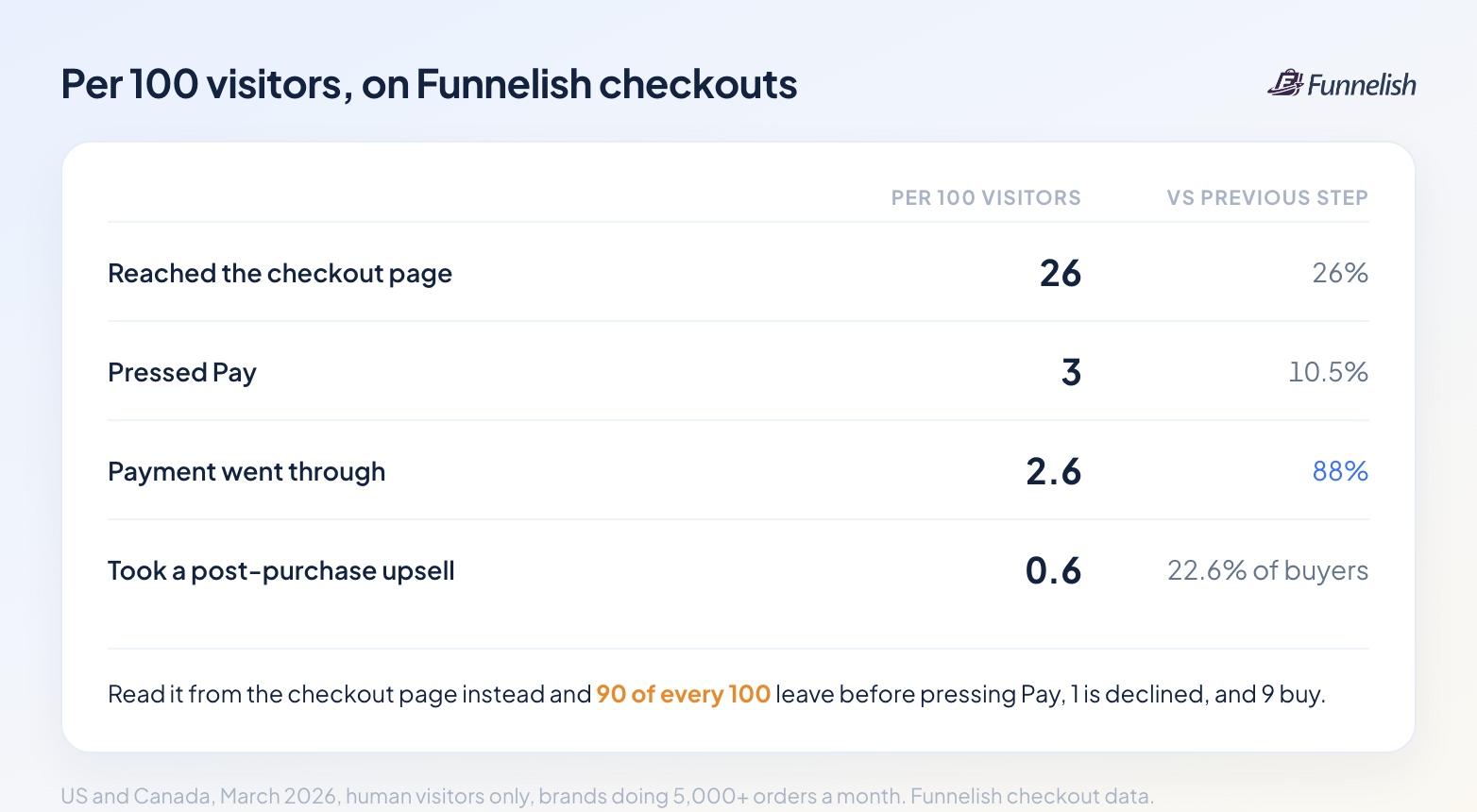
Stage | Per 100 human visitors | Rate vs previous stage |
Reached the checkout page | 26 | 26% |
Pressed Pay | 3 | 10.5% |
Payment went through | 2.6 | 88% |
Took a post-purchase upsell | 0.6 | 22.6% of buyers |
Now read the same funnel from the checkout page instead. Of every 100 shoppers who reach checkout, 90 leave before pressing Pay, one is declined, and nine buy.
Look at that 88% before you touch your payment step. Once a shopper presses Pay, the money arrives nearly every time. You lost the other 90 earlier, on the page.
One caution before you hold this against the 65% earlier in this article. That 65% is measured from checkouts started, which in the funnel above sits after carts created. This table is measured from everyone who landed on the checkout page, with no cart stage in front of it. Those are two different groups counted from two different events, so read them separately instead of against each other.
Checkout Conversion by Brand Size and Market
Segment | Checkout page to order |
US, 5,000+ orders a month | 10.0% |
US, 1,000 to 5,000 orders a month | 8.3% |
Europe | 15 to 17% |
Nordics | 20 to 26% |
Europe and the Nordics convert higher on roughly half the order value. Read the two columns together or you'll draw the wrong conclusion.
What Separates the Best Brands From the Rest
We ranked 72 established US brands by revenue per visitor and compared the top 10% against the middle and the bottom.
Metric, median brand in each tier | Top 10% | Middle 40% | Bottom 30% |
Visitors reaching checkout | 37.2% | 22.1% | 19.5% |
Checkout page to order | 12.2% | 8.7% | 6.9% |
Visitor to order | 4.22% | 2.00% | 1.58% |
Order value per session | $122.33 | $89.94 | $55.22 |
Buyers taking an upsell | 29.4% | 20.0% | 19.9% |
Mobile share of orders | 81.2% | 82.3% | 83.6% |
Payment acceptance | 87.5% | 88.4% | 88.8% |
Read the last two rows. Device mix and payment acceptance barely move between tiers. Neither one explains the gap. The five rows above them do.
Order Value by Market
Market | Sessions with an order | Median | p90 | Orders per session |
US and Canada (USD) | 1,651,776 | $71.57 | $183.00 | 2.41 |
United Kingdom (GBP) | 179,798 | £38.85 | £84.94 | 2.32 |
Eurozone (EUR) | 1,489,659 | €39.95 | €78.85 | 1.99 |
Australia (AUD) | 71,358 | A$78.24 | A$212.60 | 1.97 |
Sweden (SEK) | 184,363 | 408 | 723 | 1.90 |
Norway (NOK) | 128,101 | 458 | 896 | 2.20 |
Denmark (DKK) | 33,418 | 374 | 824 | 2.30 |
The median single US order is $29.97. The median session totals $71.57 because US shoppers place 2.41 orders per session once upsells count.
Upsell Performance
One note on what this measures. An order bump is part of the base order, and the data can't separate it out. A post-purchase upsell is a second order, and that one we can measure.
Measure | US median funnel | Top quartile |
Buyers taking an upsell | 21.6% | 30% |
Uplift to session order value | +18% | +33% |
Upsell priced as a share of the base order | 94% | — |
Based on 553 US funnels and 1.56 million sessions with an order. European funnels take upsells about a third as much and price them near 55% of the base order.
Device and Browser
85% of checkout sessions happen on a phone, and 42% arrive inside a social app's built-in browser.
Browser | Checkout conversion |
Facebook and Instagram in-app | 9 to 11% |
Safari and Chrome | 6 to 7% |
That reverses the usual advice. The shopper who tapped an ad a minute ago converts better than the one who arrived from a bookmark.
How Long Buyers Take
Half of US buyers go from first pageview to paid in under 6.4 minutes. A quarter finish inside 3.9 minutes, three quarters inside 11.5, and 4.5% take more than an hour. If your checkout needs an account and three screens, you're asking for time most buyers won't give you.
Filter Your Bots Before You Read Any of This
16.7% of sessions on a direct-to-consumer checkout trip at least one non-human rule, and together they carry 1.2% of orders. Strip them out and conversion reads 1.15% against the 0.97% an unfiltered dashboard shows. That's a 19% difference, and it lands on every rate in this article.
Measure Your Own Before You Trust Anyone Else's
Benchmarks also move under you. Contentsquare's 2026 benchmark, drawn from , recorded conversion down 5.1% year on year across nine industries. A store that held its rate flat that year gained ground while looking like it stood still.
Published ecommerce benchmarks are useful for sanity checks and useless as targets. Baymard's checkout benchmark scores 64% of desktop sites mediocre or worse on checkout UX, and 63% of mobile sites. So most ecommerce stores could be converting better than they are. Yours might be the exception, and only your own numbers will say.
Build your own baseline instead.
Pull three months of conversion data, split it by device and traffic channel, and record the rate between every pair of stages across the whole customer journey. That's your industry data now.
Name one primary conversion and hold everything else as a supporting metric, or you'll optimize five numbers and move none of them.
Re-measure monthly and change one thing at a time.
Compare against what you did last quarter. A number somebody published about a different store with different traffic can't tell you anything about yours.
Getting those stage numbers out of a normal store setup takes stitching together analytics, your cart and your payment provider. Funnelish , so the drop between your landing page, your checkout and your completed orders shows up against the page that caused it. The benchmark tables above use that same measurement, so once your own numbers are running you can read them side by side and see where you land.
Table of contents
Boost your eCommerce
sales today

24/7 support
No credit card required
Cancel anytime
24/7 support
No credit card required
Cancel anytime
