

Shopify Collabs: What It Is, How It Works, and What Changed This Year
13 October 2026
Anna P.
14 minutes
Shopify Collabs is Shopify's own influencer marketing app. It lives inside your Shopify Admin and handles the whole Shopify Collabs affiliate program: finding creators, sending gifts, generating affiliate links and discount codes, tracking the sales they drive, and paying commission.
It's free to install, and that pulls a lot of stores toward it. There's also a change on Shopify's own help pages that nothing in the app or the changelog announces.
Collabs stopped accepting new creator signups.
The app still works, merchants still run programs on it, and creators who already have accounts are fine. What's frozen is the open pool of creators you can recruit from, and that changes which parts of Collabs are worth building on.
What Is Shopify Collabs? Definition and Features
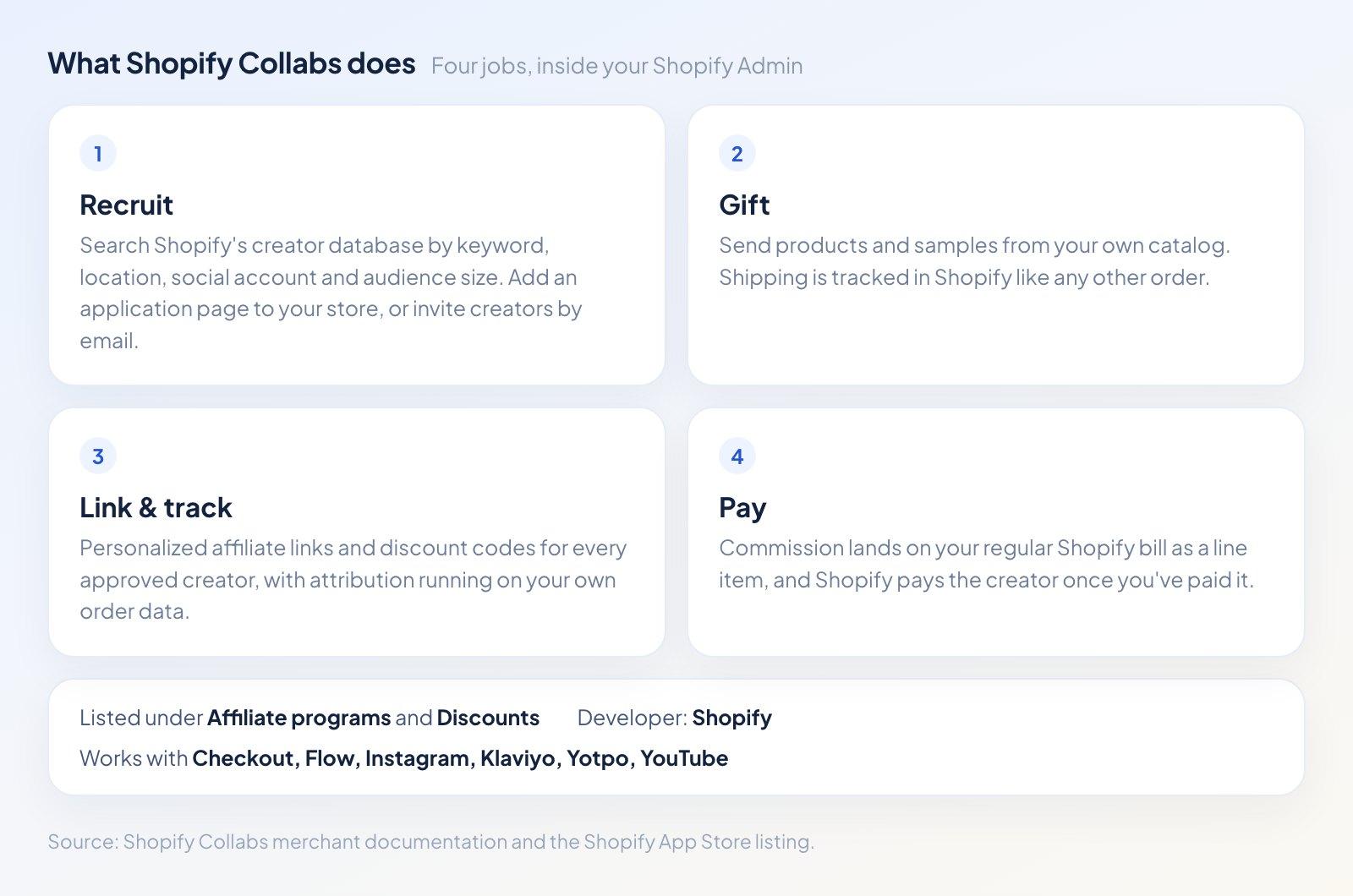
Collabs is an affiliate program manager that happens to live inside your admin.
The Shopify Collabs definition in Shopify's own merchant documentation is "an affiliate marketing app that helps you recruit and manage creators." That's narrower than the word "collabs" suggests.
This is not a content studio or a campaign brief tool. The Shopify Collabs influencer marketing features cover four jobs:
Recruiting. You can search Shopify's creator database by keyword, location, social account, and audience size. You can also add an application page to your online store, and invite creators you already work with by email.
Gifting. You pick products from your own catalog and send them to creators as gifts or samples, with the shipping tracked in Shopify like any other order.
Affiliate links and codes. Every approved creator gets personalized links and discount codes. Because the tracking runs on Shopify, attribution comes from your own order data instead of a third-party cookie.
Payments. Commission is added to your regular Shopify bill, and Shopify pays the creator once you've paid it.
The app store lists Collabs under Affiliate programs and Discounts, and it connects to Checkout, Shopify Flow, Shopify Admin, Instagram, Klaviyo, Subscriptions, Yotpo, and YouTube.
How Does Shopify Collabs Work?
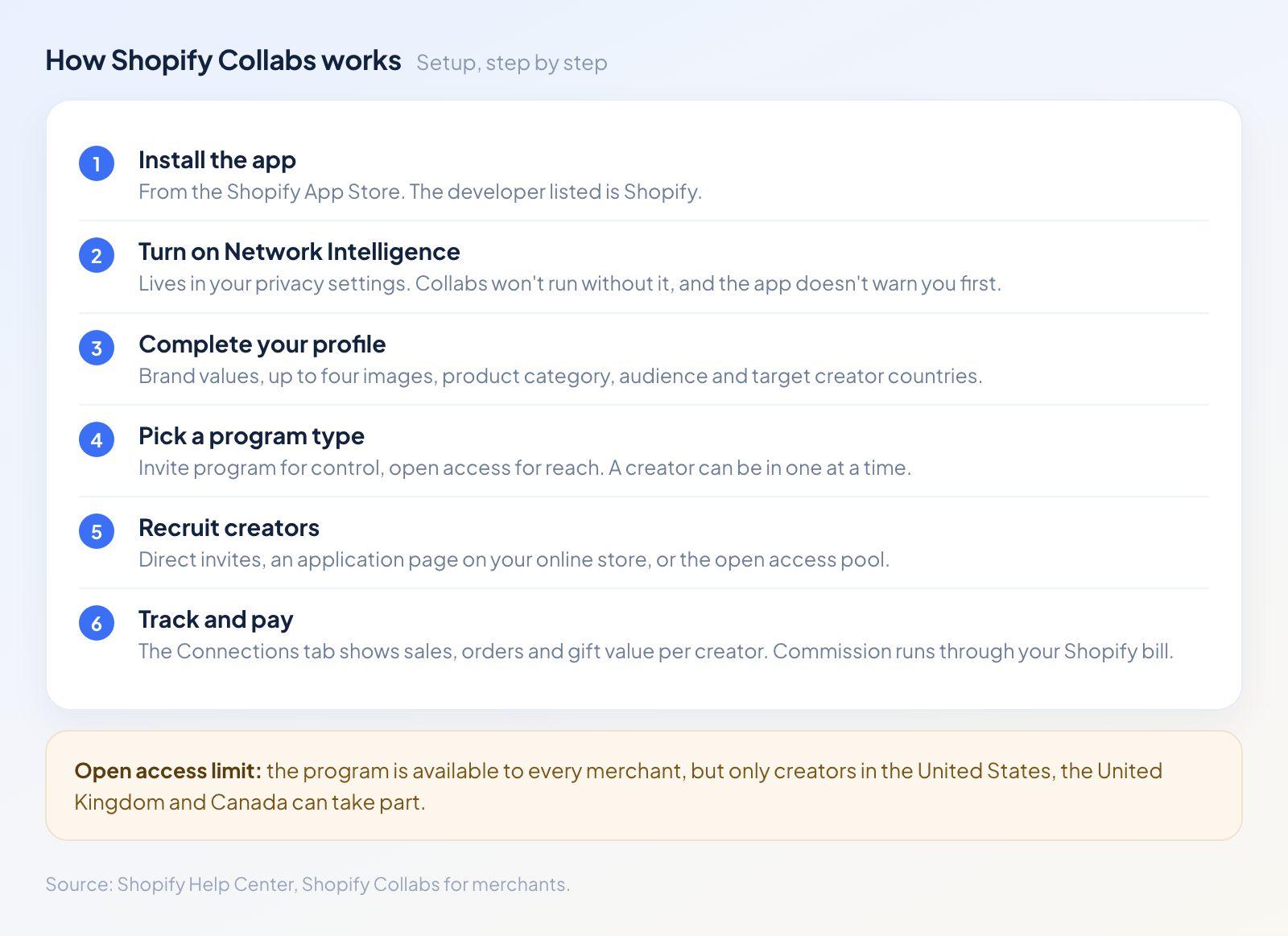
Setup runs in six steps, and the second one trips people up.
Setup follows a fixed order, and one step in the middle catches people out. Here's how to use Shopify Collabs end to end.
Install the app. Collabs comes from the Shopify App Store, and the developer listed is Shopify itself.
Turn on Shopify Network Intelligence. This setting lives in your privacy settings, and Collabs won't work without it. Nothing in the app tells you this before you start.
Complete your Collabs profile. You add your brand values, up to four images, your product category, your primary audience, and the countries you want creators from. Collabs uses the square logo from your Shopify brand settings, and it's worth updating that first if it's out of date.
Pick a program type. This is the real decision, and we'll cover it below.
Recruit creators. Direct invites, your online store application page, or the open access pool.
Track and pay. The Connections tab in your Shopify Collabs dashboard shows each creator's name, their active program, total sales, order count, and the value of gifts you've sent them. Click a name and you get collaboration history, application details, current offers, gifting history, and sales performance.
Open access vs invite programs
Collabs gives you two program types, and a creator can only be in one of them at a time.
An invite program is the controlled version. You choose the creators, set their commission, and approve everyone who joins.
An open access program flips that around. You set one commission rate across all products or on a collection, and your products appear in the creator discovery feed. Any Collabs creator can then generate an affiliate link and start selling without asking you first.
Open access carries two limits worth knowing before you switch it on. Anyone eligible can share your links immediately, with no approval step. And although the program is open to all merchants, only creators in the United States, the United Kingdom, and Canada can take part.
How to invite creators to your Shopify Collabs program
Direct invites are the most reliable route now that signups are paused. Before you can send any, you have to verify your email address in the app.
From there, open the Recruiting section and search. Keyword search covers usernames, bios, and posts. You can filter by location, by social account (Instagram, YouTube, TikTok, Facebook, Twitch, and Twitter), and by audience size, counted as total followers across the platforms on a creator's profile. Results sort by relevance or audience size.
The creator gets an email with a Review offer button. They accept, sign in with a Shopify account or open one, agree to the community guidelines, and the connection appears in your dashboard.
Shopify Collabs News and Updates: What Changed
The biggest piece of Shopify Collabs news this year carries no fanfare. It's a grey note at the top of the creator documentation, and it reads: "Collabs isn't accepting new creator signups at this time."
None of the Shopify Collabs updates this year reached the changelog, and this one appears only in the documentation. What still works, per that note and the creator setup guide:
Creators with existing accounts keep full access to the app and the website.
Merchants can still send direct invites.
Creators can still apply through a merchant's online store page.
A creator can create an account only by accepting an invite or submitting an application.
So the app is alive, but the front door is shut. A creator who hears about Collabs and wants to join can no longer sign up on their own. They need a brand to pull them in.
For your store, that changes the maths on open access. The pitch for open access was reach into a large pool of creators browsing for products to promote. That pool is now capped at whoever was already inside, minus anyone who leaves.
Another two changes are worth noting.
Manual commission payments were retired in January 2024, and every payout now runs through automatic payments.
The most common complaint in recent app reviews is that Collabs still has no public API. You can't pull your creator or commission data into your own systems.
Shopify Collabs Pricing
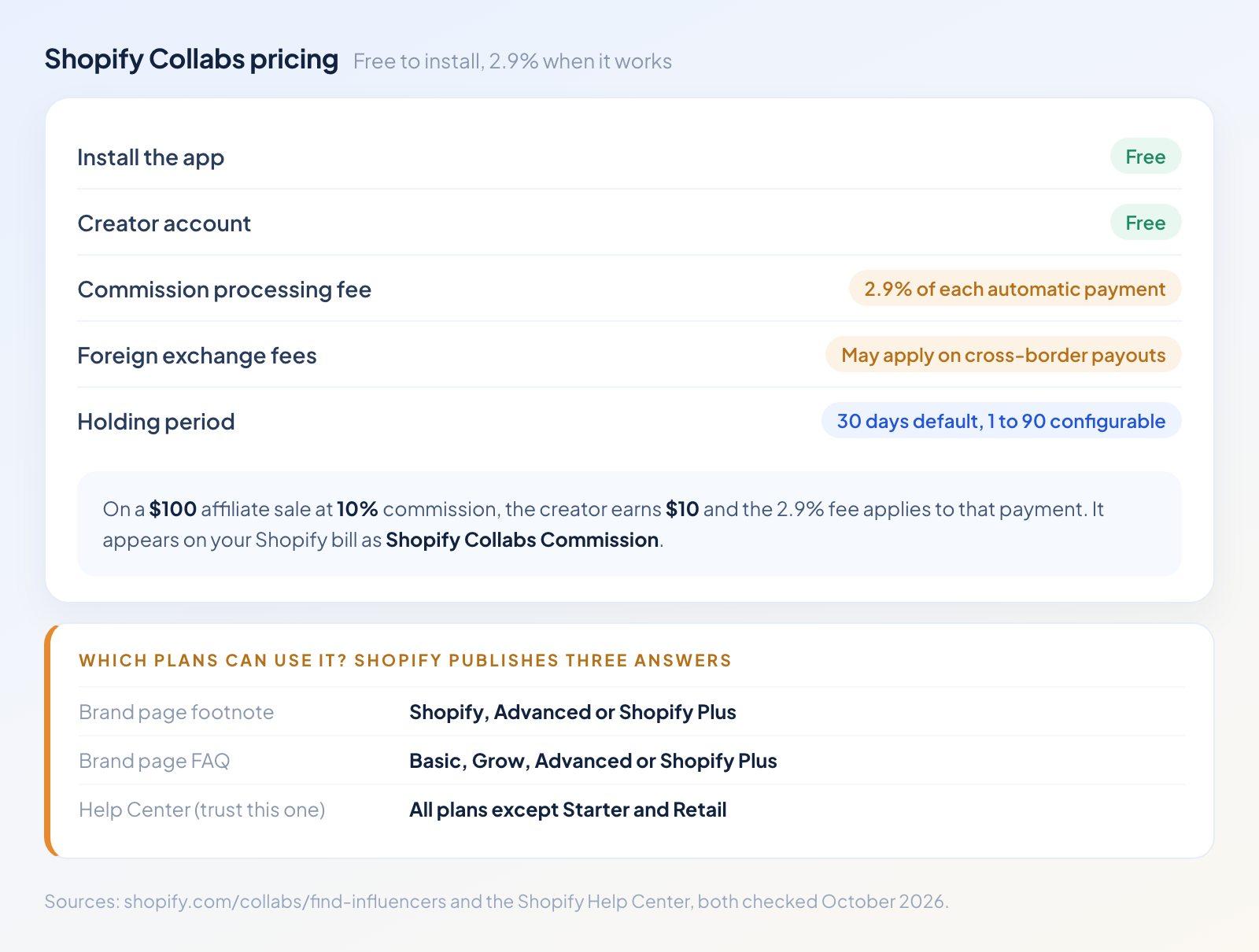
Free to install, with one fee and three different answers about eligibility.
Collabs is free to install, and free for creators to use. The cost arrives when a creator sells something.
Every automatic commission payment carries a 2.9% processing fee, paid by you, on top of the commission itself. Foreign exchange fees can apply on cross-border payouts. Both figures come from Shopify's brand page for the app.
On a real order that lands small. A creator sells $100 of product at 10% commission. You owe the creator $10, and the 2.9% fee applies to that payment. The fee lands on your Shopify bill as a line item called Shopify Collabs Commission.
Payment timing is worth planning around:
Commission waits out a holding period before it's billed. The default is 30 days, and you can set anything from 1 to 90 days in your Collabs settings.
Orders that get cancelled or fully refunded during the holding period have their commission cancelled automatically.
You can open a payment dispute during that window.
After the holding period, commission goes onto your next Shopify bill. Once you pay that bill, Shopify pays the creator.
The creator has to activate auto-payouts on their side through Hyperwallet. If they haven't, the commission moves to a "waiting for creator" state and stays there.
That last point is the one worth warning creators about at invite time. The money leaves your account on schedule, then waits in Collabs until they finish their payout setup.
Which plans can use Shopify Collabs?
Shopify publishes three different answers to this question, and we checked all three on the same day.
The footnote on the Collabs brand page says it's free for merchants on the Shopify, Advanced, or Shopify Plus plans. The FAQ further up that same page says Basic, Grow, Advanced, or Shopify Plus. The Help Center says Collabs is available on all Shopify plans except Starter and Retail.
The Help Center version is the one to trust. It's the newest, it uses Shopify's current plan names, and it appears on both the overview and setup pages. The marketing page footnote still uses plan names Shopify renamed.
Shopify Collabs for Creators
For creators, Collabs works as a single place to manage brand partnerships: apply to programs, accept gifts and discount codes, track your affiliate sales, and collect commission.
Joining now happens one of two ways. A brand invites you by email, or you find a brand's application page on their store and apply. Either route asks you to log in with a Shopify account or create one, and applications need the brand's approval before anything starts.
Payouts run through a Hyperwallet account, set up under Settings, then Payouts, then Activate auto-payouts. Your payout method is managed in the Shopify Partner Dashboard, the same platform Shopify uses for affiliates and freelancers. Commission stays pending through the merchant's holding period, then gets billed to the merchant and paid out to you.
How to connect Instagram to Shopify Collabs
Social accounts prove your audience to brands, and Collabs supports Facebook, Instagram, TikTok, and YouTube.
For Instagram, open your Collabs dashboard, click Settings, then Social accounts, then Connect beside Instagram. Log in to the Instagram account you want to connect and follow the prompts.
A pair of rules decides whether this works. Collabs accepts Creator or Business accounts only. A personal account has to be switched over in Instagram first. Your Instagram account doesn't need to be linked to a Facebook Page, and that's a common misreading of the Facebook instructions printed right above it on the same setup page.
If you see "Authorized account and selected account do not match," you're logged into a different Instagram account in your browser than the one on your application. Log into the right one and reconnect.
Shopify Collabs Review: Is It Legit?
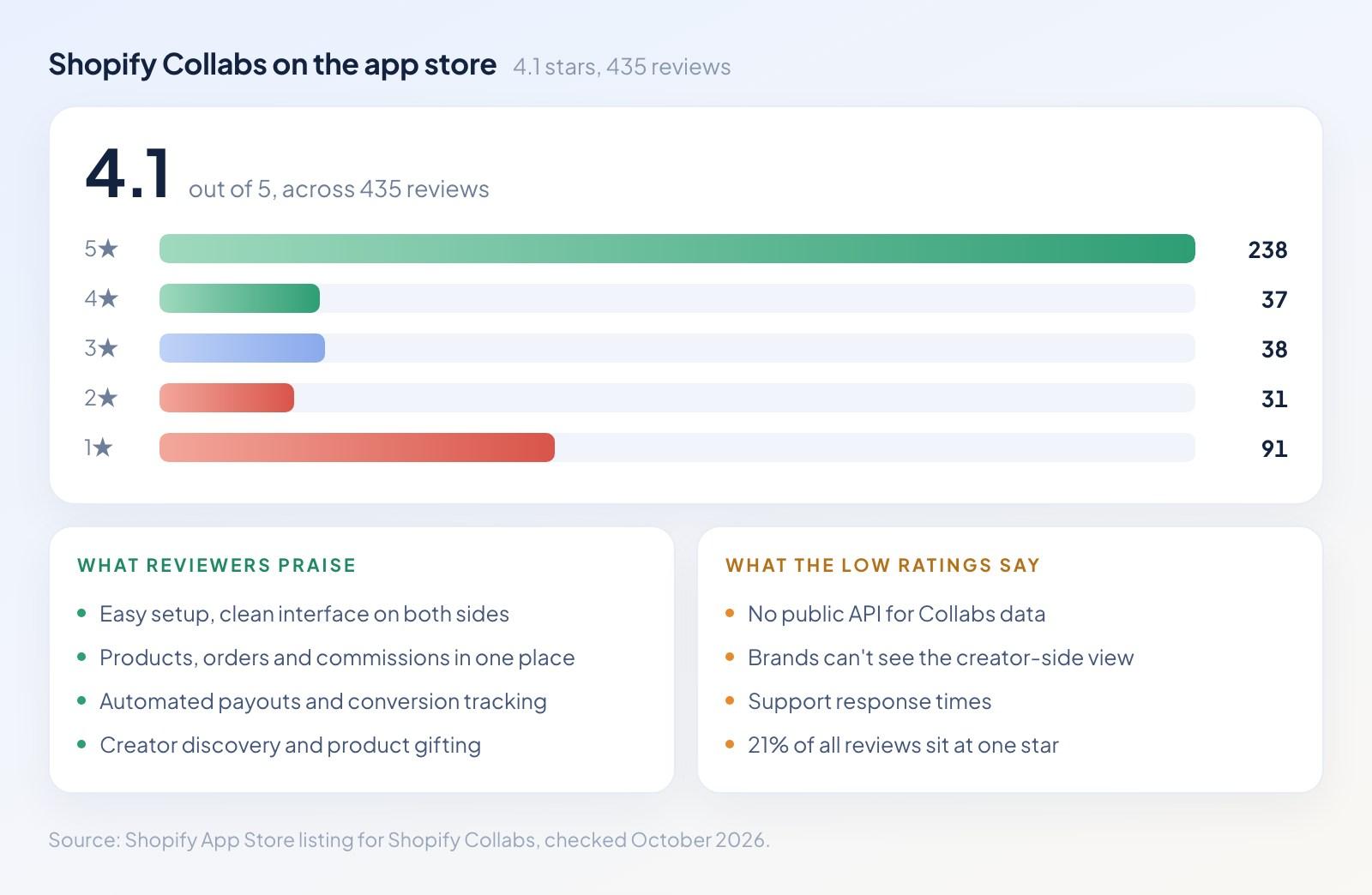
A strong top and a heavy tail, an unusual shape for a first-party app.
Is Shopify Collabs legit? Yes, in the plain sense. It's built and operated by Shopify, listed under Shopify as the developer, and billed through your Shopify account. Nobody is going to take your money and vanish.
Whether it's good is a separate question, and the app store ratings give an honest picture. Collabs holds 4.1 stars across 435 reviews. The breakdown matters more than the average:
5 stars: 238
4 stars: 37
3 stars: 38
2 stars: 31
1 star: 91
That's 55% of reviewers at five stars and 21% at one star, with very little in between. Merchants either find it an easy win or hit a wall.
Shopify's own summary of the reviews highlights easy setup, a clean interface for both sides, tight integration for products and orders, automated payouts, creator discovery, and gifting. The recent one-star and two-star reviews cluster around different things: no API access, no way for a brand to see what the creator sees on their side, and support response times.
For a store that wants a working affiliate program with minimal setup and no monthly fee, Collabs does the job. The gaps are real for a store that wants to pipe affiliate data into a warehouse, run custom commission logic, or recruit at scale. The signup pause makes that last one worse.
Shopify Collabs Alternatives
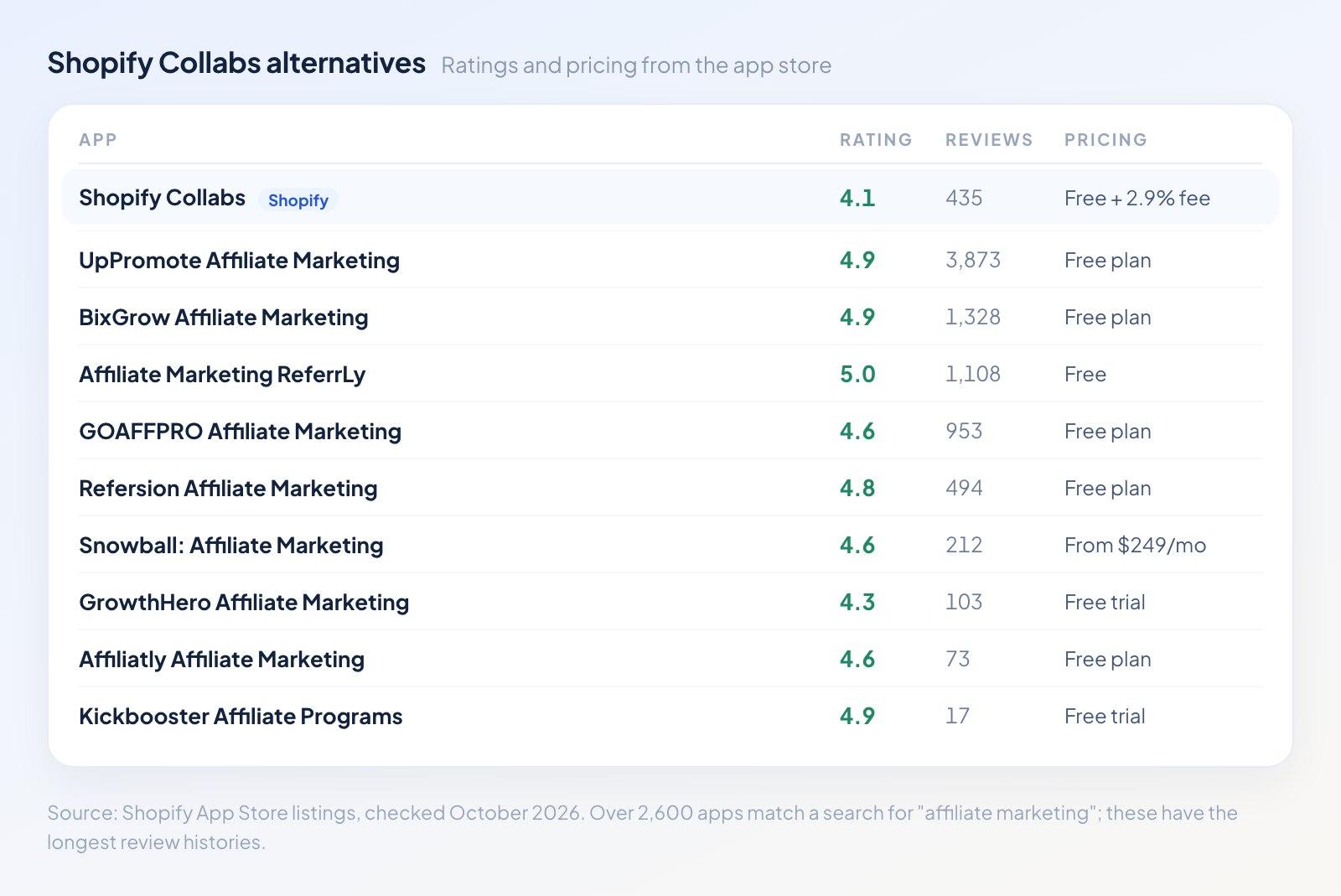
Collabs carries the lowest rating of the major affiliate apps on the store.
The Shopify App Store lists over 2,600 apps matching "affiliate marketing." The question isn't whether alternatives exist, but which ones have the track record to trust. Here are the ratings and review counts, all taken from their app store listings:
App | Rating | Reviews | Pricing |
4.9 | 3,873 | Free plan available | |
4.9 | 1,328 | Free plan available | |
5.0 | 1,108 | Free | |
4.6 | 953 | Free plan available | |
4.8 | 494 | Free plan available | |
4.1 | 435 | Free to install, 2.9% fee | |
4.6 | 212 | From $249/month | |
4.3 | 103 | Free trial available | |
4.6 | 73 | Free plan available | |
4.9 | 17 | Free trial available |
Collabs comes sixth by review count and last by rating in this group, and it's the first-party option.
UpPromote carries more reviews than the rest of the list combined, and that makes it the obvious first stop for a store leaving Collabs. Refersion describes its tracking as cookieless and first-party, making it the pick for anyone whose attribution has to survive a privacy browser. Snowball bundles referral, affiliate, and influencer programs into one system at $249 a month and up. ReferrLy is listed as free outright, and GoAffPro runs a free plan with nearly a thousand reviews behind it.
What none of them replace is the billing. Collabs puts commission on the Shopify invoice you already pay, while every alternative needs its own payout rail, and that tends to mean another account and another fee.
Run the subscription prices against your own volume before you decide. Funnelish checkout data puts the median US order at $29.97, and a 10% commission on it comes to about $3. That makes a $249 monthly fee the commission on roughly 83 orders, and below that volume the subscription costs more than the program pays out.
Should You Use Shopify Collabs?
Use Collabs if you already know the creators you want, you're happy inviting them one by one, and you'd rather not add a monthly subscription to run a program you're still testing. The gifting flow and the billing integration are easier than the alternatives, and there's no subscription to justify while you test.
Look elsewhere if creator discovery was the reason you wanted it. The signup pause took the best part of the pitch off the table, and nothing on Shopify's pages says when or whether it comes back.
What Happens After the Creator's Link Gets Tapped
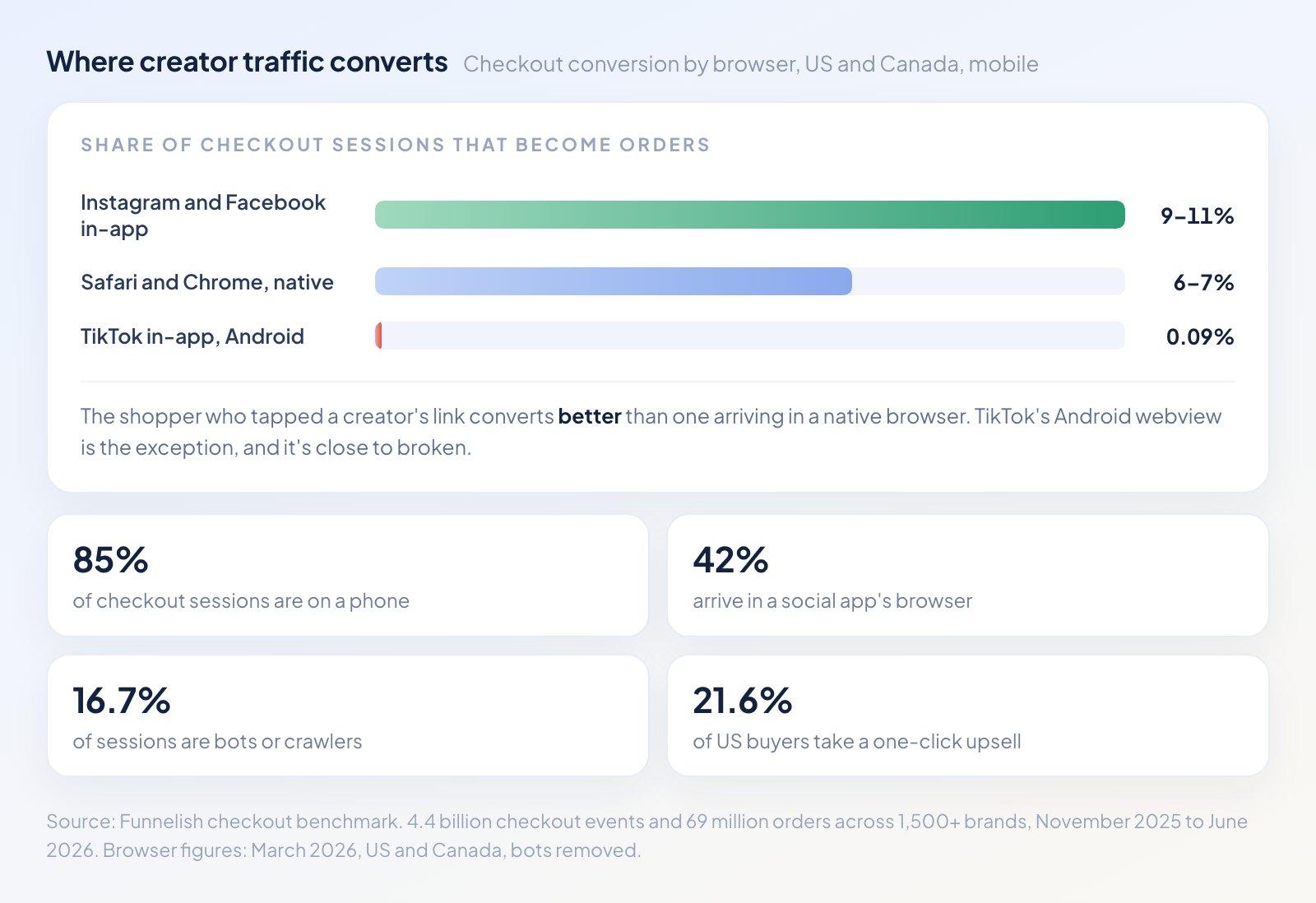
Creator traffic arrives in a social app's built-in browser, and it converts better than the rest.
Collabs ends at the click. What that click lands on decides whether the commission was worth paying, and creator traffic behaves differently from your other traffic in ways worth designing around.
The numbers below come from the Funnelish checkout benchmark: 4.4 billion checkout events and 69 million orders across more than 1,500 brands, between November 2025 and June 2026.
In-app browsers convert better. 85% of checkout sessions happen on a phone, and 42% of them arrive inside a social app's built-in browser. The received wisdom is that these sessions convert badly. On our data they convert at 9% to 11% on Facebook and Instagram, against 6% to 7% in native Safari and Chrome. A shopper who tapped a creator's link a second ago is further along than one who arrived from a bookmark.
One exception. TikTok's in-app browser on Android converts at 0.09%. If a creator's main audience is on TikTok and your checkout hasn't been tested inside that browser, the program is losing almost everyone.
The leak is the checkout page. Of every 100 shoppers who reach a checkout page, 90 leave before pressing Pay, 1 is declined, and 9 buy. Pay for the traffic and you've paid for the hard part. The page is what loses it.
Upsells are where a borrowed audience pays for itself. 21.6% of US buyers accept a one-click upsell after paying, and it adds 18% to the order. You're paying commission on that order either way, and the upsell lifts the margin on traffic you've already bought. The best brands in the benchmark run 29%.
Judge creators on orders. 16.7% of US and Canadian checkout sessions are bots or AI crawlers, and they account for 1.2% of orders. A creator measured on traffic looks better than they are, because roughly one in six of those clicks had no person behind it. Collabs reports orders by default, and that's the number to pay on.
For reference, the top 10% of US brands in the benchmark make $5.70 per visitor against a $2.02 median. They get 37% of visitors to a checkout, close 12% of those, and sell a $122 order with an upsell attached 29% of the time. None of that comes from better ads.
A creator link that lands on a slow product page with a six-field checkout wastes the audience you worked to borrow. Send it to a page built for one offer and one decision. That's what the Funnelish funnel builder exists for. You can build a dedicated landing page per creator in the page builder, with their code applied automatically, and see which creator drove which sale without waiting out a holding period.
Shopify Collabs FAQ
Is Shopify Collabs free?
Free to install, free for creators, and 2.9% on every automatic commission payment. Foreign exchange fees can apply.
Which Shopify plans can use Collabs?
Every plan except Starter and Retail.
Can creators still sign up for Shopify Collabs?
No. Signups are paused. The only ways in are a brand's direct invite or an application through a brand's store page.
How do I invite creators to Shopify Collabs?
Verify your email in the app, then search the Recruiting section and send an invite. They get an email with a Review offer button.
How do I connect Instagram to Shopify Collabs?
Settings, then Social accounts, then Connect beside Instagram. Creator and Business accounts only. A personal account has to be switched over first.
When do Shopify Collabs creators get paid?
After your holding period, 30 days unless you change it. The commission goes on your next Shopify bill, and the creator gets it once they've activated Hyperwallet payouts.
Does Shopify Collabs have an API?
No public one. It's the most frequent complaint in recent reviews.
Can I move an existing program into Shopify Collabs?
Yes, by sending direct invites to the affiliates you already have.
What's the best Shopify Collabs alternative?
UpPromote, on the numbers: 3,873 reviews at 4.9 stars against Collabs' 435 at 4.1, with a free plan.
Table of contents
Boost your eCommerce
sales today

24/7 support
No credit card required
Cancel anytime
24/7 support
No credit card required
Cancel anytime
