

9 Digital Products to Sell: What People Buy, Where to Sell It and How Much You Keep
17 September 2026
Anna P.
11 minutes
Coursera added 7.6 million new learners in the first three months of 2026 and passed 205 million registered learners, according to its . People will pay for files and skills every day of the week, and digital products won't cost you stock, postage or customs paperwork.
Every marketplace will take a cut, though, and some take a third. Below you'll find the digital products to sell that suit a first launch, what each platform charges, how the file reaches your buyer and a free selling page template you can edit today.
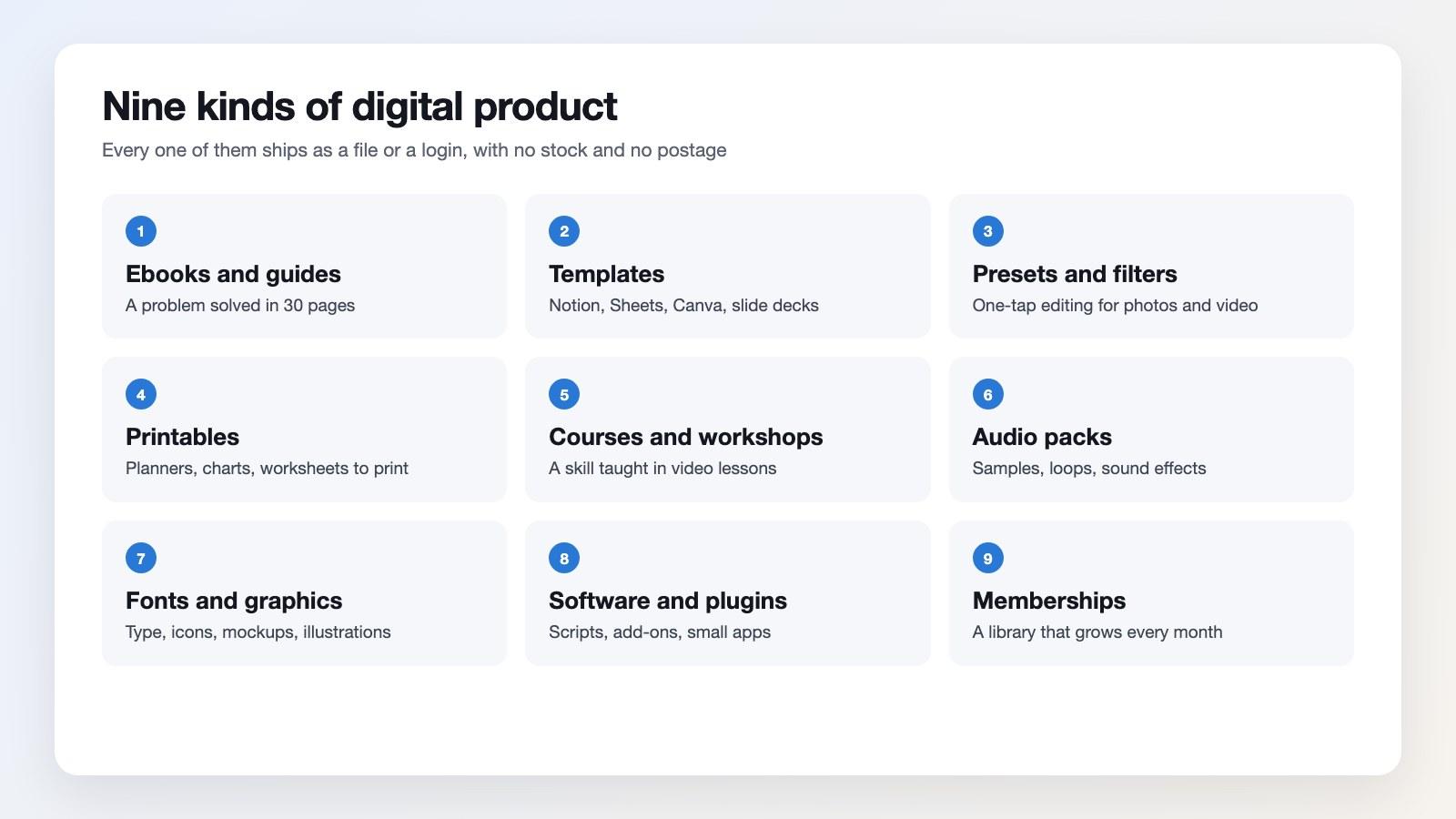
Digital products examples, from a 30-page guide to a membership that grows every month.
What Digital Products Are in Demand?
Demand has settled into two piles. It's one of two jobs: you save someone an afternoon with a spreadsheet that prices a builder's quotes, or you teach a skill with a course on lighting a product photo. Neither one needs a warehouse.
The most profitable digital products cost nothing to copy. You'll build the file once, and every sale after that costs a payment fee and a few cents of hosting. A physical order can't manage that, because each unit needs stock, packing and postage.
The best digital products to sell answer a question your buyer has already typed somewhere. Search your inbox, the comments under your videos or a forum in your trade, and you've probably seen the same request three times in a week.
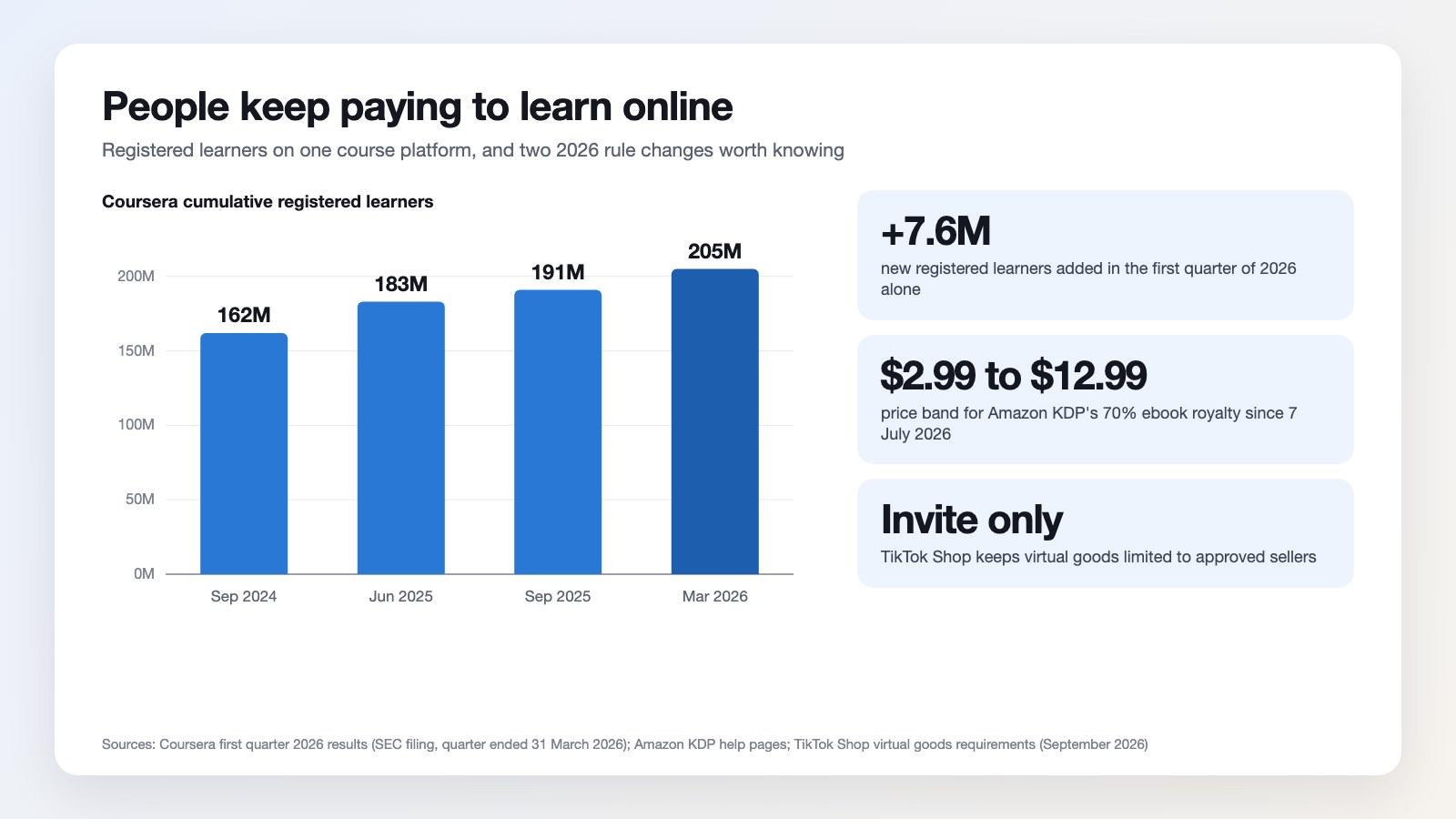
Learners keep signing up for courses, and the rules around digital products have kept moving.
Simple Digital Products People Buy Impulsively
Price can do the work here. Under about $30, nobody asks permission first, and the digital products to sell in that range will be usable the same evening: templates, presets, checklists, printables, prompt packs, a single spreadsheet.
Best selling digital products at those prices have shared a shape for years. They're quick to use, easy to judge from one screenshot and cheap enough that a mistake costs less than lunch. Put the result in your first image and the decision takes seconds.
Bundling can lift the same catalog. Three templates at $12 each become one pack at $29, and buyers don't compare files line by line any more. Keep the digital products in a bundle related, because whoever wants your invoice template won't need your wedding printables.
Read more: Digital Dropshipping: How to Sell High-Margin Products with Zero Inventory
Low Competition Digital Products to Sell
Broad categories are crowded; narrow ones aren't. A planner for nurses on rotating shifts, a quoting sheet for tree surgeons, a lesson pack for teaching fractions to eight-year-olds: each has a smaller audience that's found nothing built for them. Those are the digital products to sell when you're starting without a following.
Top selling digital products in crowded categories have kept moving, though they'll need a sharper angle to get noticed. Pick the buyer first and the format second, and your product page can write itself.
How to Sell Digital Products in Five Steps
These five steps take a weekend, and you won't need a developer for any of the digital products to sell listed above.
1. Package the file
Export a PDF, a Notion duplicate link, a zip of presets or a video library. Add a one-page read-me telling buyers how to open it. Files that arrive with instructions won't attract as many refund requests.
2. Price it
Start from what the result is worth, then check what similar files cost. In a catalog, the most profitable digital products are the bundles and the upgrades. That's why a cheap entry offer belongs in front of both.
3. Build the page and the checkout
Keep it to one landing page, one price and one button. To sell digital products you'll need a checkout that takes cards and wallets, plus a page that loads fast on a phone. Build both in the Funnelish , then add an order bump for the bigger package.
4. Deliver the file
Funnelish will handle the pages, checkout, bumps and upsells. For the file itself, connect your email tool through automations or Zapier, and the download link will go out the moment payment clears. The file should reach the buyer before they've closed the tab.
5. Follow up
Send a second email two days later and ask whether they've opened it. Selling digital products gets easier once you've built a list, because your next launch starts with people who've already paid you once.
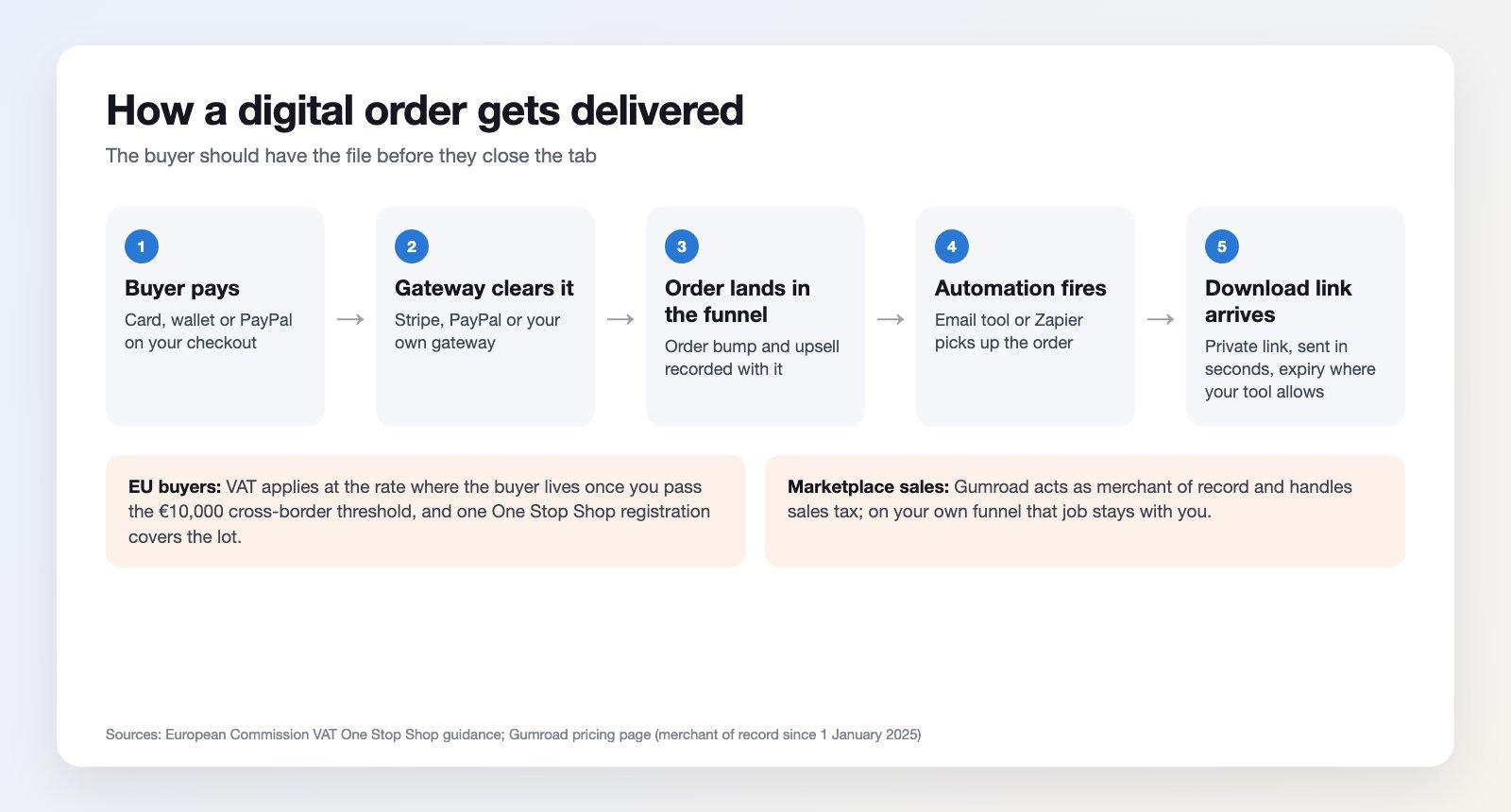
The delivery path for digital products, from payment to download link, with the tax notes that catch sellers out.
Where to Sell Digital Products
You've got three routes: a marketplace that brings shoppers and takes a cut, a store platform you rent, or a funnel of your own. Your audience decides it: the best platforms to sell digital products look different for someone with a mailing list and someone starting cold.
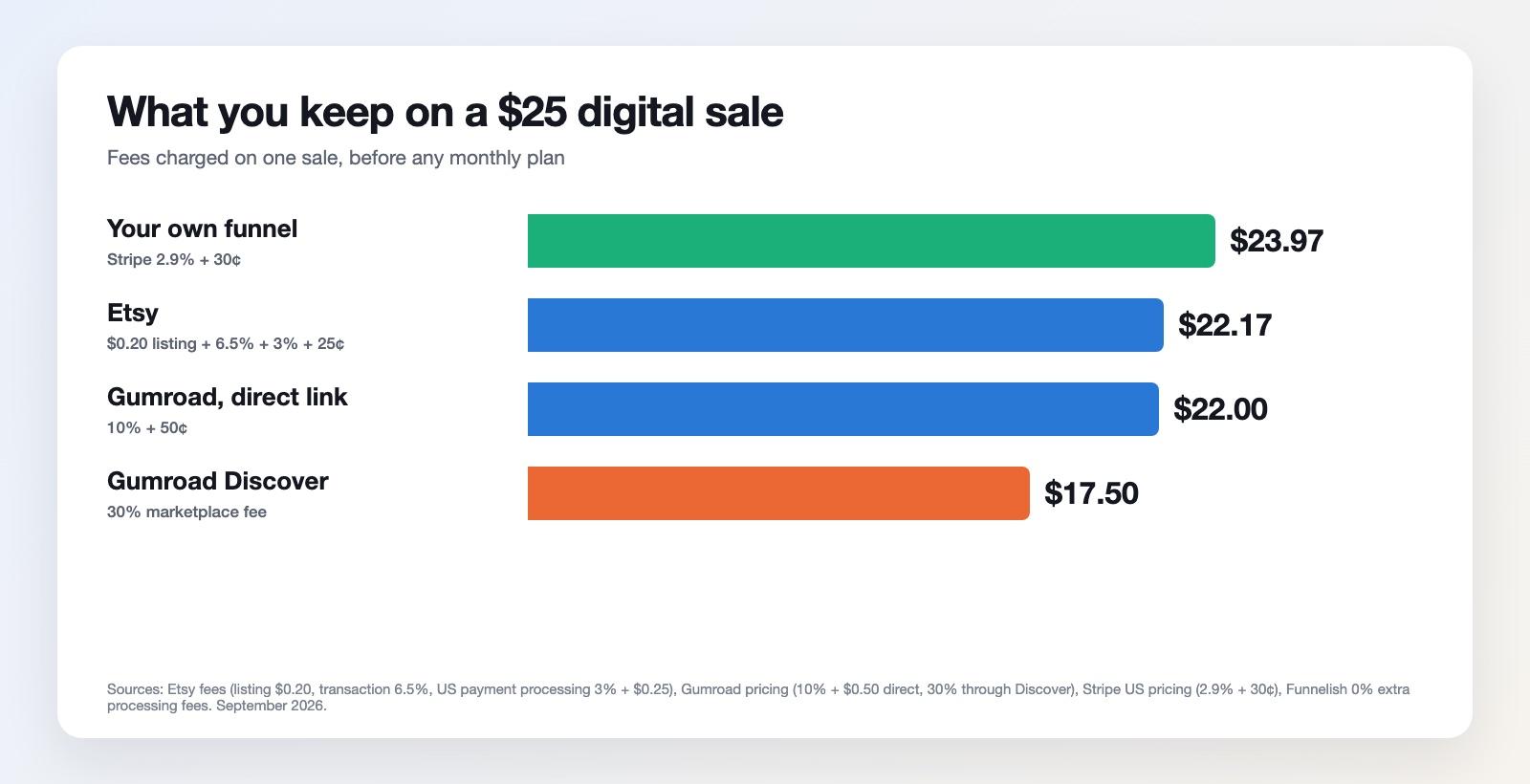
Here's what you keep when you sell digital products for $25, before any monthly plan.
How to Sell Digital Products on Etsy
Etsy has listed instant downloads beside handmade goods for years, and its shoppers arrive ready to spend. On Etsy, selling digital products costs $0.20 to list, a 6.5% transaction fee and, for US sellers on Etsy Payments, per sale.
How to Sell Digital Products on Amazon
If you've written something, Amazon will point you at Kindle Direct Publishing. KDP can pay 35% or 70% of your list price, and its deduct delivery costs averaging $0.06 a unit on the 70% plan. Since 7 July 2026, that 70% band has covered list prices from $2.99 to $12.99 on Amazon.com.
Shopify Digital Products
Shopify can sell downloads through your own storefront, and its say there are no additional fees for selling them on your online store. You'll still pay the monthly subscription and the card rates.
How to Sell Digital Products With WooCommerce
WooCommerce can turn any product into a download with two checkboxes, virtual and downloadable. Its can force downloads through PHP, require a login and add a unique string to filenames that stops people guessing links. You'll host it, update it and fix it yourself.
Can You Sell Digital Products on TikTok Shop?
Not by default. TikTok's limit virtual goods to invite-only sellers who need approval before they list, and they rule out stored-value items such as course credits and loadable tickets. Treat TikTok as the place to build demand for your digital products, then send that demand somewhere you control.
How to Sell Digital Products on Instagram
Instagram won't host your file, and its shop features are built around inventory you can post. Use it as the traffic source instead: the link in your bio, the link sticker in stories, a reel that shows the result, and a checkout of your own at the other end.
Best Marketplaces for Digital Products
Scan this list, pick one and give it a month before you judge it:
Etsy for printables, planners and templates, where search traffic already exists.
Gumroad for creators with an audience who want a link they can post anywhere.
Amazon KDP for ebooks, with royalties of 35% or 70% depending on your price.
Udemy for courses, where the platform runs the discounts and brings the students.
Creative Market and Envato for fonts, graphics, mockups and themes.
App and plugin stores for tools that live inside another product, such as Notion, Figma or WordPress.
Marketplaces have traded reach for margin for years. The best marketplaces for digital products can put you in front of buyers you couldn't reach alone, and they'll keep a slice of every sale along with the customer relationship.
Where to Sell Digital Products for Free
With Gumroad you pay nothing monthly, and it takes its cut per sale instead. Payhip and Ko-fi can do the same job, and a payment link from your gateway can take money with no store at all. Free platforms suit a first file, since you'll pay only when something sells.
There's a ceiling, though. Where to sell digital products stops being a fee question once sales come in steadily, because a percentage of every order will cost more than a flat monthly plan.
Best Platform to Sell Digital Products: Your Own Funnel
On your own pages the fee math will change. A $25 sale through Stripe costs 2.9% plus 30¢, Funnelish adds 0% extra processing fees on every plan, and you can keep $23.97 instead of $17.50. You'll also get the buyer's email, something the best platforms to sell digital products hand over.
Control can matter as much as the cut. You set the order bump, the upsell and the thank you page yourself, and you can sell digital products online without a catalog: one page, one checkout, one offer after payment. Funnelish plans start at $49 a month, or $41 billed yearly, after a 14-day free trial.
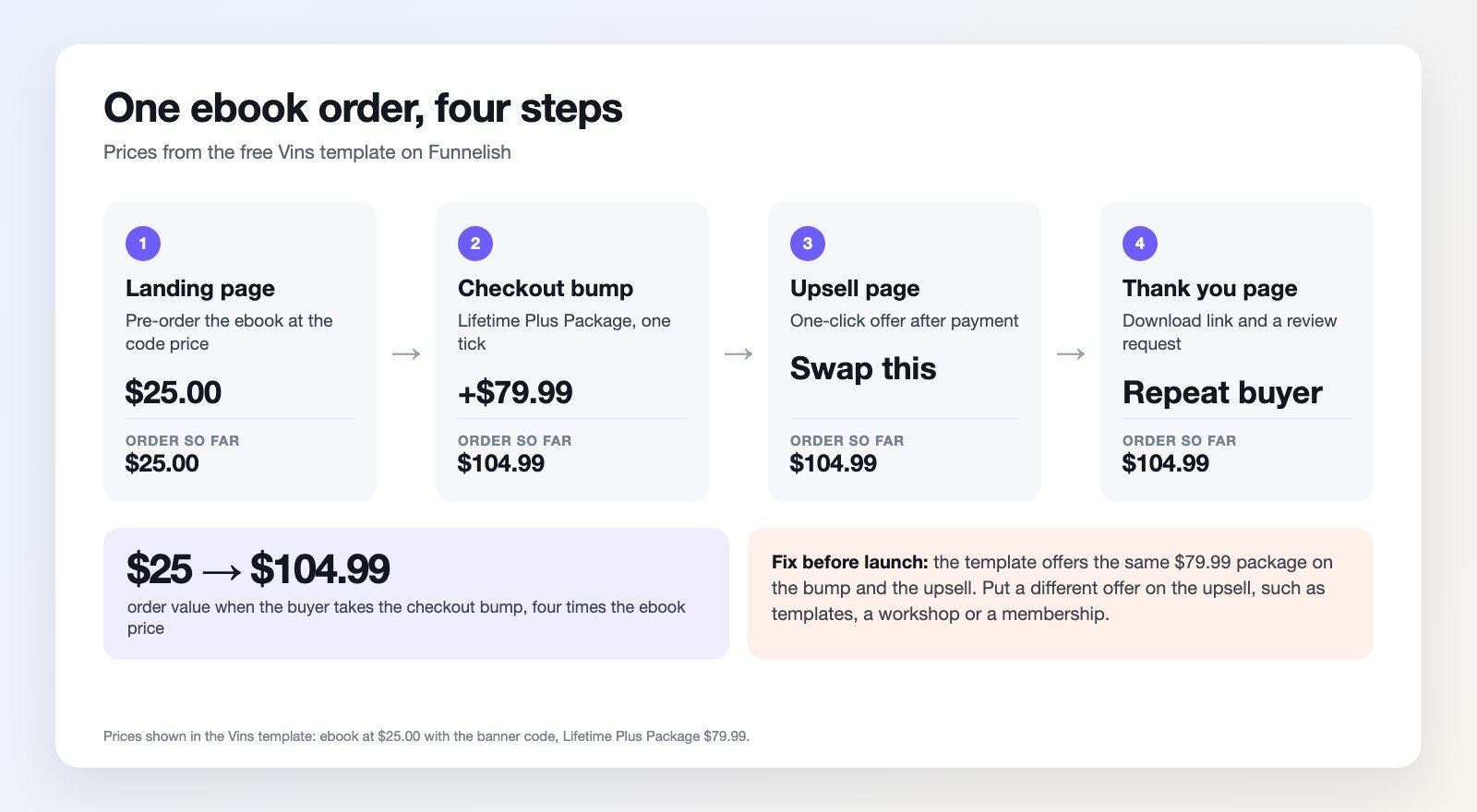
One ebook order grows from $25 to $104.99 when the buyer ticks the package, and both digital products arrive by email.
Start From a Free Digital Product Template
Vins, a free Funnelish template, was built for a pre-order ebook, and it fits the digital products to sell where one file carries an upgrade behind it. Its landing page leads with "Build Your Brand Easily in 90 Days", and a banner offers the bundle at $25.00 with a code.
At checkout you'll find a countdown, the ebook and the Lifetime Plus Package at $79.99 as an order bump, with a Notion planner, a private Discord group and lifetime updates. After payment, an upsell page repeats that package, and the confirmation page invites a review. Digital products can sell well in this shape: a small first purchase, a bigger package one tick away.
Before launch, make three edits. Delete the shipping address and the cash-on-delivery option, because nothing is being posted. Replace the placeholder product text with your own. Put a different offer on the upsell page, since the bump has already sold that package. Then you can sell digital products through it the same day.
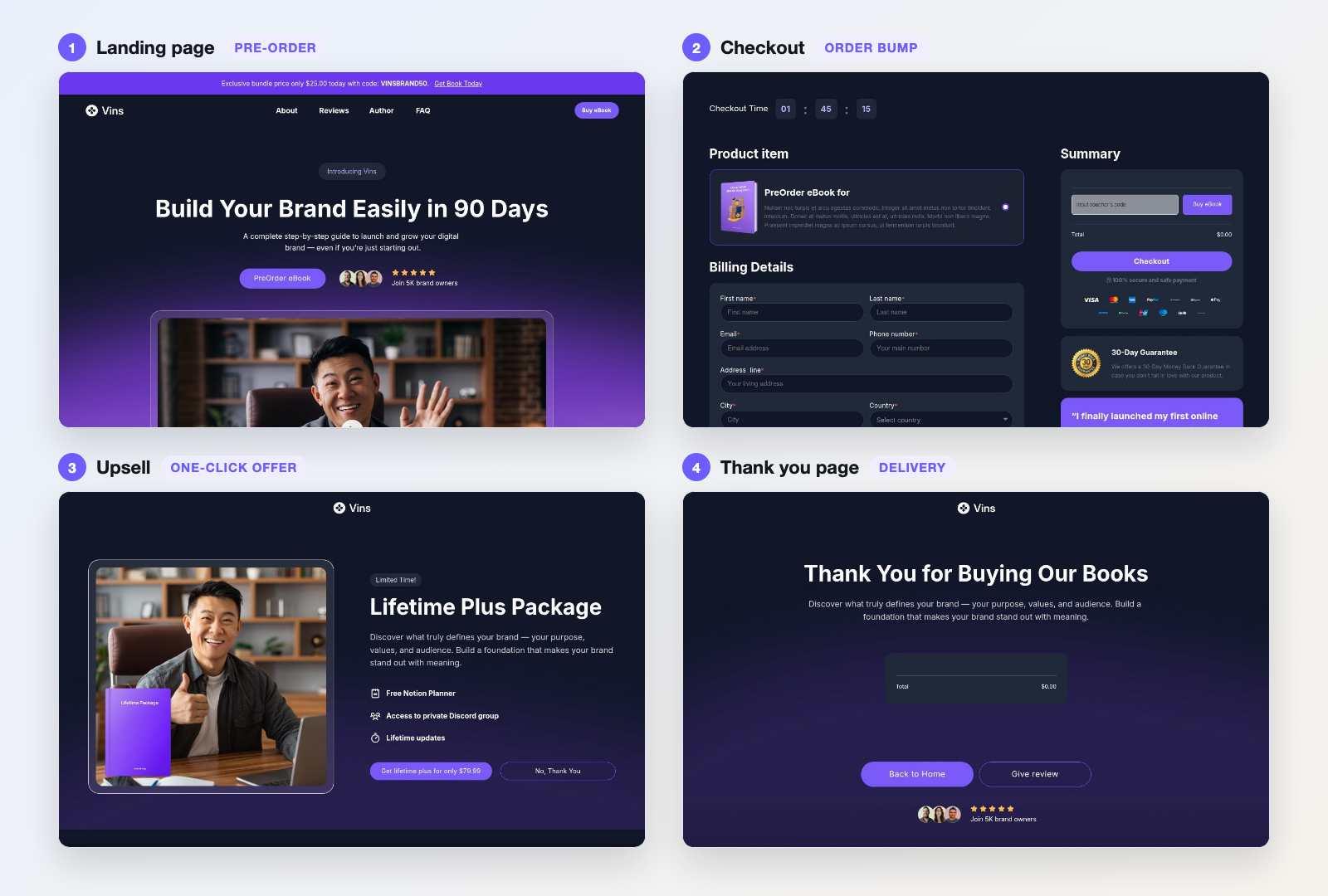
Selling digital products through Vins: landing page, checkout, upsell and confirmation.
Swap the copy and colors in the , connect your gateway and send yourself a test order. Once that lands, you'll know how to sell digital products online end to end, and real buyers can follow the same path.
How to Market Digital Products
Marketing a file won't work like marketing a jacket, because nobody can hold it. Show the result instead: the finished spreadsheet, the edited photo, the planner in use on a desk.
How to market digital products rests on proof and repetition. Post the before and after, hand one piece out free in exchange for an email, answer questions where your buyers already read, and ask for a review on the thank you page.
Give the digital products to sell on your site a page that answers plain questions. AI assistants and search engines both quote pages that state prices, contents and formats outright.
Leave paid traffic until last. Learning how to sell digital products online through ads will cost money you haven't made yet. Test one audience with a small budget after the free routes have shown you which message lands.
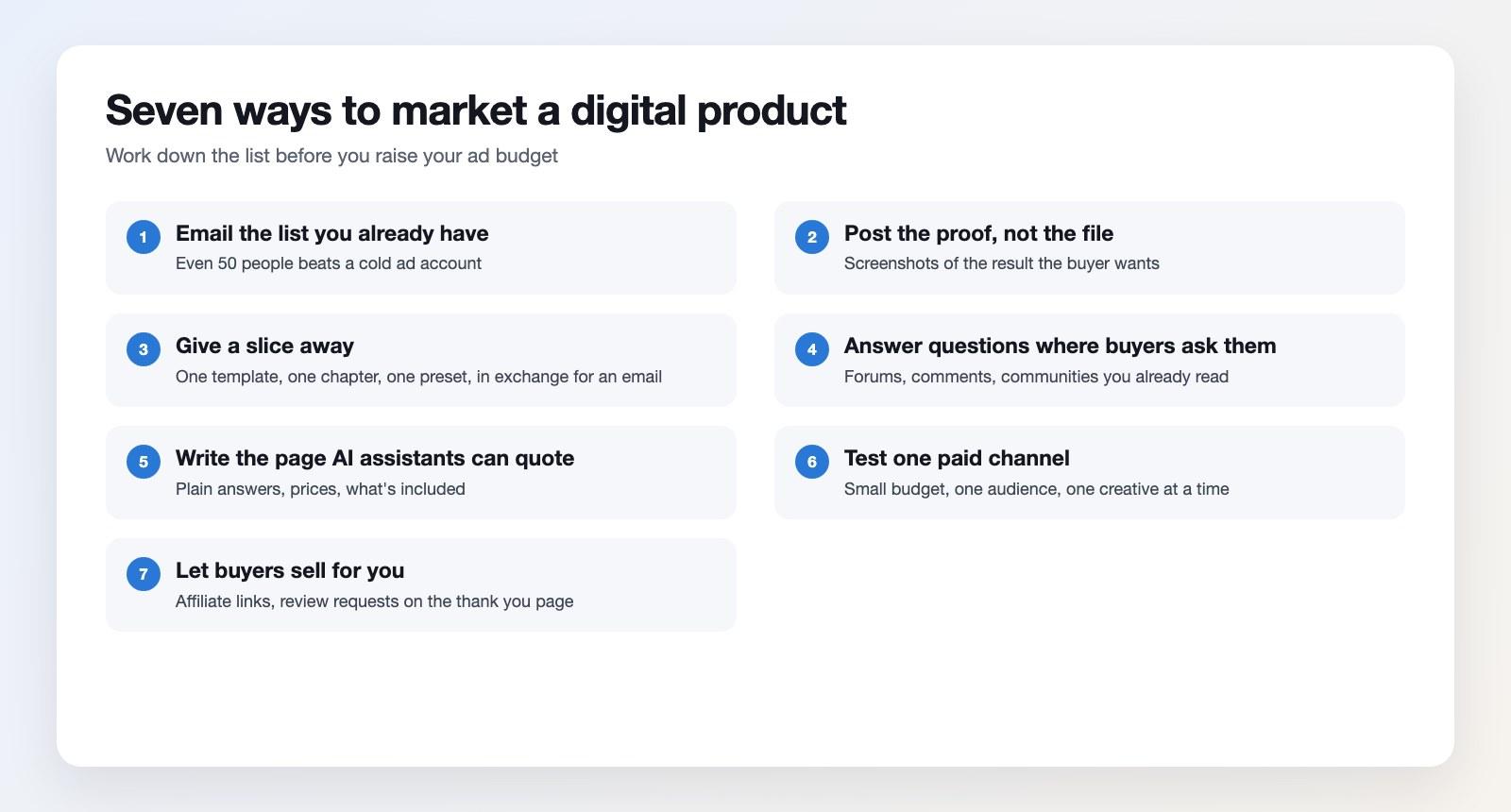
Work down this list before you raise your budget on digital products to sell.
How to Sell Digital Products Without a Website
A payment link and a delivery email will do it. Your gateway can create a hosted checkout, your email tool can send the file, and a link sticker in a story sends people there. Sell digital products this way for a few weeks, and you'll know whether the offer deserves a proper page.
Tax on Digital Goods
If you're selling to EU consumers, VAT will apply where the buyer lives. The European Commission's lets you register in one member state and file for all of them. A €10,000 cross-border threshold has applied since January 2019 to digital services and distance sales.
Marketplaces can carry that load. Gumroad has acted as merchant of record since 1 January 2025 and handles sales tax worldwide. Once your own funnel sells the digital products, that job comes back to you. Check your obligations before your first month closes.
Questions People Ask
Is Selling Digital Products on Etsy Profitable?
It can be, once you're above roughly $10 a file. Etsy takes $0.20 to list, 6.5% of the sale and payment processing, leaving $22.17 of a $25 order for a US seller. Digital products can absorb that better than handmade goods, because you've got no unit cost to cover.
How to Make Money With Digital Products?
Sell one file to more people, or sell more to the same people. The second route can move quicker: a bump at checkout and an upsell after payment turned a $25 ebook into $104.99 in the template above, with no extra traffic. That's $79.99 of it from a single tick.
What Digital Products to Sell First?
Start with the thing you've already made twice for someone else. The best digital products to sell first are the spreadsheet you rebuilt for a client, the checklist you sent a colleague or the preset you put on every photo.
Is Gumroad Worth It?
The gumroad sell digital products official pricing page lists 10% plus 50¢ on sales through your own link, 30% on sales from its Discover marketplace, and no monthly fee. For a first product with no audience, that's a fair trade.
As a Gumroad sell digital products platform it'll set up in an hour, and its checkout stays plain. You'll get little say over layout, bumps or upsells, while Discover sends a limited amount of traffic. You'll want your own buyers either way.
How Do I Sell Digital Products Online Without Ads?
Build an audience somewhere free first. Without ads, how to sell digital products means posting the work publicly for a month, collecting emails with a free sample, then launching to that list.
You'll sell digital products faster to a small group that trusts you than to a thousand strangers. Pick one product, build the page today, and send it to ten people who have the problem it solves. That's the shortest route to a first sale.
Table of contents
Boost your eCommerce
sales today

24/7 support
No credit card required
Cancel anytime
24/7 support
No credit card required
Cancel anytime
